

1.0 product boundary
Status: Pre-release. Dee Wan has not been released. Last updated: 2026-10-17.
This page lists what Dee Wan does today and how far each part has been proven. The established “1.0 contract” has local automated coverage. The October source additions below have focused checks; final browser integration and visual acceptance remain pending. No complete acceptance run on a real Cloudflare account exists yet.
Dee Wan is a headless CMS for defining and operating structured content. It can also generate a standalone backend that you own: a normalized Prisma schema, reviewable migrations, generated routes with familiar Prisma model and query semantics, and the published content, in a repository, database and runtime of your own. The generated backend reads normal tables and does not depend on Dee Wan at runtime.
Cloudflare is the current platform. Strapi archives, WordPress exports and bounded connected WordPress REST acquisition are the import sources. Import helps you move in and out. It is not the point of the product.
Each capability is in exactly one list: 1.0 contract, supervised pilot, or later/unavailable. “Unavailable” is not a promise to build it.
1.0 contract: built and verified locally
Section titled “1.0 contract: built and verified locally”Content operations
Section titled “Content operations”- Content models and fields defined in the UI: text, rich text, number, boolean, select, date, media, JSON, relation, component and point.
- Breaking-change checks before a model change is applied.
- Multilingual content with configurable languages and a strict or fallback locale policy.
- Immutable published snapshots, version history, restore, publish and unpublish. Restore can cover one language: only that language’s translatable values, its own relation lists, its draft address and its SEO overrides change; shared fields, shared relations and media stay. It needs
restorefor that language. - Direct publishing, or an approval workflow.
- Optional review mode, off by default, set per site under Settings → Workflow.
- It cannot be turned off while content is waiting for review. The refusal names the items.
- With review on, the dashboard is the review queue: what is waiting, what you may do next, what a row you cannot move is waiting on, and what was sent back.
- With review off, the dashboard shows recent changes.
- Switching it does not rewrite any workflow definition, so a customised workflow comes back unchanged.
- Editing ownership and unsaved-work recovery for ordinary content editing and the page
composer.
- One editor at a time holds an entry and language. Others read along and can take over in one action; the previous holder’s saves are refused from then on and their unsaved typing is kept as their own recovery draft.
- An existing entry’s unsaved edit autosaves as one shared draft per entry and language, with the server version it started from. Reloading, or opening it on another device or as another person who may read it, shows it. One made on an older version is compared before it is restored, so it never overwrites someone else’s save.
- A new item’s unsaved edit is kept as that person’s own draft and offered back.
- It survives a crashed tab, a reload, a discarded tab and a closed browser. A leave warning covers deliberate navigation.
- The browser keeps a copy until the server has it, so an offline or failed write loses nothing.
- When another device replaced the draft, the editor asks which one to keep.
- A draft is kept for 30 days after its last change.
- The page composer shares its change-set the same way, per page and language. An unapplied AI proposal stays the person’s own.
- Components, owned by a site or shared.
- A site can own components. A shared library is readable by every site and editable only by a superadmin. Two sites may each own a component with the same slug.
- A site can fork a shared component. The fork overrides the shared one for the whole site: every field that names that slug uses the fork from then on. The UI states how many references move before you confirm.
- Creating a site component with a shared component’s slug is refused until you confirm the
override. Confirming does not let it expose a key whose retained values belonged to a private field in the shared
component (
retained_key_reuse). - Field-list edits automatically retain the previous definition. Existing pins keep their values until an explicit Update component. Retired types cannot be added or duplicated; existing instances stay editable.
- On a deployment with separate site databases, shared field-list and retirement changes are refused (
split_topology_migration_unsupported). Name-only edits remain available. Fork for the site before changing fields. See private fields. - A component’s slug cannot change after creation, because fields and other components refer to it by slug. Its name can change.
- Fork warnings and the delete guard count references from model fields and from other components.
- Strapi components and dynamic zones import as components the site owns. See import and migration.
- Single-entry models, for one-of-a-kind content such as a home page or site settings. A second
entry is refused (
single_entry_exists) on every path that creates one; an entry in Trash still holds the place. A Strapi single type imports as one. See single-entry models. - Per-site roles and permissions.
- Saved content-list views: personal and shared views, configurable columns and their order, personal and site defaults. Views preserve stage, delivery and saved-text search filters, field conditions and one sort. See saved views.
- Field filters and sorting on the content list: up to four conditions in AND/OR groups, three levels deep, for one model. Scalar fields, relation membership/empty checks and configured same-site relation display fields use current saved values, including drafts. Sort by one scalar field or the display field of a single-valued, single-target relation. Point fields support radius, bounding-box and nearest queries. Counts, pages, views and all-matching selections share the same access checks and SQL plan. Rich text, media, component and JSON fields cannot be filtered or sorted. See filter and sort by fields.
- Bulk actions on the content list: move to a workflow stage, publish or unpublish by override,
and move to Trash. Explicit-row actions handle up to 25 items; select all matching handles up to
5,000 items across pages, with exclusions, in steps of at most 25. Scalar field editing is available
for matching selections of one model. In Trash: restore, or delete for good on explicit rows.
- Every item is checked on its own: role grants,
:ownownership, workflow permission, its workflow revision when one is sent, and its own reviewed dependents when it goes offline. One refusal does not stop the rest. Results come back in the order sent. - A retry with the same key never applies an item twice, even after a request that stopped part-way. A key is bound to the person who used it.
- Filter-wide selection is fixed when the operation starts. Current access and revisions are checked again for each item. Results distinguish changed, unchanged, refused and conflicting items. See change many items.
- Every item is checked on its own: role grants,
- Reviewer assignment: a whole-entry assignee, independent locale owners and due dates. Editorial tasks have their own owner, optional language, due date and revision. Required tasks block affected publication until completed against the reviewed version; unrelated-language edits preserve locale approval. The review queue can show your workflow assignments. No automatic reminders.
- Review feedback and notifications: version- and language-bound field threads, replies, user/team mentions and resolve/reopen. Current field, language and recipient access are checked. In-admin notices cover assignments, review requests and returns for changes; mail is optional. Editor, management API and plugin commands share these paths. Imports are quiet unless notifications are selected; carried history never notifies. Models can use named workflows with the site workflow as fallback. See feedback and notifications.
- Crop and focal point per media reference, stored as fractions of the image. The stored bytes
never change.
- Each use has its own framing: the same image twice in one field, each component value and each page-section slot.
- A published version keeps its framing. Replacing the file keeps the framing and warns when the new image has a different shape. A default focal point applies to new uses only.
- The public API and generation carry the framing. Generated sites and the managed renderer serve resized, cropped copies through Cloudflare Image Transformations on hosts the owner declares, and the original image with CSS framing elsewhere.
- Relation writes replace a field’s ordered list, or
connectanddisconnectsingle items. Aconnectitem may carry a position (beforeorafteran id, orstartorend), and amovelist repositions items already related. They apply in order: disconnect, connect, move. Each written list is checked: the target exists in the site, is of the field’s target model, is readable by the writer (:ownincluded), appears once, and a to-one field holds one target. A missing target and an unreadable one are refused the same way. - Field validation checks supplied types, structure, bounds, uniqueness and references on Save. By default, drafts may omit required values; optional strict mode also requires completeness on Save. Publication validates the exact snapshot, including required values.
- Page composition into a framework-neutral structured document (see the page-document contract). Page revisions use normal versioning, publishing and rollback. The admin does not serve your public website: the generated website, the managed template or your own front end draws its pages.
- Search and sharing, sitemap and redirects. See
Search and sharing and Redirects.
- Each language of an entry or page can set a search title, a description, a social image, a canonical address, “hide from search engines” and a page type. They are saved in the version and served from the published version only. Nothing is filled in from the page’s text or images.
- Site Chrome holds the defaults, who runs the site, search-engine verification codes, the sitemap and robots policy, and redirects: up to 256 exact addresses and 32 patterns, answering 301, 302, 307, 308, 410 or 451.
- One redirect service refuses loops, ambiguous patterns, and reserved or live addresses. A changed pattern needs a review of the live pages it covers.
- A publication that moves a live address adds and accepts a permanent redirect from the old one. When no redirect can be made, the publication still succeeds and the editor says why. Publishing at an address a redirect holds is refused by name.
- The public API serves each item’s
seo, the accepted redirects (GET /v1/_redirects) and the sitemap data (GET /v1/_sitemap). The generated website writes the head tags, structured data,hreflangalternates,/sitemap.xml(an index of 5,000-address chunks with images) and/robots.txt. Its redirects and page sitemap chunks are fixed when it is generated; a Blog’s post chunks are read live. Your own front end reads the same data and draws it itself.
Standalone backend
Section titled “Standalone backend”-
The admin API endpoint
GET /api/models/public-client.tsgenerates a dependency-free TypeScript client for one site: exact model fields, the locale union, query types, the response envelope and one method per model. The file records the schema identity it was generated from. Thedee-wan-client.mjscommand from Settings → API refreshes it with a site API token and, before a deploy, exits non-zero on a breaking schema change. It is a script you commit, not a runtime dependency. -
Generating a standalone backend produces a typed backend you own and a snapshot of the content published at that moment. Its API does not call Dee Wan at runtime; Blog, search, Latest entries, comments and forms on its website still do (see the detachment contract). Its API accepts
API_BEARER_TOKEN,ACCESS_CONFIGread tokens and optional standalone sessions. -
Regeneration managed from the CMS pulls model definitions and reports the result back to Dee Wan. Building and running the backend are separate from that reporting.
-
Read tokens for a generated backend, issued from the CMS per model (never
*), shown once and delivered as digests on the next regeneration and deploy. Revoking takes effect only after that regeneration and deploy. Relation writes in a generated backend check that a to-one target exists. -
A generation-readiness scan. Settings → Source & delivery lists model-level refusals before a build, and can also walk the published content and list what a build would refuse, one bounded page at a time. The build itself stays the authority on site-wide conflicts.
Sites, accounts and access
Section titled “Sites, accounts and access”- Many sites in one installation, each request scoped to one site. A caller cannot choose another site’s data or database.
- Sites sharing one database are isolated from each other in code.
- Database-backed sessions, a one-time claim link for the first administrator, password ownership, recovery, session revocation, lockout and request limits.
- An optional Cloudflare Access perimeter, off by default.
- Existing accounts can be granted access to individual sites. Invitations are a supervised pilot, below.
Public read API
Section titled “Public read API”- A separate public Worker serves each site’s published content on the site’s own hostname. The
site is chosen by the
Hostheader, never by a site id the caller sends. See the public read API reference. - Published snapshot reads, strict or fallback locale policy, cursor pagination, and relation filters.
- Typed field filters: equality on text, select, boolean, number and date fields, exclusive and
inclusive ranges on number and date fields, one sort field, and sparse
fields. At most 4 filtered fields; repeatingfilter[field]gives up to 10 alternatives (OR within a field, AND across fields).expandreturns up to 3 relation fields one level deep, 25 published targets each, with a cursor route for the rest. Requests that exceed a limit are refused rather than narrowed. A cursor only continues the exact query it came from. No measured row-count ceiling exists yet. - Public models need no token. Private models need a site API token and are never stored in a shared cache.
- Edge caching is off by default. When an operator turns it on (
PUBLIC_CACHE_MAX_AGE) and configures purge credentials (CF_PURGE_ZONE_ID,CF_PURGE_API_TOKEN), publishing purges the affected responses by cache tag. - The public Worker never writes to the database. This is a code rule. D1 has no read-only binding setting.
Media and AI
Section titled “Media and AI”- Media stored in R2 or Cloudflare Images, with WebP and AVIF conversion.
- Text generation, translation and image generation through the server-side inference connection. Provider keys never reach the browser.
- A per-site hourly quota. DeepInfra is the default; an optional deployment-owned OpenAI-compatible connection selects text, vision and image models. See Inference provider.
- Duplicate files in one site’s library. An upload whose exact bytes the site already holds
stores nothing and offers Use existing or Upload a separate copy. The same choice applies
in the media dialog, to a saved AI image, in the management API (
on_duplicate) and for plugins. Another site’s files are never matched. Only identical bytes match, so a resized or re-encoded copy is not found. Files already in the library are not scanned. Import and site copy keep one file per source asset and do not match duplicates. - Private files. Public media is the default. A private file’s bytes live in a separate
private bucket and open only through a five-minute download link issued to site members.
- A private file can be placed in a media field or protected rich text of a private model, including rich child fields in plugin blocks. Public models, snippets, site settings, social images and page sections refuse it by name. A private model cannot be made public while an entry uses a private file.
- Public reads never carry private bytes or a usable address: an anonymous read of a private model answers 404, and a site-token read returns the file’s details with an empty address.
- A site copy and a transfer with history carry private files with their bytes, checksum and visibility, and the destination stores them privately. Building or downloading such a file needs permission to export and read access to the whole media library, checked again on every download. CSV, collection JSON and XLSX exports never depend on private files. A destination without private storage is refused by name before anything is written. No storage credential or bucket name travels.
- A generated application serves a private file at
GET /api/<model>/files/<field>/<id>only to a caller who may read that row under the application’s own sessions and access rules; CMS library access grants nothing there. The application stores private bytes in its own private bucket (PRIVATE_FILES). The Nodeserveruntime serves them the same way from an adopter-owned directory named byPRIVATE_FILES_DIRECTORY, and answers 503private_files_unavailableonly while none is configured. - Making a private model public and saving a private file into it are checked inside their own writes, so a concurrent save, import or restore cannot leave a public model holding a private file. See private files.
Import and export
Section titled “Import and export”- A portable Dee Wan site bundle, and CSV and XLSX content transfer.
- Strapi v4 and v5 import: archive inspection, explicit mapping, dry run, resume, repeatable reruns, receipts, problem rows, manifests and guarded undo.
- WordPress import from a Tools → Export file (format 1.2, UTF-8, at most 8 MiB): posts, pages, categories, tags, authors, comments, menus, custom post types and taxonomies, reviewed custom fields and Yoast SEO values, with up to 5,000 media files copied from public https hosts. Items that were not published come in as drafts; comments come in held for moderation. Undo removes what the import created. See import from WordPress.
- When it is unclear which source records belong together, the dry run stops. The importer never guesses from names, slugs or URLs.
- Imports of real production archives, Worker limits on a deployment, and cutover and rollback have not been proven yet.
Operations
Section titled “Operations”-
Command-line install planning, apply and resume, diagnostics (
npm run doctor), verification, an install manifest, and a dry-run teardown. -
A local browser installer, for a developer who already has Node, a checkout and a terminal.
-
Deployment history, with rollback refused after a destructive migration.
-
Outbound webhooks: configuration, signed delivery history, secret rotation and manual replay.
-
Automatic retry for outbound webhooks.
- A delivery that failed for a potentially temporary reason (no answer,
408,429or any5xx) is retried on an exponential, jittered schedule, up to five attempts, honouringRetry-After. - A non-transient refusal from the subscriber is not retried.
- Every attempt carries the same event id, so your consumer can recognise a duplicate.
- A retry sends the exact recorded body, signed with the subscriber’s current secret.
- Retries waiting to be sent do not count against the delivery-history limit.
- Delivery is bounded best-effort: at most five attempts, a notification can arrive more than once, and receipt is not guaranteed. Verified locally only.
- A delivery that failed for a potentially temporary reason (no answer,
-
Error reports.
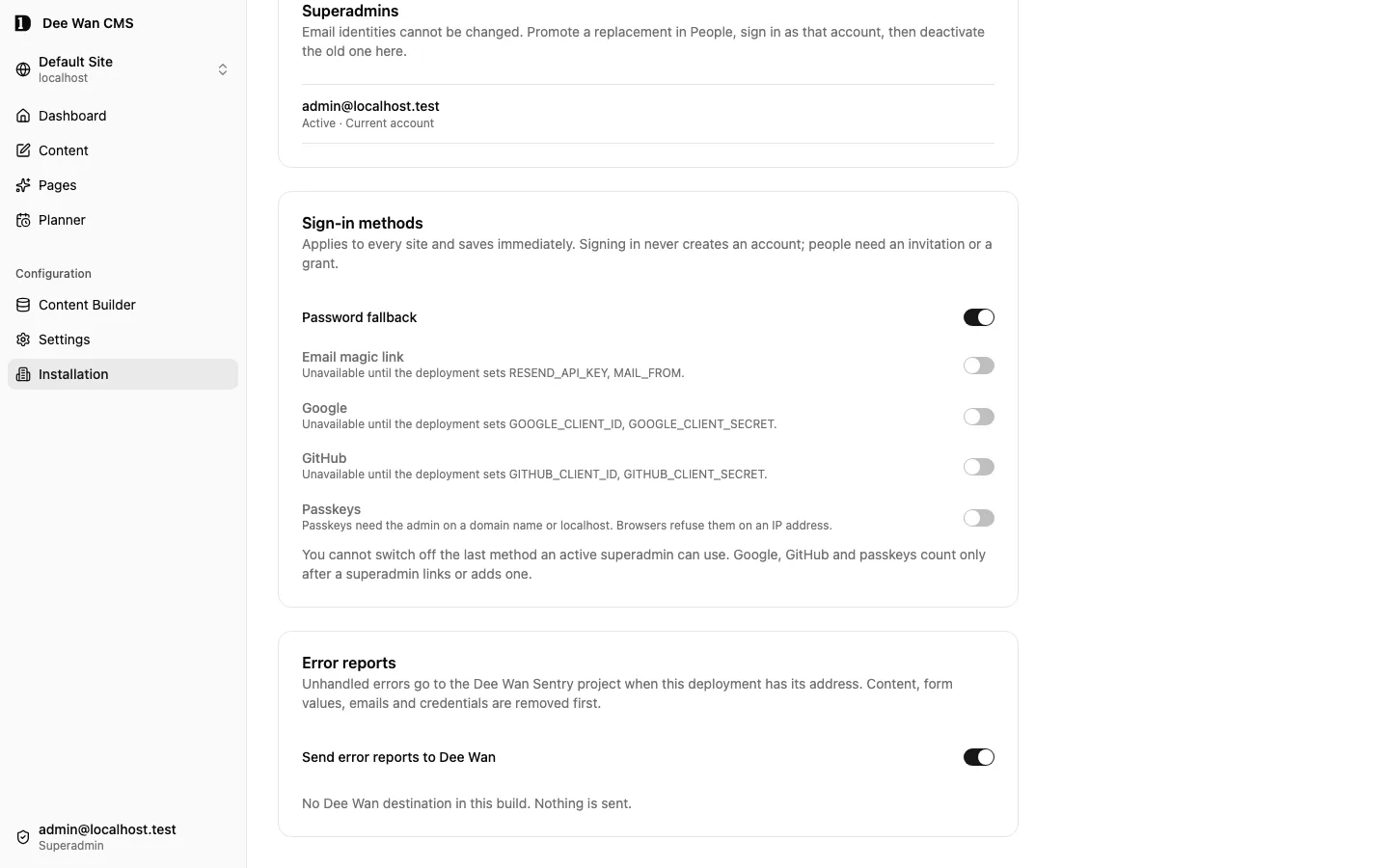
- Unhandled errors from the admin Worker, the public Worker and the admin UI can be sent to a Sentry-compatible project.
- Nothing is sent by default. This version has no built-in Dee Wan project address, so reports go
to Dee Wan only if the deployment sets
DEEWAN_SENTRY_DSN, and to your own project only if you setOPERATOR_SENTRY_DSN. - A report carries the error type, a scrubbed message, stack frames (function, file name, line), the route pattern, the release and the environment. Content, form values, email addresses, URLs, query strings and credentials are removed first.
- A superadmin can switch reports to Dee Wan off for the whole installation at Installation →
Error reports. The Worker variable
DEEWAN_ERROR_REPORTING=offdoes the same. Neither switch affectsOPERATOR_SENTRY_DSN.
-
Rich text is one checked rich document, and your renderer draws it.
- It is stored as canonical HTML, at most 256 KiB of UTF-8: text blocks, tables, image galleries, audio, video and file blocks, and embeds of YouTube, Vimeo or an https origin the site allows under Settings → Integrations.
- Every write reads it strictly and stores the canonical spelling. Markup outside the document is refused with a 400 that names the field, language and element or attribute, never the content.
- Its generated type is
Html, not a “safe HTML” type: media and embed blocks are data, not players. Render it with the page contract’srenderRichDocument, or your own renderer of the same document. - Dee Wan’s own renderers (Blog post pages and Latest entries) draw it with
renderRichDocument.
-
One place for delivery, under Settings → Source & delivery.
- The live CMS read API and the standalone backend are presented as two different contracts, with the differences in routes, authentication, response envelope, deployment, rollback and CMS dependency stated before you switch.
- The status shows never generated, current, drifted, building, build or deployment failure, and detached. The revision list refuses rollbacks that are not safe. Verified locally only.
-
Generator version and drift. A generated backend is identified by the generator version plus a fingerprint of the site’s model contract, never a timestamp. A site rebuilt by a newer generator shows as drifted rather than current. Every deployment records its generator version: the build workflow stops with
generator_version_missingwhen the artifact names none, and a build report without one is refused (build_report_incomplete). Nothing regenerates or deploys on its own. Regeneration of an artifact made by an older generator is refused until you generate the standalone backend again; there is no compatibility layer. -
An administrative audit log, at Settings → History, behind its own
audit:readpermission.- It records who changed a model, a component, a role, a grant, a site token, settings, infrastructure or the hostname, and who deployed or rolled back.
- Each action writes its intent before it runs and its result after. If the intent cannot be written, the action does not run. If the result cannot be written, the outcome shows as unknown rather than as success.
- It is append-only: nothing can edit it.
- It filters by operation, outcome, actor, target type, target id and a from/to range, and downloads
as CSV (
format=csv) from the sameGET /api/sites/:siteId/auditroute underaudit:read. CSV cells are formula-escaped. Results are paged with a cursor; there are no counts.
Supervised pilot: built locally, not yet proven on real infrastructure
Section titled “Supervised pilot: built locally, not yet proven on real infrastructure”- A separate content database per site. One control database plus one content database per site. Routing, provisioning, migrations across sites, backup and restore, and teardown are verified locally. Capacity, backup and restore, and isolation between several sites have not been proven on a real Cloudflare account.
- Deploying a standalone backend from the CMS. The claim, the build token, the generated repository workflow, migrations, reporting back and rollback are verified locally. No complete run through GitHub Actions to Cloudflare has been recorded.
- The complete installer path. The admin Worker and UI follow the normal setup path.
setupalso writesbackend/wrangler.public.jsonconce the account, the Cloudflare zone and the database are known. It never overwrites an existing file. When it cannot derive a value, it refuses and names the value instead of guessing. Copying the example by hand is only the fallback for that refusal. Without the file,deployrefuses rather than skipping. An installation that deliberately serves no public content says so with--admin-only, and the run is reported as admin-only rather than complete. What is missing is a recorded run on a real account. - Preview on your own front end. The admin stores an HTTPS front-end address and a route template
per model, and Preview opens the draft on your front end. The Preview panel, under Settings →
Source & delivery → Advanced — custom renderer, reads and writes that configuration, explains what
Preview does before it is set up, and names each refusal. Until a front end is configured and
verified, Preview opens the public API’s JSON response.
- Unsaved preview on a verified renderer that declares it (the managed Blog renderer for posts, and generated or owned renderers through the published verification key): text, components, relationships, the images you picked and the language’s address, from one signed draft that expires after 60 seconds. Files are looked up by id on the server with your current permissions. Nothing is saved, reserved or redirected, and public reads do not change. Other renderers and models show the saved version with the reason. See preview unsaved changes.
- Remote plugins, protocol v1 (Dee Wan side). Install from an HTTPS manifest with reviewed capability and model grants. Delegated operations recheck the actor’s live grants: entry detail, retained versions, create, typed updates, Trash, media reads/metadata, publish and unpublish use existing lifecycle services. Settings compares a fetched manifest with the installed version before upgrade; newly requested permissions stay ungranted. Host-drawn controls remain available. A manifest can also declare a reviewed frame on its exact plugin origin with declared operations: the credentialless sandbox and bound message channel carry no admin cookie or token, field edits use normal saves, and actions use authorized operations. Disabling or removing the plugin returns fields to their built-in editor. An operator-configured catalogue (
PLUGIN_CATALOGUE_URLS) supports discovery. Editors open Scheduling for readable models withoutsite:plugins; management API, CLI and MCP list views/actions and mint one-time launch links. Verified locally; Scheduling deployment remains pending. - Backup and restore. Verified against local SQLite, not against real D1.
- Invitations, at Settings → People. An administrator invites an address to one role on one site. The invited person types that address on the invitation page. With mail configured they also enter a code sent to that address. Without mail the administrator passes the link on, and the new account is recorded as unverified. An existing account gets the role and keeps its password. Links work once, expire after 7 days, and can be resent or cancelled. Verified locally with a stubbed mail provider. No delivery through a real Resend account has been recorded.
- Passkeys, off until a superadmin switches them on. Sign-in asks for no address. Each person adds, renames and removes their own passkeys under Account security; the last way to sign in cannot be removed. Verified locally with a software authenticator. No sign-in with a real device (Touch ID, Windows Hello, a phone) has been recorded.
- Migrating live sites from Strapi. The import path exists. No end-to-end migration of real sites, with cutover and rollback, has been completed.
Later / unavailable: not built, or disabled
Section titled “Later / unavailable: not built, or disabled”- Production acceptance of the maintained Astro reference starter. The source-emission command exists; the complete browser gate and real-provider acceptance remain open.
- A sitemap and robots preview in the admin.
- Managed renderer delivery, a post-1.0 track. Prepare, activate, roll back and Check deployment run through a separate deployment service that holds the Cloudflare token. This code has not been verified and has never run against a real Cloudflare account, so it is not part of the 1.0 contract. Without the deployment service settings these actions stay unavailable. Accepting a site template changes nothing that is live.
- An installer that needs no terminal, and a registered Cloudflare OAuth application.
- A preconfigured shared GitHub App service. The admin Source & delivery workflow supports an operator-configured GitHub App. The CLI uses device flow. See the authentication matrix.
- Arbitrary related-field filters and field filters across several models at once. Configured same-site relation display queries are supported.
- Finding similar images that are not byte-identical. Exact duplicates, media search and alt-text filtering are built.
- Automatic review reminders and multiple workflow assignees for one whole item. Independent locale owners, editorial tasks and field discussions are built.
- Webhook queueing beyond the retry above, and any guarantee that a subscriber receives a notification.
- Continuous synchronisation from the CMS into a standalone backend’s database.
- Sections a page’s editor cannot remove or turn into a separate copy. Shared sections, which show one published set of sections on many pages and change only where they are edited, are built (see page builder).
- Splitting one model across several databases.
- Enterprise SSO and MFA.
- Scheduled publish and unpublish in the core product. Scheduling is the separate Scheduling plugin, which is not deployed. Coordinated content releases are built in that plugin, not in the core product.
Two ways to read your content
Section titled “Two ways to read your content”- The CMS public read API is live. A publish reaches it immediately. If edge caching is on and purge credentials are set, the publish also purges the affected cached responses.
- A standalone backend is a release. It contains what was published when it was generated. Later publishes reach it only when you regenerate and redeploy it. It is not a live feed.
October source additions and remaining acceptance
Section titled “October source additions and remaining acceptance”The current source adds the following to the established contract. Focused tests cover these paths; final browser integration, live review at mobile and desktop sizes, and provider acceptance are still required.
- Content-list AND/OR groups, contextual relation choices and conditional select options share bounded rules and recheck dependencies on save.
- Plugin entry/version/create/update/Trash and media operations use the existing lifecycle and delegated actor’s current grants. Upgrades show version, permissions and origin changes before confirmation; new permissions need an explicit grant. Reviewed plugin-origin frames support custom UI without admin credentials.
- Rich text keeps paragraph/heading alignment, relation controls and nested repeatable plugin groups. Vendor snippets carry typed HTML/CSS/JavaScript and execute inside an isolated frame in the admin and both site renderers.
- Account security verifies the new mailbox before changing the same account’s email and ending its sessions. Memberships, credentials and history stay attached. Sign-in offers mail-based self-service password reset when configured; unknown and known addresses receive the same response. Existing no-mail recovery remains available.
- Role document rules scope core reads and atomic create/update/delete using current user context and old/proposed values. Existing model, own-row, field and locale limits remain ceilings. The related API/export audit is pending.
- CSV/XLSX offer Create, Update and Upsert through the reviewed Collection JSON core, with structured relations, media, nested components and normal scope/version checks. Update is the default; match by stable entry ID or an eligible unique field.
- Connected WordPress acquisition uses the existing WXR review/import/receipt/undo path. Explicit configuration replacement covers title, tagline, logo, icon, SEO description and supplied indexability; it requires
site:settingsand the reviewed destination revision. Unsupported or REST-hidden source data stays visible as omissions. - AI image alt/caption suggestions use authorized bytes and require author review before replacement. Translation updates run only after source save, for selected languages, with explicit consent to replace existing manual translations.
Entry-folder source adds nested trees, one placement per translation group, scoped counts/list filters and a separate placement history. Moving an entry does not create or publish a content version. Native copy carries the tree and placement; history transfer also carries placement history, with import receipts and undo. Final integration acceptance remains pending. Existing model navigation folders are separate. A production reference renderer/starter, Scheduling deployment, and real Cloudflare publication, preview, media, mail and recovery acceptance remain delivery gates. Source changes alone do not satisfy them.
A maintained live-API Astro starter is now present in source; see First site. Production starter acceptance, Scheduling deployment, and real Cloudflare publication, preview, media, mail and recovery evidence remain release gates. No tagged supported release is claimed.
The unreleased integration candidate also adds private file attachments to native website forms and approved plugin mail addressed to an entry’s author or assigned reviewer. These extend the existing intake and mail services. Their final integration checks remain open; no supported release or real-provider acceptance is claimed.
Current integration additions
Section titled “Current integration additions”These source features are part of the unreleased integration candidate. The final browser gate, live mobile/desktop review and external-provider acceptance remain separate requirements.
- Chunked native site/history transfers carry accepted large media with checksums and continuation.
- WordPress page conversion preserves headings, code, tables, longer bodies and explicitly mapped source metadata.
- Protected rich text supports private images, attachments and authorized image variants.
- Native-script addresses retain Unicode letters, numbers and combining marks and can be generated from titles.
- Named compound uniqueness joins two to four scalar fields under atomic write guards.
- Blog metadata can resolve live contributor, category and tag information; snapshot behavior remains an explicit option.
- Ordinary and mixed components can be retired, retain older definitions and upgrade instances deliberately.
- Plugin rich-text blocks can contain bounded host rich-text child fields.
- Native relationship columns show scoped labels, counts and related values.
- Typed visibility conditions combine up to four terms in AND/OR groups, at most three levels deep.
- Optional translated fields can borrow absent values from published fallback languages; deliberate empty values stay empty. See Field fallback.
- Validated static SVG works through the image workflow.
- Generated applications support up to 32 named application roles with model-operation grants, a non-admin signup default and existing admin/user roles.
- DeepInfra remains the default inference provider; a deployment can select an OpenAI-compatible endpoint and explicit text, vision and image model lists.
- Related draft previews resolve authorized saved related drafts; ordinary public reads still require publication.
- Content search covers saved rich-text bodies, including drafts, with matching fields and short excerpts inside the reader’s access scope.
- Live API browser origins configure CORS, preflight and permitted public-read headers per site.
- Management media replacement keeps the media ID and references while replacing bytes through the existing replacement service.
- Generated account administration creates named-role accounts and deletes unlinked accounts, with session revocation and last-administrator protection.
- Rendered entry editing opens text and rich-text controls over supported renders; older renderers keep field-focus fallback.
- WordPress imports retain reviewed ACF groups/repeaters as editable JSON and explicitly keep future publication schedules or draft intent.
- Selected-content refresh reviews additions, updates and deletions in populated models, preserves excluded data and old media pins, and refuses conflicting edits. Resume and cancel remain available; replacement has no automatic Undo.
Current authoring also includes localized model, field/group, help and option labels without changing stored keys; reviewed model promotion between sites binds both definition revisions. Zoned datetimes retain a UTC instant and IANA zone, refuse nonexistent times and require an offset choice for ambiguous times. Batch AI produces editable retained proposals without saving content; cancellation keeps completed proposals. Independent future drafts retain their own snapshots and media pins without changing the ordinary draft; release start freezes the selected branch, and cumulative previews use the scheduled future state.
Unreleased / pre-MVP; no stable version
Source revision: fe23db481c422b40e317b92fc98116b4c0c26a87 (modified checkout)
Build date (UTC): 2026-10-18T09:22:34.630Z
Upgrade target: unavailable: modified checkout. Release notes