

People, accounts, roles and access
An account belongs to the installation. A grant gives that account a role on one site. Selecting a site does not grant access to it. Review the selected site before adding, changing or revoking a grant.
Add a person
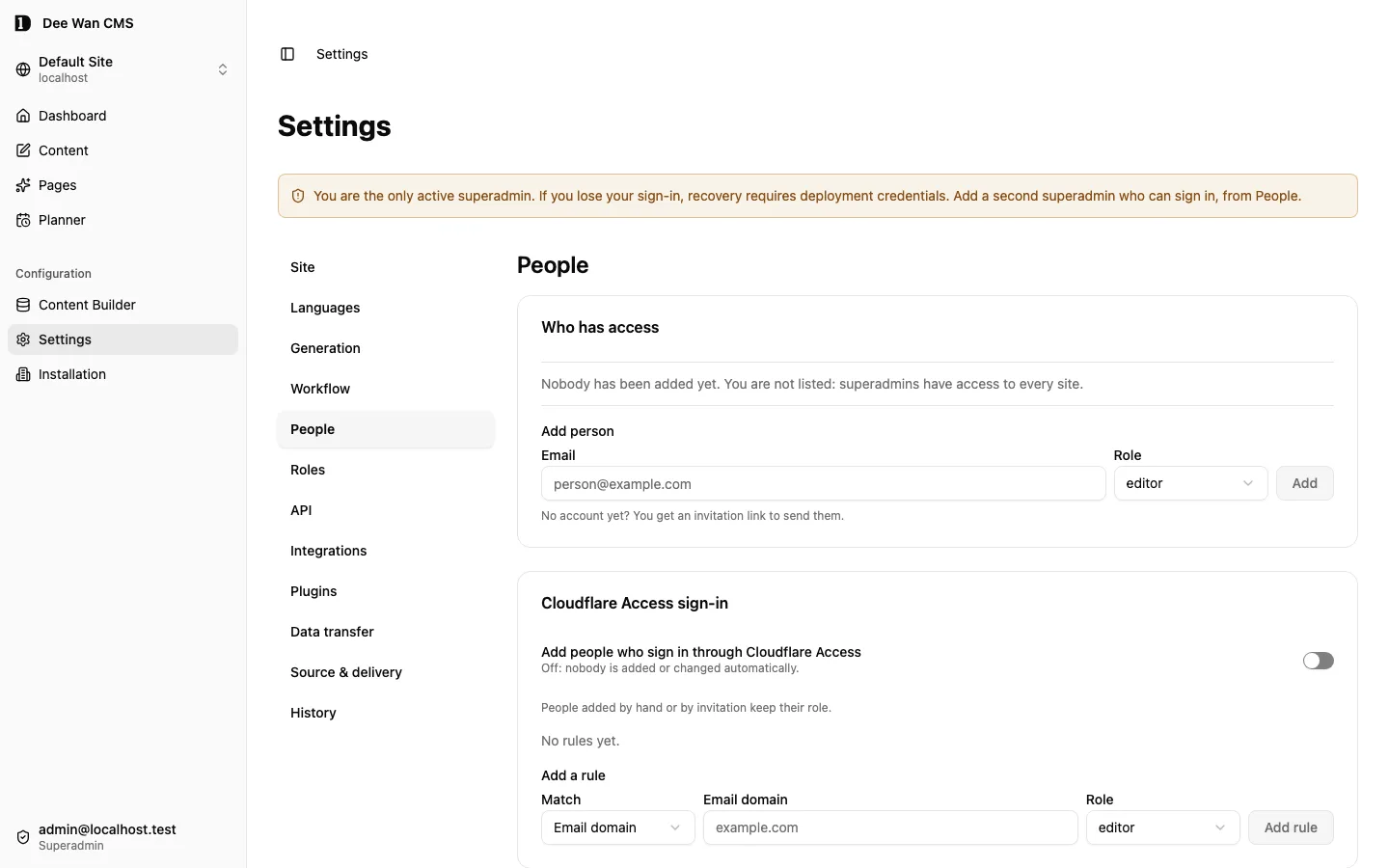
Section titled “Add a person”Open Settings → People with permission to grant site access. Under Add person, enter the email, select the role and use Add. The role cannot be raised above your own.
- The address already has an account: it gets the role at once. No email is sent.
- No account yet: no account is created. An invitation is made instead. Nobody gets access until the person accepts.
How the invitation travels:
- Mail configured (
RESEND_API_KEYandMAIL_FROM, or your own mail transport): the link is emailed. The screen says so only when the provider accepted the message. - Mail not configured: nothing is emailed. Copy the link and send it privately. The link is shown once.
The person opens the link and types the address it was sent to. With mail configured, a code is emailed to that address and must be entered: the code, not the link, proves the address. Without mail, the typed address is the only check, and a new account is recorded as unverified. A person accepting an invitation for a new address chooses their own password. An existing account gets the role and keeps its password. An existing account with no way to sign in gets a password only after the code proves the address; without mail it gets the role, and a superadmin issues a password link.
Links work once and expire after 7 days. Resend the invitation for {email} issues a new link and the old one stops working. Resend is refused with escalation_refused when the invitation’s role is above your own; the old link keeps working. Cancel the invitation for {email} asks for confirmation and invalidates the link. Pending and expired invitations are listed under Invitations, below the people, with their actions. Accepted and cancelled ones move under Earlier invitations ({count}). An expired, cancelled or used link shows the same refusal, whichever it was.
If a role or your own access changes while you add someone, invite or resend, nothing is granted, created or sent, and a resend keeps the old link working. When you may no longer grant site access, or the role is now above your own, the refusal says so (missing_permission or escalation_refused). Otherwise the screen says a role or your own access changed and nothing was saved: try again.
Each row shows where the person stands:
- Can sign in (a password, a linked provider or a verified address)
- Link pending with its expiry
- Link expired
- Needs setup link
- Cloudflare Access (Access is configured and the product cannot tell whether the person uses it)
- Deactivated
After Add grants an existing account that cannot sign in yet, a superadmin is offered Create link. Anyone else is told to ask a superadmin. Share that link privately. Never put it in content or screenshots. A superadmin can revoke a live link from the row, including a recovery link for someone who can already sign in. Revoking also removes a pending sign-in link the person requested. A deactivated account gets no link: reactivate it first.
Neither a grant nor an invitation is public self-registration.
Mail transport
Section titled “Mail transport”Resend is the default. To send through your own service instead, set MAIL_TRANSPORT_URL (a var),
MAIL_TRANSPORT_TOKEN (a secret) and MAIL_FROM. Dee Wan has no mail server and no SMTP client; your
service does the delivery.
- When it is used. With
MAIL_TRANSPORT_URLset, every message goes to your service and Resend is not used. If the token orMAIL_FROMis missing, or the address is refused (it must behttps://, with no credentials and a public address), mail is not configured: nothing is sent and the invitation or password link is shown to you to pass on. - The request. One
POSTper message, withAuthorization: Bearer <token>, anIdempotency-Keyheader and JSON{ "message_id", "from", "to", "subject", "text" }.message_idequals the key. The same message sent again carries the same id. - The answer. Your service answers HTTP 200 with JSON:
{ "status": "sent" }(optionally with anid),{ "status": "sent", "duplicate": true }when it already delivered thatmessage_id, or{ "status": "failed" }. Any other status, body or redirect, or no answer within 10 seconds, counts as failed. A retry of one message id therefore delivers it once and is never reported as a second delivery. - What you see. Sent, failed or not configured, as your service reported it. A failed or missing delivery never undoes what was created: the invitation or password link exists and is shown to you.
- Plugins never receive the token, and never see a message.
Choose the smallest sufficient role
Section titled “Choose the smallest sufficient role”| Built-in role | Scope |
|---|---|
admin |
Full site administration. This does not make the account a deployment superadmin. |
editor |
Content creation, editing, publishing, unpublishing, approval and export; full media access. No model or site administration. |
author |
Read and create content. Edit owned entries only. Add media files, not change or delete them. No publishing, unpublishing, approval or restore. |
viewer |
Read-only access. |
Custom site roles can differ: inspect their definitions under Settings → Roles rather than inferring permissions from a name. Author ownership is checked on content, including both translation and primary where an operation affects both. A shared draft and the editing lease follow ownership of the row in that language: an own-only role (read:own, update:own) reaches them only on a language row it owns, and is otherwise refused with not_owner. A superadmin has deployment-level authority across sites.
In Settings → Roles, All models grants apply to every model, including models with their own row. Buttons edit direct grants; the ↳ indicator shows inherited grants. Access combines both: removing a direct grant does not remove inherited access. Editing a * all-actions grant replaces that token with individual actions; an unchanged save preserves it.
Media permissions
Section titled “Media permissions”Files in the media library have three separate permissions, so you can grant the right to add, change or delete them independently:
| Permission | Allows |
|---|---|
media:upload |
Add files, including private files. |
media:update |
Change alt text, focal points, replace a file, folders, tags and public or private visibility. |
media:delete |
Delete a file. Deletion is refused if content or retained history uses the file, regardless of who requests it. |
admin and editor hold all three. author holds media:upload only, so an author can add files and cannot change or delete one. viewer holds none. A management API credential with the media:write scope carries all three, narrowed to what its creator holds when it is used. An import needs media:upload for the files it adds and media:update for the folders it creates, and undoing one needs media:delete and media:update.
Rich-text snippets follow content access: anyone who may create or change items of a model can use them there and manage the ones they saved. site:settings manages every snippet.
Workflows are administered with site:settings: creating, editing and deleting a named workflow, choosing the workflow of a model and reviewing the move of items in review. Feedback on an item follows access to that item: reading it needs read access, writing and resolving need update access. A notification is shown only while its recipient can read the item.
Limit a role to some fields or languages
Section titled “Limit a role to some fields or languages”By default, a role can access every field and language of the models it may use. No additional configuration is needed. To narrow a custom or built-in role, open Settings → Roles, edit the role and open Limit fields and languages.
- Limit fields lists the model’s fields, plus Search and sharing and Address. Tap a field to cycle it through Edit, View and Hidden.
- Limit languages picks the languages the role works in. The choice applies to every action the role holds: create, update, delete, restore, review, publish and unpublish. Can read every language keeps reading open, so a translator can see the source while editing only their own language.
- The All other models row limits languages for every model the role reaches through its default grants. A model’s own setting replaces it.
What a limit does:
- A hidden field is left out of the editor, version history and comparisons, the content list search, the spreadsheet export and the management API. A view-only field is shown disabled.
- A save that names a field the role may not change is refused with
field_deniedand names the field. Nothing is dropped silently, and what is stored in fields the role cannot see is kept. - An action in a language outside the role is refused with
locale_deniedand names the language. An operation that spans languages, such as a whole-entry publish or a bulk action, is refused in its entirety. - A shared (non-translatable) field, a shared relation list and media live on the primary language. Changing them needs the role to update the primary language. Sending a shared value unchanged with a translation is not a change.
- Restore French only in version history (the button names the language) restores one language: its fields, its own relation lists and its address. Shared fields, shared relations, media and every other language stay as they are. It needs the restore action in that language only, so a translator can recover their own language.
- Restore this version restores the whole entry: every language and every field. It needs the restore action in every language of the entry.
- Either way, a field-limited role may restore only where the fields it cannot change already match the version.
- A shared draft follows the same limits. Every draft answer, conflicts included, carries only the fields the role can read. A page draft shows an empty title without read on the title and is refused with
field_deniedwithout read on the sections. Joining or taking over the editing of a language needs the role’s change grant there (create, when that language has no row yet); otherwise it is refused withlocale_denied. - Feedback follows the same limits. A note belongs to the language it was written in. A role sees only the notes of languages it may read, writing a note needs the update action in that language, and resolving or reopening a note needs both read and update in the note’s language. Otherwise the request is refused with
locale_denied. - Languages the role may not read are hidden from the editor’s language list and from content lists. A preview link serves only what its maker may read and never falls back to a language outside the role.
- The update-only Export spreadsheet → Import spreadsheet round trip needs read and update on the model. An own-only grant (
read:ownorupdate:own) exports and accepts only the person’s own items; a row for anyone else’s item answersspreadsheet_row_not_found. Columns include only fields the role may both read and change. View-only fields are left out; stored hidden values are preserved on apply. Sheets include only readable languages. Changing a language without update access is blocked withlocale_denied. CSV/XLSX create and upsert use the collection path below instead. - Collection files exports JSON with
readon the model and only the rows, fields, related items and languages that read grant reaches. Its JSON, CSV and XLSX imports check permissions per row: creating needscreate; updating needsreadandupdate, and an own-only grant reaches only that person’s items. Upsert needs the grant for each row’s actual action, not both actions for every row. Adding a translation to an existing item also needs create access in that language. Every changed field and language needs its write grant; unchanged values stay untouched. See content editing. - A whole-site export copies every field and language, so a role that limits reading cannot start one.
- When someone holds several roles, each field and language keeps the strongest grant that covers it. A role with no limit for an action makes that action unlimited.
update:ownin one language besideupdatein another stays owner-restricted in the first: the merged set records it as anupdate:ownlanguage list. - You can hand out only limits within your own. Saving a role that reaches a field or language you cannot is refused with
escalation_refused, and the editor says so before Save. - Limits name fields by key. Renaming a field key in the model builder rewrites every role’s limits to the new key once the rename is saved.
- The page composer opens a page only in a language the role reads and refuses a page whose sections the role may not read. The page library hides titles and languages the role may not read.
- Roles, limits included, can also be managed through the management API with the
roles:writescope.
Change or revoke access
Section titled “Change or revoke access”Change a grant’s role in the People list or revoke that site’s grant. Revocation is not account deletion. A superadmin can deactivate an account and revoke its sessions. Reactivation requires a fresh sign-in. Self-deactivation and removal of the last active superadmin are refused. Site access also protects the last administrator.
Sign in through Cloudflare Access
Section titled “Sign in through Cloudflare Access”This needs an installation with Cloudflare Access set up. Open Settings → People → Cloudflare Access sign-in with permission to grant site access.
A rule maps one exact email domain, such as example.com, or one Access group to one role of this site. When the switch is on and a person verified by Access signs in with a matching domain or group, they get an account and that role in one step. Subdomains do not match. A group name must match your identity provider’s exactly, including case.
Groups are read from Cloudflare Access (get-identity on your team domain), not from the sign-in token, which can drop groups. They are read only when some site has a group rule, and once per Access sign-in session.
- Later sign-ins update the role to match the rules. Removing a rule removes the role it gave.
- People added by hand or by invitation keep their role. No rule changes or removes it. People shows Access beside a role a rule gave.
- Several rules match one person (a domain and groups): the role that includes the others applies. If none includes the others, that site gives no role. Two rules for the same domain or group that cannot combine are refused when saved. One that becomes ambiguous after a role edit shows Conflict.
- Groups cannot be read: no account or role comes from a group rule, and roles a group rule gave are not changed or removed. Domain rules still apply. A first sign-in that only a group rule could admit is refused and can be retried.
- The last administrator of a site is never removed or downgraded by a rule. The screen names who is kept.
- Off stops every automatic change: no new accounts, no role changes, no removals. Existing accounts and roles stay.
- A deactivated account stays refused. No rule makes anyone a superadmin. Password, email link, Google and GitHub sign-in still create no accounts.
- You can only hand out a role within your own. Changing a rule, even only its domain or group, is refused with
escalation_refusedwhen the rule’s role is above your own. Deleting such a rule, or changing it to a role within your own, is allowed. - If a role or your own access changes while you save a rule, nothing is saved. When the rule’s role is now above your own, or you lost permission to grant site access, the save is refused with
escalation_refusedormissing_permission. Otherwise the screen shows the latest rules; try again. - A role a rule uses cannot be deleted. Change the rule first. A site holds at most 100 rules.
Every change to the switch or the rules, and every role a rule gives or removes, is recorded in the site’s administrative history.
Replace a superadmin
Section titled “Replace a superadmin”Follow Replace a superadmin. A replacement person uses a separate account promoted with Make superadmin. To change only your own email, use the verified Account security flow below.
Passkeys
Section titled “Passkeys”A superadmin switches passkeys on from the Installation page, under Sign-in methods. They are off by default. Passkeys require the admin interface to be served from a domain name or localhost. On an IP address such as 127.0.0.1 browsers refuse them, so the switch stays unavailable and says why. Each person then manages their own passkeys under Account security. See Passkeys.
Lost device. Sign in another way (password, email link, Google or GitHub) and remove the lost passkey under Account security. With configured mail, use an enabled email sign-in link or the password-reset request on the sign-in screen. Without mail, a superadmin issues a password link from the People list, as described below. The person sets a password and signs in with it, then removes the lost passkey.
Password ownership and recovery
Section titled “Password ownership and recovery”Claim and reset links expire after 15 minutes and are single-use. Issuing a new one invalidates the previous link. The password must have at least 12 characters. Public signup is unavailable. With mail configured, sign-in offers a self-service password-reset request; without mail, an authorized issuer provides the recovery link.
For the existing sole active superadmin who is locked out, the deployment owner may use npm run claim:link -- --remote --email <existing-email> from the CMS repository. It refuses to create a new account or reset an arbitrary user. First installation uses the installer claim instead. See installation for prerequisites.
Authorities: backend/src/api/sites.ts, backend/src/api/users.ts, backend/src/lib/invitation.ts, backend/src/lib/access-provisioning.ts, backend/src/lib/access-identity.ts, backend/src/api/access-provisioning.ts, frontend/src/routes/settings/components/tabs/People.svelte and scripts/claim-link.ts. Access in a standalone backend is separate: see optional artifact authentication and access. CMS accounts and roles are not exported into it.
Next step
Section titled “Next step”Build with Dee Wan, starting with preview and the generated TypeScript client.
Change your email or recover your password
Section titled “Change your email or recover your password”Open Account security → Change email address and enter your new address. Enter the code sent to the new mailbox; it expires after 15 minutes. The new address must be unused. Your account ID, site access, credentials and content history stay unchanged. All sessions end after confirmation, so sign in with the new address. This requires mail delivery. Google and GitHub callbacks never change the account email.
On the sign-in screen, choose Forgot password?, then enter your email and request a link. The option is available when mail is configured; no email is needed to open it. The response is the same for known and unknown addresses. An active account receives a single-use link, valid for 15 minutes. Open the link and choose a new password. Without mail, ask a superadmin for a reset link from People. The last superadmin uses npm run claim:link -- --remote --email <address> with deployment credentials.
Entry rules in custom roles
Section titled “Entry rules in custom roles”Open Settings → Roles, edit a custom role, and open Limit access by entry. Choose a model and action, then Add entry rule. Match the creator or a field value; choose an operator and a fixed value, current user ID, email or roles. Combine conditions with All conditions (AND) or Any condition (OR) groups. The builder allows four conditions and three group levels; incomplete rules disable Save. Server refusals remain visible when a field or permission changed. Model permissions still decide which actions the role grants. Entry rules narrow those actions using current entry values. Field, language and ownership limits still apply. A scoped update must satisfy both read and update rules before and after the change; changing a department cannot move an entry outside your rule. Create checks the proposed values. Delete and workflow actions check the current values.
Saving or restoring one language checks the primary entry and each language changed. Unchanged sibling languages add no permission requirement.
{"article":{"read":{"field":"department","op":"in","values":[{"user":"roles"}]},"update":{"field":"assigned_editor","op":"eq","values":[{"user":"id"}]}}}Each model key is its slug. Actions are create, read, update and delete. A condition uses a field key, op (eq, in, contains, empty, not_empty) and values. Values are strings or {"user":"id"}, {"user":"email"}, {"user":"roles"}. {"owner":true} means an entry created by the current person. Combine conditions as {"join":"and","conditions":[...]} or {"join":"or","conditions":[...]}. A rule has at most four conditions and three group levels. Shared fields use the primary language’s values.
Roles add authority: a person holding an unrestricted role can still read its permitted entries. Ownership and entry rules from one role stay together when several roles are combined. Invalid rules cause that role’s grant to be refused. A delegated role cannot relax your entry-rule ceiling. Rules do not change public publication or URLs.
Existing saved links keep their IDs when their targets become unavailable to your role; hiding a name does not disconnect the link. Revision history shows target names and addresses only when your current access permits them. The stored revision is unchanged.
Value rules support text, select, boolean, number and date fields. Select eq and in match exact choice IDs, including values in a multi-select; [] counts as empty. contains works only on text. Number comparisons use numeric values, boolean comparisons use true or false, and dates use YYYY-MM-DD. Missing or renamed fields deny access, including an empty rule. Use empty or not_empty with values: []; blank comparison values are refused.
Administrative history
Section titled “Administrative history”Open Settings → History with audit:read permission to review changes to this site’s models, roles, access, tokens, settings, hostname and deployments. Filter by action, outcome, person, target or dates; Download CSV exports the filtered results. An Unknown outcome does not confirm success or failure. Rows cannot be edited or deleted here. Content changes have their own version history.
Unreleased / pre-MVP; no stable version
Source revision: fe23db481c422b40e317b92fc98116b4c0c26a87 (modified checkout)
Build date (UTC): 2026-10-18T09:22:34.630Z
Upgrade target: unavailable: modified checkout. Release notes