

Standalone backend: API reference
This page covers the API, authentication, deployment and rollback of a generated standalone backend. It describes emitted source, not a Cloudflare deployment that has passed acceptance. For what a standalone backend is and how to generate one, see the overview. For files, dependencies and table mappings, see Implementation details.
Routes
Section titled “Routes”Generated IDs such as Article.findMany identify operations. HTTP routes use the lower-case model name, for example /api/blogpost. The customizable catalogue includes only operations that have generated security.
Method/path below /api/<model> |
Operation | Result |
|---|---|---|
GET / |
findMany |
Array of rows |
GET /paginated |
findManyPaginated |
{ data, total, hasMore } |
GET /unique |
findUnique |
Row or null |
POST / |
create |
Row, status 201 |
PUT / |
update |
Row |
DELETE / |
delete |
Row |
Junctions expose only the three reads; a list relation is written through its owner (below). Translation tables also allow create, update and delete operations for editors. Bulk operations, aggregate/count/groupBy, upsert, updateEach and other unconfigured operations are absent. Disabling an emitted operation removes it from execution and OpenAPI while keeping its path reserved against the raw owned mount. Reads have no POST alias.
Read arguments use query parameters, with JSON for structured values. Writes use Prisma argument objects in JSON bodies. URL-encode structured query values.
GET /api/blogpost?take=25&skip=25GET /api/blogpost/unique?where={"id":"item-id"}POST /api/blogpost {"data":{"id":"new-post","featured":false}}PUT /api/blogpost {"where":{"id":"new-post"},"data":{"featured":true}}DELETE /api/blogpost {"where":{"id":"new-post"}}This is not the CMS /v1 public API: consumers receive Prisma-shaped results, not the CMS { data, page } response contract.
Relation and translation writes
Section titled “Relation and translation writes”A to-one id is written on the row, like any column. A missing target returns 422 relation_target_missing.
A hierarchical parent link (a to-one relation to its own model marked Hierarchy (parent/child)) never loops. A create or update that makes a row its own parent, or puts it under one of its own descendants, returns 422 relation_hierarchy_cycle with field (the <field>_id column) and targets. Generated create and update routes and trusted routes check it before writing. SQLite triggers in migrations/ refuse the same write inside the database, so two concurrent writes cannot both succeed; the refused one gets the same answer. Every migration drops and re-creates these triggers around its changes. Roots, reparenting and clearing the parent (null) are ordinary writes. An id from another model or site, or one that identifies no row, returns relation_target_missing. Locale rows never carry the parent.
A list relation has one route per field on its owner: PUT /api/<owner>/relations/<field>. The body names the owner row and either the whole ordered list or the changes to it.
PUT /api/article/relations/tags {"where":{"id":"post-1"},"set":["tag-2","tag-1"]}PUT /api/article/relations/tags {"where":{"id":"post-1"},"connect":["tag-3"],"disconnect":["tag-1"]}POST /api/articletranslation {"data":{"article_id":"post-1","lang":"fr","title":"Bonjour"}}setreplaces the list in the given order.connectappends;disconnectremoves, and disconnecting an id that is not linked is treated as already complete.setcannot be combined with the other two.- The resulting list is validated against the CMS rules: no duplicates (
relation_duplicate_target), required andminItems(relation_too_few),maxItems(relation_too_many), existing targets (relation_target_missing). Item counts are checked on every request. Deleting a target removes its link, so a list can fall belowminItems; it then answersrelation_too_fewuntil a write brings it back within its limits. A list equal to the stored one writes nothing and answers with the stored list. - A one-to-many target already held by another owner is refused with
409 relation_target_taken. - The links are rewritten in one database batch. If the list changed after it was read, nothing is written and the answer is
409 relation_changed_concurrently. - The route inherits
<Owner>.update: its access mode, permission, operation and group hooks. Disabling<Owner>.updatedisables the route; its path stays reserved.
A locale row is created with its row key and language. The language must be one the site was generated with (422 unknown_locale): a Blog’s configured languages, or a language used by published content. A Website pins no language list, so a language with no published content yet needs a regeneration. The base row must exist (422 translation_row_missing), and a row has one locale row per language (409 locale_exists). An update changes only the translated values. Translation writes inherit <Model>.update, and deletes <Model>.delete.
A field that allows several models
Section titled “A field that allows several models”A relation field can allow more than one model. Such a field is stored in one join table per allowed model, for example ArticleRelatedTag and ArticleRelatedPerson, each with a foreign key to its model that deletes the link with the target. The rows of all these tables share one list order through position, so the list can mix models freely. A mixed to-one field (manyToOne, oneToOne) is stored the same way, not in a column. A parent link (hierarchy) allows one model only.
-
A reference is
{"model":"<model slug>","id":"<row id>"}. Inset,connect,disconnectandrelationsof the atomic create, a bare id is refused with422 relation_target_model_requiredon a field that allows several models. A model the field does not allow answers422 relation_target_model_not_allowed, and an id that identifies no row of the named model, or no row at all, answers422 relation_target_missing. A field that allows one model still takes bare ids and also takes{ model, id }with its own model. -
The answer lists
{ "model", "id" }references in order. Intargetsof an error, a reference of such a field is writtenmodel:id. -
The same rules as for any list apply to the whole mixed list: no duplicates,
minItemsandmaxItems, a one-to-many target held by one owner (409 relation_target_taken), one write in one batch. A to-one field holds one reference across all its models, also against a racing write: the write that read an older list answers409 relation_changed_concurrently. -
GET /api/<model>/files/<field>/<row id>serves a private file when the row’s<field>_urlholds aprivate-file:marker. The Worker reads it from thePRIVATE_FILESR2 binding; the Node server (npm run serve:local) reads it from the absolute directory named byPRIVATE_FILES_DIRECTORY, which must exist, in which a file’s content type is kept in a<key>.meta.jsonbeside it. It inherits<Model>.findUnique: its access mode, permission, hooks and availability, and the caller’s own guarded read of the row. It answers404for a row without a marker, an object the bucket lacks, or a row the caller cannot read. With neither the binding nor the directory it answers503 private_files_unavailable, and never falls back to public storage. A response isprivate, no-store; images and PDFs are displayed inline, anything else downloads. -
Rich-text media use the same protected route with
?media=<media id>. It selects aprivate-file:marker actually held by the row’s rich field, not a storage key supplied by the caller.&variant=thumband&variant=previewread that parent’s private WebP variants; a missing preview falls back to its original. The exportedprivateRichText(html, endpoint, rowId)helper maps canonical rich HTML to these same-origin file URLs for display. Use it after reading the row; the file route still checks live row access on every request. -
GET /api/<owner>/relations/<field>?id=<owner id>reads the ordered list with each reference’s model (add&locale=for a list with links in each language). It inherits<Owner>.findUnique, and a private field answers editors only. Reading one join table, for exampleGET /api/articlerelatedtag, returns only that model’s rows;positionis the place in the whole list. -
A published item that links to a model the field does not allow blocks generation (
invalid_reference), and a model that is not on the site blocks it (relation_target_absent).
Create a row with its lists in one write
Section titled “Create a row with its lists in one write”An owner with at least one list relation also has POST /api/<owner>/with-relations. It creates the row and its list memberships together. The ordinary POST /api/<owner> still creates a row without lists, and PUT /api/<owner>/relations/<field> still changes a list later.
POST /api/article/with-relations {"data":{"id":"post-1","title":"Hello","author_id":"person-1"},"relations":{"tags":["tag-2","tag-1"],"topics":["topic-1","topic-2"]}}POST /api/note/with-relations {"data":{"id":"note-1"},"relations":{"related":{"en":["tag-1"],"fr":["tag-2","tag-3"]}}}datais the body of the ordinary create, validated against the same create guard shape and hooks asPOST /api/<owner>. A missingidis generated.relationsnames list fields; a shared list is an array of ids in order, a list with its own links in each language is an object from language to array. Anything else in the body answers400 invalid_request.- Every list field of the owner is checked, and a field you leave out counts as empty. A required list (
minItems) must be given, or the answer is422 relation_too_few. For a list with links in each language only the languages you name are checked. - Before anything is written the route checks the CMS rules: no duplicates (
relation_duplicate_target),minItemsandmaxItems(relation_too_few,relation_too_many), existing targets (relation_target_missing), a one-to-many target held by another owner (409 relation_target_taken), a parent link that names the new row (relation_hierarchy_cycle), an id that is already a row (409 record_exists), and to-one ids indata(relation_target_missing). - The row and all its links are written in one database batch on D1 and in one transaction on SQLite. If any statement fails, none of them is kept: there is no row without its links and no link without its row. Two creates that claim the same one-to-many target at the same time cannot both succeed. One answers
201; the others answer409 relation_target_takenand leave nothing behind. A failure the preliminary checks could not detect, such as a unique value another write took first, answers409 write_conflict. - A success answers
201with{ "id", <columns>, <field>: [ids] }. Private fields are left out, as in every write answer. - The route inherits
<Owner>.create: its access mode, permission, and operation and group hooks. It answers403 forbiddento a caller that may not create. Disabling<Owner>.createremoves the route. If the owner’screatehas an operation override, the route answers501 atomic_create_unavailable, because the override replaces the write this route performs. Without a batch runner it answers503 relation_writes_unavailable. OpenAPI marks the routex-atomic-create. - It does not write translation rows. Create those with
POST /api/<model>translation.
Deployment runs scripts/check-relation-ids.mjs before it applies migrations. A database migrated by an earlier generator can hold relation ids that name no row, and the migration that adds their foreign keys would fail as a whole. The check lists each one (model, column, row id, missing target) with the remedy and refuses with relation_ids_dangling before anything is migrated. npm run db:init and npm run data:load -- --database <file> run the same check, with the same database, before local migrations. Generating the standalone backend locally into an existing target database refuses the same way.
Readiness refuses relation shapes no generated write can satisfy: limits no list can meet (relation_bounds_unsatisfiable), a target model the site does not have (relation_target_absent), and required to-one fields that lead back to their own model (relation_required_cycle). Published items whose parent links already loop are refused with relation_hierarchy_cycle, naming the items. Model Builder shows the same note on the relation field.
Text validation
Section titled “Text validation”Generated text fields retain the declared minLength, maxLength and pattern rules. Patterns support Unicode property escapes such as \p{L} and \p{N}; an intentionally ASCII-only pattern keeps its restriction. Regenerate and redeploy after changing these rules. Generation refuses executable custom text validation with unsupported_text_validation instead of running or discarding it. Malformed text rules, including invalid patterns or a minimum above the maximum, refuse generation with invalid_field_validation.
Point queries
Section titled “Point queries”Generated list and paginated-list routes accept filter[location][within_radius]=13.75,100.5,1000 (latitude, longitude, metres) and filter[location][within_bbox]=13,100,14,101 (south, west, north, east). Bounds are inclusive; west greater than east crosses the antimeridian. Nearest order uses sort=location&origin=13.75,100.5; sort=-location reverses distance. Missing points sort last, followed by stable row ID order. Radius uses Haversine distance in metres.
These options pass through the existing generated route, authentication, row guard and effective field-query permissions. A disabled point field is refused with 403 spatial_field_denied. They do not enable a field or operation removed by an owned customization or saved query. sort cannot be combined with orderBy; invalid coordinates or syntax are refused with 400 spatial_query_invalid.
The emitted local SQLite and D1 runtimes supply a driver adapter. A spatial request without an adapter returns 501 spatial_adapter_required. SQL translation also covers PostgreSQL and MySQL; those providers require their own runtime acceptance before deployment. Spatial filtering and ordering run before SQL pagination and use the same predicates for counts.
Live shared references require source-site grant custody. Generation returns shared_references_require_live_delivery for effective shared slots; remove or replace them before generating a detached backend. Ordinary same-site relations remain supported.
Retained locale originals
Section titled “Retained locale originals”Media identity remains <field>_id; <field>_url remains the default transferred address. Media-bearing fields also carry <field>_originals, a JSON map from served locale to media ID to the exact retained original’s facts and transferred URL. Shared component and rich fields keep one authored value and retain originals for each served language. Private fields and components with private nested fields keep this metadata private.
Import mediaOriginal from src/media-original.ts. mediaOriginal(row, 'cover', 'fr') reads the original for the row’s cover_id; pass a fourth media ID for a component or rich field. An absent locale or asset returns null. Generation uses the published version’s recorded fallback result; it does not choose a newer library file. Exit transfers each retained object independently and rewrites its address while preserving the asset identity.
Authentication, guards and errors
Section titled “Authentication, guards and errors”Access policy decides whether a route accepts anonymous, session or service callers. Missing model policy is service. Read tokens are digests scoped by model in ACCESS_CONFIG. Unscoped routes and /api/openapi.json require wildcard scope. Service writes without a writer authenticator return 503 writes_unavailable. Absent credentials return 401 and denied permission returns 403. Optional Better Auth supplies the artifact session for both local and Worker runtimes. Local serving and the Worker accept the same API_BEARER_TOKEN service bearer.
Managed deployment builds ACCESS_CONFIG on every deploy from two sources: the CMS-issued tokens in the generated file access/read-tokens.json, and your own vars.ACCESS_CONFIG in wrangler.jsonc. It deploys their union. With neither, it deploys a valid empty list (tokens: []). Both are checked by one rule module, src/access-config-rules.js, which the Worker also uses at startup. The rule requires version 1, this site, every token naming this site, and lowercase SHA-256 hex digests. It also requires model scopes, no write capability, no duplicate token id and no duplicate digest. An invalid owned value is rejected with owned_access_config_invalid, and an invalid generated file is rejected with generated_access_tokens_invalid. The same id in both is rejected with access_token_id_conflict, and the same digest in both with access_config_union_invalid, all before any database or Worker changes. Your own entries are never removed. A value set only in the Cloudflare dashboard is replaced by the next deploy, so keep yours in wrangler.jsonc. Commit digests of long random secrets only, never the secrets. Outside the generated deployment flow, missing or invalid ACCESS_CONFIG refuses boot.
Read tokens issued from the CMS
Section titled “Read tokens issued from the CMS”Settings → Source & delivery → Deployed API read tokens, with the site:infra permission.
- Issue. Give a name and one or more models. The secret,
dw_art_and 43 base64url characters, is shown once and stored nowhere. The CMS keeps its SHA-256 digest. Callers sendAuthorization: Bearer <secret>. The CMS never issues a*token. A wildcard token stays in your ownvars.ACCESS_CONFIG. - Deliver. Nothing reaches a deployed backend until you regenerate and deploy. Issuing or revoking marks the site out of date. Regeneration writes the active tokens, digests only, to
access/read-tokens.jsonwith each scope mapped to the model’s generated name (and its translation table). - Revoke. Revoking does not deploy. The deployed backend accepts a revoked token until the next regeneration and deploy. A detached backend is out of the CMS’s reach.
- Rotate. Issue a replacement, deploy, move the caller to the new secret, revoke the old token, deploy again. There is no in-place swap.
- Models. Scopes are model ids, so renaming a model changes nothing. Deleting a model, or undoing the import that created it, removes it from every token. A token left with no model is revoked, never widened.
- CMS site API tokens (
site_api_token) are never copied into a generated backend. - Generation refuses a token whose scope no longer maps to a generated model (
token_scope_not_emitted), and single-model generation refuses while active tokens exist (read_tokens_need_site_graduation).
Generated reader shapes permit id equality. Editor shapes permit equality on the generated row columns. A model’s private fields are left out of reader selects (anonymous reads and read tokens) and of every write response; a component column holding a private field anywhere below is left out whole, and a private list relation’s join table responds only to editors. A single-entry model’s table holds one row: a unique index refuses a second, and the create route answers 409 single_entry_exists. Normal lists order by id and use default 25/max 100. Translation lists order by language then id. Junction lists order by position then id with default 100/max 200. Unsupported selectors/operators are refused. D1 is isolated per site. The artifact refuses a mismatched SITE_ID rather than claiming row-level tenancy.
In the generated backend, a component field is one embedded JSON value, nested up to 3 levels below a root component, the same limit the CMS enforces when you build the definition. A chain deeper than that is refused before generation with component_nesting_too_deep, naming the component and the path of components that reaches it. Media references inside nested components are found at every level.
Customization cannot remove generated authentication, permissions, variant selection, guards or error protection. The generated composition layer resolves guards before hooks, validates resolved shapes and disables the environment guard bypass regardless of owned settings. The installation’s other supported guard choices remain generation inputs. allowE2EGuardBypass is still deprecated upstream, but is not an override escape hatch here.
Generated router errors retain upstream normalization. Errors disclosing SQL, Prisma calls or local paths are replaced by request_refused while preserving status. Unhandled owned failures return request_failed. A configured commit is returned in x-artifact-commit.
Guard settings
Section titled “Guard settings”Settings → Source & delivery → Generated API guards remains the installation input for generator policy. The owned composition layer fixes the following security settings. Owned declarations cannot weaken them. The existing reader/editor variants remain the only variant dispatcher.
| Setting | Generated customization pipeline |
|---|---|
requireGuardShape |
true |
validateGuardShapes |
true |
requireDefaultVariantOptIn |
Retains the installation’s selected policy |
enableUpdateEach |
false |
guardResolutionOrder |
before-hooks |
allowE2EGuardBypass |
false |
validateResolvedShapes |
true |
OpenAPI
Section titled “OpenAPI”Authenticated GET /api/openapi.json combines upstream generated schemas and enabled operations with schema-validated declarative routes. Same-contract overrides retain the generated request/result schema. Custom routes declare their access operation and optional model scope. Their supported schema subset is enforced for input and output. Raw Hono routes have no generated OpenAPI contract. Documentation does not make an anonymous route public.
Optional artifact authentication and access
Section titled “Optional artifact authentication and access”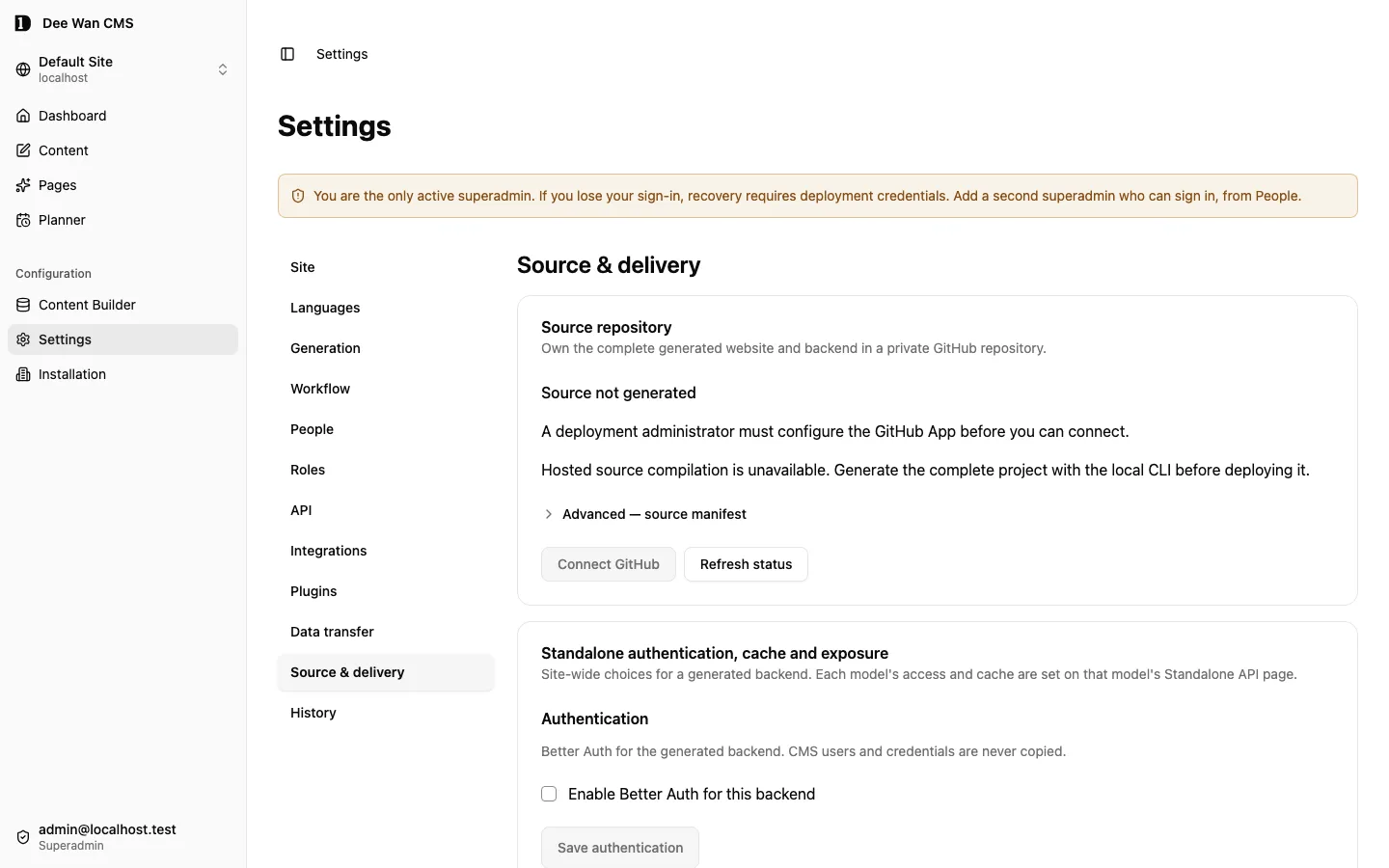
In Settings → Source & delivery → Standalone authentication, cache and exposure, enable Better Auth once for the backend. Then select Password, Magic link (Resend), Google or GitHub. Disabled is the default: no Better Auth dependency, runtime, routes, tables, migration, provider configuration or secrets are emitted. CMS accounts, sessions, invitations, password hashes and provider credentials never enter a standalone backend. Application content named User stays separate from the artifact identity tables.
| Access mode | Accepted caller |
|---|---|
public |
Accepts an explicit typed anonymous principal without a credential. |
session |
A current session from this artifact’s Better Auth instance. |
service |
API_BEARER_TOKEN, or an eligible scoped token for a read. |
session_or_service |
Either the artifact session or service authentication. |
Each model’s access mode and operation overrides are set on its model page → Standalone API. Saving needs site:infra. The policy is stored against the model id, so it follows a slug rename and is deleted with the model. A save names the revision it replaces. A stale screen gets 409 policy_changed_concurrently. Slugs that generate the same model name (blog-post and blog_post) are refused when a model is created or renamed. A missing model configuration explicitly uses service. Missing operation overrides inherit the model default. Overrides use exact generated IDs such as User.findMany, User.findManyPaginated, User.findUnique, User.create, User.update and User.delete. Validation rejects removed operations. Generated policy types also reject stale IDs. Operation availability remains in the owned backend registry. Access settings do not re-enable disabled operations. Policies name sessions, never particular login providers.
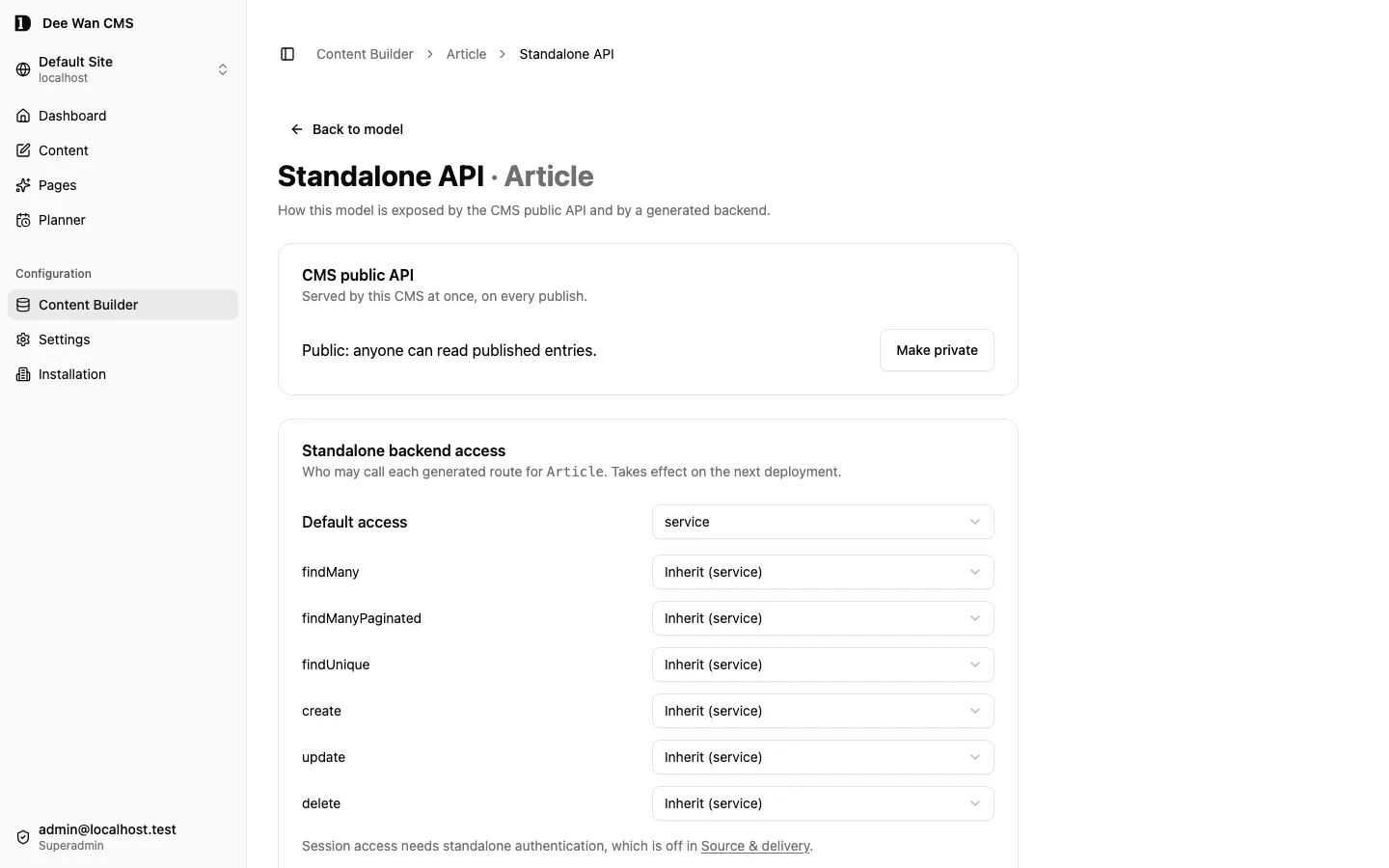
Authentication and permission checks run before hooks and overrides. Guard resolution, existing ownership boundaries and error protection remain mandatory. A public create rejects protected system, owner, tenant, role, administrator, password, verification and provider-link fields, including nested input. Public create makes application content. Signup happens only through Better Auth routes. Raw routes default to service. Declarative routes must state access.mode and access.operation, with optional model scope. OpenAPI shows each operation’s access mode.
| Optional install root | Package | Block | Exact version |
|---|---|---|---|
root, only when enabled |
better-auth |
dependencies |
1.6.25 |
Enabled artifacts emit src/better-auth.ts, provider verification and the existing auth limit/lockout rules, plus a separate migration for _artifact_auth_* infrastructure tables. These tables have no generated CRUD endpoints. Both the Node/SQLite server and Worker/D1 use the same selected methods, password bounds, verified OAuth identities and hashed verification tokens. They also use the same database session revocation, seven-day session limit and mutation-origin checks. Provider access, refresh and ID tokens are discarded. Auth responses suppress provider internals.
Run npm run auth:init to create a fresh random secret in ignored .dev.vars. It preserves an existing artifact secret. The Node server can load this file with node --env-file=.dev.vars src/serve.local.mjs. Wrangler loads it directly. Apply db:init first. Set ARTIFACT_ORIGIN to the API origin, for example http://127.0.0.1:8787 locally. Remote origins must use HTTPS. Deployment derives the origin from the reviewed target hostname, never from the CMS origin.
| Selected method | Required runtime values | Target callback |
|---|---|---|
| Password | BETTER_AUTH_SECRET |
Password routes under /api/auth |
| Magic link | BETTER_AUTH_SECRET, RESEND_API_KEY, MAIL_FROM |
<ARTIFACT_ORIGIN>/api/auth/magic-link/verify |
BETTER_AUTH_SECRET, GOOGLE_CLIENT_ID, GOOGLE_CLIENT_SECRET |
<ARTIFACT_ORIGIN>/api/auth/callback/google |
|
| GitHub | BETTER_AUTH_SECRET, GITHUB_CLIENT_ID, GITHUB_CLIENT_SECRET |
<ARTIFACT_ORIGIN>/api/auth/callback/github |
Register callbacks in adopter-owned OAuth applications. Resend needs a verified sender domain. Only selected methods require credentials. Target preflight fails before deployment when a selected method lacks them. Repository Actions secrets prefix runtime names with ARTIFACT_. This also avoids GitHub’s reserved GITHUB_ prefix. Delivery generates a new artifact secret and seals it to the target public key. Existing target secret names are preserved without rotation. npm run backend:deliver reads provider inputs only from ARTIFACT_* environment variables. Secret values never enter source, manifests, generation inputs, digests, checked-in vars, logs or deployment ledgers.
Regeneration preserves owned/shared files. Enabling auth in an existing shared package or changing selected methods requires regeneration to update dependencies and caller workflow bindings. Disabling auth on an existing destination is rejected: use a new destination, preserving the old identities and migration history. Access-only changes participate in generation-source and manifest digests.
verify:deployment respects access policy. Public reads are checked anonymously. Service reads use the bearer. Session-only reads require a current target session in ARTIFACT_VERIFY_SESSION_COOKIE. Without it, verification refuses with verify_session_required. It never reports an unperformed content check as passed. For first deployment, initialize the target, create an account through its auth routes, and rerun verification with that session. Keep the short-lived session out of source and evidence. Browser and live deployment acceptance remain separate gates.
Application-account administration
Section titled “Application-account administration”Off by default. When Better Auth is enabled, the artifact can also expose the Better Auth admin plugin for the application’s own accounts. Accounts, roles and sessions stay in the application’s database, and only an application administrator can use these operations. The Dee Wan CMS holds no copy of the accounts, takes no part in a request, and need not be running. With the integration off, no plugin, route, migration, column or binding is emitted.
Turn it on. Add "accountAdmin": true to the authentication setting of the site, then regenerate and deploy: PATCH /api/sites/<site-id>/standalone-auth with {"authentication":{"enabled":true,"methods":["password"],"accountAdmin":true}} and the site:infra permission. A save that leaves accountAdmin out keeps its current value. In the admin it is the switch “Account administration in the generated application” under Settings → Source & delivery → Standalone authentication, cache and exposure; it is disabled while Better Auth is off. The setting adds the migration migrations/<number>_artifact_auth_admin.sql: it adds the role, banned, banReason and banExpires columns to _artifact_auth_user and impersonatedBy to _artifact_auth_session. The number is the next free one in the migration lineage the artifact already has when the setting is first enabled (0004 on a new artifact). Regeneration keeps that file and number, and an applied migration is never renumbered. Turning the setting off later removes the routes and the page and leaves the columns and the migration file; turning it on again reuses the same file.
Who is an administrator. A user whose role is admin, or whose id is in the optional runtime binding ARTIFACT_ADMIN_USER_IDS (comma-separated, at most 50 ids). New accounts use the configured default application role unless an administrator selects another role. list-users and get-user add access (admin or user) and adminSource (role, configuration, both or null) to each account, computed on every request from the stored role and the current binding. The binding never changes the stored role; the account page shows both. To create the first administrator, sign up through /api/auth/sign-up/email, read your id from GET /api/auth/get-session, set the binding as a Worker secret of the target (or in the environment of the Node server) and restart. Later administrators are promoted with set-role. The database refuses deletion, demotion or banning of the last active administrator. Keep the binding as an independent recovery path. The generated deployment workflow does not manage this binding.
All calls use the administrator’s own session cookie, and mutations must come from ARTIFACT_ORIGIN like every other auth call. The paths are under /api/auth/admin/.
| Operation | Method and path | Body or query | Effect |
|---|---|---|---|
| List accounts | GET /api/auth/admin/list-users |
limit (at most 100, default 100), offset, searchValue, searchField, sortBy |
{ users, total } |
| Create an account | POST /api/auth/admin/create-user |
{ name, email, role?, password? }; a configured role; password 12–128 characters |
Creates the account without public sign-up or mail delivery |
| Delete an account | POST /api/auth/admin/remove-user |
{ userId } |
Ends sessions and removes credentials; self-deletion, last-administrator deletion and linked application records are refused |
| Read one account | GET /api/auth/admin/get-user |
id |
The account |
| Edit a profile | POST /api/auth/admin/update-user |
{ userId, data }, data holds name, image or email only |
The updated account |
| Set application access | POST /api/auth/admin/set-role |
{ userId, role }, role is a configured application role (default: admin or user) |
The updated account |
| Ban | POST /api/auth/admin/ban-user |
{ userId, banReason?, banExpiresIn? } (seconds) |
Marks the account banned and ends all its sessions |
| Unban | POST /api/auth/admin/unban-user |
{ userId } |
Clears the ban |
| List an account’s sessions | POST /api/auth/admin/list-user-sessions |
{ userId } |
{ sessions } |
| Revoke one session | POST /api/auth/admin/revoke-user-session |
{ sessionToken } |
{ success: true } |
| Revoke all sessions | POST /api/auth/admin/revoke-user-sessions |
{ userId } |
{ success: true } |
Create or delete. Open /admin/accounts, choose New account, enter a name, email, initial role and password when password sign-in is enabled. Creation uses the same Better Auth service and hashes credentials; no sign-up request or email transport is needed. Open an account and choose Delete account to confirm irreversible deletion and session revocation. A 409 ACCOUNT_ADMIN_LINKED_RECORDS response lists the model/table and field to reassign or remove first. Application foreign keys are checked at deletion; related application records are never silently cascaded. 400 YOU_CANNOT_REMOVE_YOURSELF and 409 ACCOUNT_ADMIN_LAST_ADMINISTRATOR protect administrator access.
A banned account cannot sign in until it is unbanned or the ban duration specified by banExpiresIn expires; its sign-in answers 403 authentication_failed.
Refusals. Every refusal answers { "error": "account_admin_refused", "code": "<code>" } with the status below.
| Status | code |
When |
|---|---|---|
| 401 | no code, or Better Auth’s | No valid session |
| 403 | YOU_ARE_NOT_ALLOWED_TO_… |
The signed-in user is not an administrator; or the origin is foreign |
| 404 | USER_NOT_FOUND |
No such account |
| 404 | ACCOUNT_ADMIN_OPERATION_UNSUPPORTED |
Any other path or method under /api/auth/admin/: set password, impersonate, stop impersonating, has permission |
| 400 | ACCOUNT_ADMIN_PROFILE_FIELD_UNSUPPORTED |
update-user with a field other than name, image, email, or with no field |
| 400 | YOU_CANNOT_BAN_YOURSELF |
An administrator bans their own account |
| 400 | YOU_ARE_NOT_ALLOWED_TO_SET_NON_EXISTENT_VALUE |
set-role with an unknown application role |
The administrator role carries only the permissions these operations use, so an operation outside the table is unavailable even if a request reached the plugin. The integration never writes the _artifact_auth_* tables itself and adds no generic CRUD over them.
Account page. The artifact serves a page for these operations at /admin/accounts on its own origin. It uses the application’s own administrator session, in the browser, with the page’s own cookie, and calls only the operations in the table plus the artifact’s own get-session, sign-in/email and sign-out. Signed out, it shows a sign-in form when the password method is selected; with another method, sign in through the application first. A signed-in user who is not an administrator sees a refusal. Each account shows its stored role and, separately, “Administrator (role)”, “Administrator (configured)” or “Administrator (role and configured)” when it has administrator access. An administrator can search accounts by email, edit a profile, set the role, ban and unban an account, and list and revoke its sessions. The page holds no account data of its own and names no CMS address, so it works with the CMS offline. With the integration off the route does not exist. In the Dee Wan admin, once the switch is saved on and the deployment has recorded a hostname (Settings → Source & delivery → Advanced — build webhook and deployment → Standalone backend), “Open account administration” under the switch opens https://<hostname>/admin/accounts in a new tab; until a hostname is recorded the admin shows “Deploy the application to record its address.” The CMS never proxies the application’s cookies: a page served by the CMS cannot call these operations, because the artifact’s session cookie belongs to the artifact origin and its trusted origin list holds only that origin. curl or a client of your own on the artifact origin also works.
Application roles
Section titled “Application roles”In Settings → Source & delivery, enable application sign-in and account administration.
Application roles lets you add roles such as customer or staff, choose the signup role,
and select each role’s generated API operations by model. Save, then regenerate and deploy the
application. /admin/accounts offers those roles when an administrator changes an account.
Up to 32 roles, including admin and user, are supported. Names use 1–64 lowercase Latin letters,
digits, hyphens or underscores and start with a letter. The signup role must exist and cannot be
admin. The administrator role retains all operations. All operations is explicit; otherwise
only the selected operation IDs are permitted. Empty grants permit none. Without this optional
configuration, the existing admin/user behavior is unchanged.
The stored backend_policy.authentication.roles configuration is:
{"default":"customer","grants":{"admin":["*"],"user":[],"customer":["Article.findMany","Article.findUnique"]}}This constrains application sessions on generated API operations. Public operations remain public; service credentials keep their existing scopes. Trusted reads and translation writes inherit the operation they already name. CMS roles and accounts remain separate. Assignment changes are checked on subsequent requests; they do not depend on the CMS being online. A configured recovery administrator retains access. Removed or unknown role assignments grant no application operations. The existing regeneration and deployment process carries the policy without overwriting owned code.
Snapshot, migrations, deployment and rollback
Section titled “Snapshot, migrations, deployment and rollback”data/published-snapshot.json is generated and digest-checked. db:init applies local migrations before loading it. data:load loads a declared local SQLite or D1 target. Loading the same snapshot again changes nothing. Loading is rejected for a database that holds another site’s or artifact’s snapshot, for edited snapshot bytes or for an incomplete load. A snapshot with different content replaces every table it owns: the load deletes each table’s rows and writes the snapshot’s rows. A row the snapshot does not hold is gone, whoever wrote it, and the load does not refuse. Tables the generator did not create are not touched. Store application-owned rows in application-owned tables. The observed_row_set_mismatch refusal belongs to local generation into its own disposable --db database, not to data:load.
npm run db:init -- --database ./standalone.dbRegeneration validates source ownership, emits schema/app/security/site files, regenerates Prisma and guard/router output, removes generation-machine paths, and checks customization. Migration emission appends changes and preserves history. Destructive or incompatible shape changes require their explicit review path. The final ownership manifest must describe the completed tree.
Regenerate locally
Section titled “Regenerate locally”npm run regenerate runs scripts/regenerate.mjs, then prisma:generate, portable and customization:check. A whole-site artifact needs two inputs:
definitions.jsonin the repository root: the site definitions as the CMS serves them. Git ignores the file, and the managed build deletes it before it commits. Without it, regeneration refuses withdefinitions_missing.GENERATION_SOURCE_VERSION: the version those definitions describe. Without it, regeneration refuses withgeneration_source_absent. A value that differs fromdata.generationSourceVersionin the file refuses withgeneration_source_version_mismatch.
Connected. The CMS serves definitions only to a build token. Signed in to the admin with site:deploy, call POST /api/sites/<site-id>/build/token. It answers build_token and generation_source_version. The token is short-lived and reads that one version’s definitions. DEE_WAN_URL is the same CMS origin the managed workflow uses. A change to the site after you mint the token makes the pull answer 409 source_moved.
curl -sS -o definitions.json -H "Authorization: Bearer <build_token>" "$DEE_WAN_URL/api/sites/<site-id>/definitions"export GENERATION_SOURCE_VERSION=<generation_source_version>node scripts/install-dependencies.mjsnpm run regeneratenpm run migrate:emitnpm run typechecknpm run buildnpm run files:manifestrm definitions.jsonDetached. Without the CMS, regeneration works only from a definitions.json you pulled earlier, for example with the connected steps before retirement. Keep that copy outside the repository: it is the site’s whole content model. Regenerating from it rebuilds the generated files for that same version. It brings no newer content.
cp <kept-definitions.json> definitions.jsonexport GENERATION_SOURCE_VERSION="$(node -p "require('./definitions.json').data.generationSourceVersion")"node scripts/install-dependencies.mjsnpm run regeneratenpm run migrate:emitnpm run typechecknpm run buildnpm run files:manifestrm definitions.jsonRegeneration refuses an edited generated file. If you edit generated files after detaching, stop regenerating.
A --model artifact needs MODEL_VERSION_ID and that model’s definitions instead. Without the variable it refuses with model_version_absent. The CMS /definitions route serves site definitions only. The single-model manifest reader reads the payload, and records and re-checks the artifact’s own generator guard choices.
deploy-from-repository.yml checks out an exact commit, installs verified dependencies, checks/builds, resolves D1, and applies migrations/ with wrangler d1 migrations apply. It then deploys the API, sets its writer secret, loads the committed snapshot and invalidates the response cache, verifies content/media, and deploys the site. verify:deployment compares served rows and commit identity. verify:media checks custody. An older git_sha selects an earlier code revision. It is not automatic database or media restoration: retain compatible migration history, backups and adopter objects before rollback.
The response cache and its invalidation are described in Response cache.
Known gaps
Section titled “Known gaps”D1 does not support the interactive-transaction path. Paginated rows and totals use separate reads and can differ during concurrent writes. Raw Hono handlers must apply explicit guard shapes to their own Prisma queries. Merely using an extended client does not constrain every query, and raw SQL is not guarded. Local Worker acceptance and deployment acceptance are separate gates. Source code and authored checks alone do not prove either has passed.
Next step
Section titled “Next step”For the files, dependencies and table mappings behind this API, see Implementation details.
Unreleased / pre-MVP; no stable version
Source revision: fe23db481c422b40e317b92fc98116b4c0c26a87 (modified checkout)
Build date (UTC): 2026-10-18T09:22:34.630Z
Upgrade target: unavailable: modified checkout. Release notes