

Local development and repository guide

Dee Wan CMS (ดีหวาน 🇹🇭) is a multi-tenant, multilingual headless CMS that runs entirely on Cloudflare: a Hono Worker over D1 for the API, and a SvelteKit admin on Pages.
It is a CMS first: model content, author it, publish it, manage it. What separates it from other headless CMSs is what it can hand you at the end — standalone backend generation turns a site into a repository you own, with a normalized Prisma schema, reviewable append-only migrations, generated routes with familiar Prisma query semantics, its own database, deployment and credentials, and no runtime dependency on Dee Wan. Your own code survives regeneration, and detaching from Dee Wan entirely is a supported outcome.
There are two ways to serve published content. The CMS public API updates the moment content is published. The standalone backend is an independent release of the schema and content: later CMS changes reach it only through an explicit regeneration and deployment.
Pre-release: Dee Wan 1.0 is not a released product yet. Acceptance against real Cloudflare, final browser checks and migration of real sites are still open. See the 1.0 product boundary for what is and is not covered.
Start here:
- Try it locally — no Cloudflare account needed.
- Installing Dee Wan — the full guide for your own Cloudflare account.
- Public read API — how a website reads published content.
- Standalone backend: Overview — what a generated backend is and how to generate it.
- Extending your backend — working in a generated standalone backend.
- Database migrations — changing and applying the schema.
What it does
Section titled “What it does”- Model builder — define content models and fields (text, rich text, number, boolean, select, date, media, JSON, relation, component) in the UI. Models are stored as data, so adding a “Recipe” type takes no code and no migration. A change is diffed before it is applied, and edits that would invalidate existing content are flagged first.
- Multi-site — one installation serves many sites. Every admin request names its site, and the data layer adds the site to every query. The API refuses to guess a site rather than risk reading another site’s data.
- Multilingual — configure languages in the UI. Content is stored per language.
- Versioning and publishing — content revisions with publish and unpublish. Editorial review is an optional per-site mode, off by default: a new site publishes straight from draft, and no review controls appear until someone turns review on in Settings → Workflow.
- AI assistance — generate and translate copy, and generate images, through the Worker. The provider key never reaches the browser.
- Media — upload to R2 or Cloudflare Images, with automatic WebP/AVIF conversion.
- Sign-in — the installation’s own accounts and sessions. A single-use claim link creates the first administrator with password, magic link, Google or GitHub. Password, magic-link, Google and GitHub sign-in never create accounts. Cloudflare Access is optional, off by default. Where a site administrator adds an Access rule, a matching verified Access identity gets an account and that site’s role when it signs in.
- Remote plugins — a plugin is a separately deployed service. Its code does not run in the
Dee Wan backend or the admin page’s main document; optional plugin interfaces run in isolated
frames. Plugins receive no direct database access. A versioned HTTP protocol lets them work with
content, media and workflow within both the per-site grant chosen in Settings → Plugins and
the current user’s delegated permissions. Scheduled publishing is the Scheduling plugin
(
plugins/scheduling/), not a core feature. Plugin developers: writing a plugin · protocol v1 · security · testing · manifest schema · protocol schema.
Each person gets a role per site. The built-in roles:
| Role | Can do |
|---|---|
admin |
Everything on the site: content, publishing, models, settings, people, roles, plugins, import and export. |
editor |
Create, edit, publish, unpublish and approve any content. Can export. Cannot change models or settings. |
author |
Create content and read all of it, but edit only content they created. Cannot publish, unpublish, approve or restore. |
viewer |
Read only. |
How the author rule works:
- The account that created an item owns it. An item with no recorded creator cannot be edited by an author.
- Translations of one item form a group with one primary item, and every save also writes the primary. So an author can edit a translation only if they created both that translation and the group’s primary item.
- Every action an author is allowed on an item — editing, and workflow steps such as sending it for
review — is refused with
not_owneron someone else’s item, and the editor hides controls the author cannot use.
A superadmin is not limited by any of this.
Architecture
Section titled “Architecture”| Piece | Stack |
|---|---|
| Admin UI | SvelteKit (single-page app), shadcn-svelte, TipTap — on Cloudflare Pages |
| Admin API | Hono on a Cloudflare Worker |
| Public read API | A second Worker, reading published content only |
| Database | D1, through Prisma (@prisma/adapter-d1) |
| Media | R2 or Cloudflare Images |
| Auth | Better Auth sessions. Cloudflare Access is optional. |
| Inference | DeepInfra |
The repository is an npm workspace. Most shared libraries in packages/ are git submodules, so
clone with --recurse-submodules. page-contract and plugin-conformance live in this repository.
backend/ Admin and public Workers: API, auth, site-scoped data access, AI proxy, Prisma schemafrontend/ SvelteKit admin UIpackages/ submodules: schema-parser, prisma-guard, prisma-rbac, prisma-generator-express, eav-to-prisma, cache, prisma-query-builder-ui. In this repository: page-contract, plugin-conformanceplugins/ remote plugins built against protocol v1 (Scheduling)scripts/ install, deploy, migrate, health, teardownTry it locally, with no Cloudflare account
Section titled “Try it locally, with no Cloudflare account”This runs the whole product against a local D1 file on your machine: no account, no API token, no DNS. You need Node and npm as listed under Prerequisites.
git clone --recurse-submodules https://github.com/dee-wan-cms/dee-wan.gitcd dee-wannode scripts/install-dependencies.mjs # root and backend dependenciesnode scripts/install-dependencies.mjs frontend # admin UI dependenciesnpm run local:migrate # apply the schema to the local databasenpm run local:api # admin Worker on http://localhost:8787 (leave running)npm run local:seed # sample sites and content (in a second terminal)npm run local:admin # admin UI on http://localhost:5173 (leave running)local:seed prints the sign-in it created: [email protected], password
local-dev-password-1234. Running it again reports what already exists instead of making copies.
It seeds two things, which are also separate commands:
| Command | What it makes |
|---|---|
npm run local:seed:fixture |
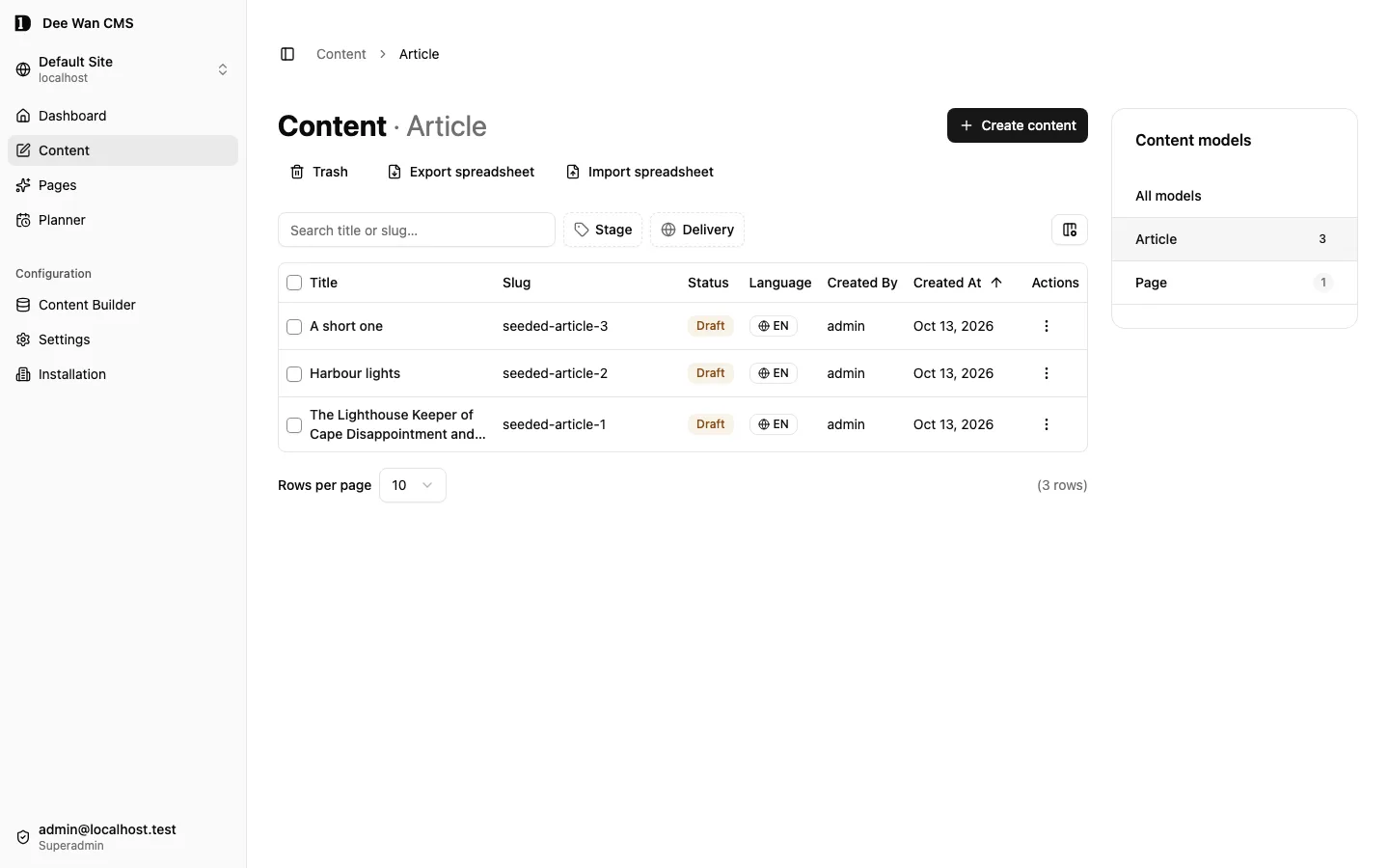
The Local Dev Site: the first admin, an Article model, three drafts and one demo page. |
npm run local:seed:corpus |
Two realistic fictional sites — Meridian Review, a magazine with an eighteen-month back catalogue, and Fern & Ash, a small studio site. They use the blog fixture definitions and contain about fifty items in published, draft, in-review, approved and scheduled states. They include relations, images with alt text, and German translations. Needs the fixture’s admin first. |
Corpus dates are anchored to when the corpus was first created, so reruns do not move existing
content. Images come from backend/scripts/fixtures/media/ when that directory has any. Otherwise
the corpus generates simple placeholder images.
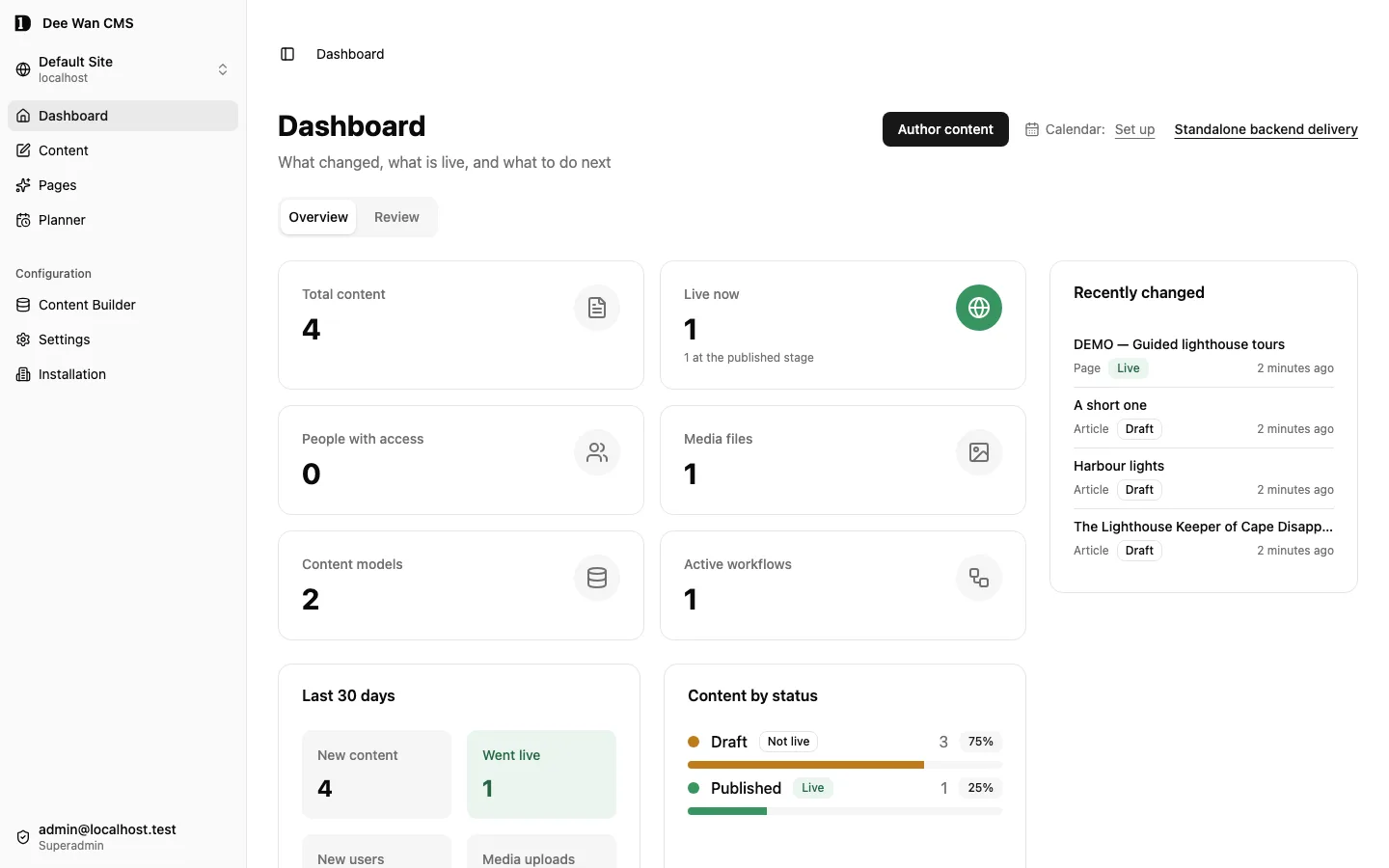
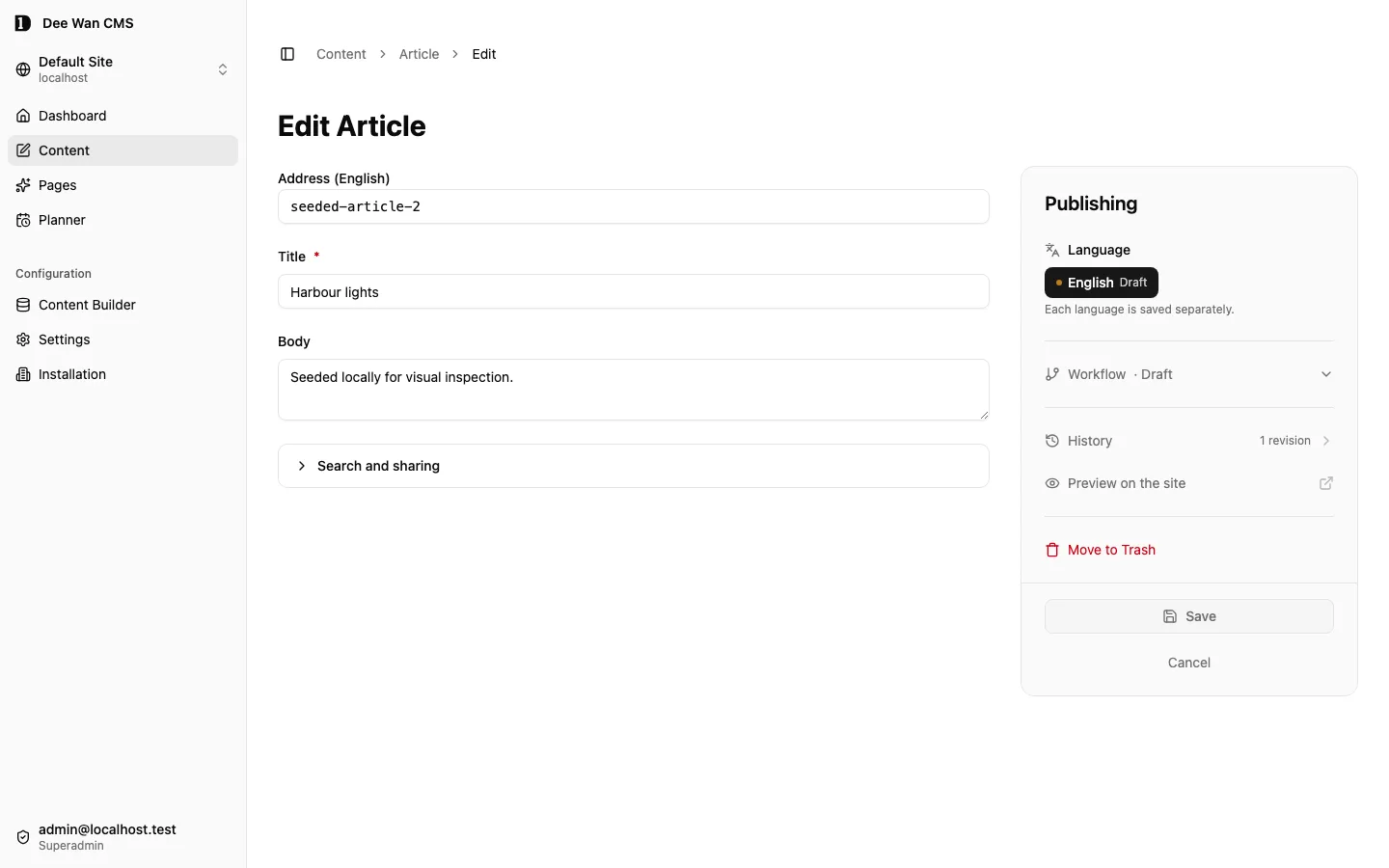
Then, in the admin UI, open Content, edit one of the seeded articles, and publish it.
To read what you published the way a website would:
npm run local:public # public read Worker on http://127.0.0.1:8788 (leave running)curl -H "Host: localhost" http://127.0.0.1:8788/v1/articleThe public Worker finds the site from the Host header and nothing else, so a request without it
answers 404 — the same rule a deployment runs under.
From here, Settings → Data transfer imports and exports content. The dashboard’s Standalone backend delivery link opens Settings → Source & delivery to connect a repository and manage deployment. Project generation is separate; deployment needs a Cloudflare account.
This rig uses backend/wrangler.dev.jsonc, which is tracked, holds no credential or account id, and
never touches Cloudflare.
Install on Cloudflare
Section titled “Install on Cloudflare”The full guide, including unattended installs, upgrading and teardown, is Installing Dee Wan. The short version follows.
Prerequisites
Section titled “Prerequisites”- A Cloudflare account with Workers, D1, Pages, and R2 or Cloudflare Images.
- Node 22 (≥22.14) or 24 (≥24.10). The repository’s
.nvmrcpins 24.18.1, sonvm usepicks it. - npm exactly as
package.json#packageManagerdeclares (11.16.0), which is the npm that the.nvmrcNode ships. Always install withnode scripts/install-dependencies.mjs, never a barenpm installornpm ci: it refuses any other npm, installs the locked tree with install scripts off, checks every dependency script againstpackage.json#allowScripts, and only then rebuilds the approved ones. - Optionally, a DeepInfra API key for the AI features.
Cloudflare Access (Zero Trust) is not required. Setup asks whether to enable it. The default is no, and sign-in then works through the installation’s own sessions.
Quickstart
Section titled “Quickstart”git clone --recurse-submodules https://github.com/dee-wan-cms/dee-wan.gitcd dee-wannode scripts/install-dependencies.mjsnode scripts/install-dependencies.mjs frontend
npm run setup # provisions everything, builds and deploys the admin UI and both Workersnpm run health # checks the deployment answerssetup creates the D1 database and media storage, applies the schema, builds and deploys the admin
UI, the admin Worker and the public read Worker, stores their secrets, and offers DNS and optional
Access. At the end it prints a claim link: open it and choose any configured password, magic-link,
Google or GitHub method to create the superadmin. Every method must prove the exact normalized
BOOTSTRAP_ADMIN_EMAIL.
The link is single-use and expires in 15 minutes. If you miss it, run npm run setup again — an
unused expired link counts as unfinished, so the run mints a new one while nobody has claimed the
installation.
Later code or configuration changes are shipped with npm run deploy (see Deploy).
A fresh clone needs no manual build step: packages/*/dist and the Prisma client are build output,
and setup, deploy and migrate:d1 build them when they are missing. npm run doctor is a
read-only check. On a fresh clone it reports those outputs as missing, so run it after setup or
after npm run build:packages && npm run prisma:generate.
Serving published content (the public read Worker)
Section titled “Serving published content (the public read Worker)”Published content is served by a separate public read Worker, configured by
backend/wrangler.public.jsonc.
npm run setup writes that file for you, once the account, the zone and the database id are
settled, and never overwrites an existing one. If one of those cannot be worked out, setup says so by
name rather than guessing. That is the case where you prepare it by hand:
cp backend/wrangler.public.example.jsonc backend/wrangler.public.jsonc# edit backend/wrangler.public.jsonc — account id, D1 id, routenpm run deploydeploy refuses to run when that file is absent, because an installation with no public Worker
cannot serve published content. An installation that only wants the admin says so with
npm run deploy -- --admin-only, which is then reported as admin-only rather than complete.
A non-default admin config (--config) needs its public config named too, for example
npm run deploy -- --config wrangler.v3.jsonc --public-config wrangler.v3.public.jsonc. Both are
read and their account_id values compared before anything is deployed.
The public cache is off until you turn it on. A default installation sets
PUBLIC_CACHE_MAX_AGE=0, and the public Worker answers Cache-Control: no-store, so every publish,
update, unpublish or delete is visible on the next read. To cache, the admin Worker must be able to
purge on publish, which needs CF_PURGE_ZONE_ID and a CF_PURGE_API_TOKEN with Zone → Cache Purge (see Secrets). Raising PUBLIC_CACHE_MAX_AGE also exposes you to the zone’s
Browser Cache TTL, which rewrites browser caching whenever the origin asks for less, and a purge
can never clear a browser. Set Browser Cache TTL to Respect Existing Headers before relying on the
cache.
Credentials
Section titled “Credentials”setup needs a Cloudflare API token. It prompts for one if none is set, and prints the exact
permission list with a reason for each. Installing Dee Wan
marks which permissions depend on your choices, such as your own domain or Access. npm run doctor prints the same list.
export CLOUDFLARE_API_TOKEN=… # optional — skips the promptexport CLOUDFLARE_ACCOUNT_ID=… # optional — skips the account pickersetup itself needs no other environment variable. Application secrets are set with
wrangler secret put (below), never in a file. Optional variables used by other commands:
| Variable | Used by |
|---|---|
DEEWAN_RESOURCE_PREFIX |
setup — namespaces every resource name. See shared account. |
DEEWAN_YES=1 or CI=true |
setup, install:cms — never prompt. Take defaults or fail. |
D1_PLAN (free or paid) |
Unattended installs — answers the D1 plan question. |
DEEWAN_CF_OAUTH_CLIENT_ID, DEEWAN_CF_OAUTH_REDIRECT |
install:web — Cloudflare sign-in. Without a client id the web installer cannot connect to Cloudflare. |
DEEWAN_INSTALL_PORT |
install:web, install:web:dry-run — port on 127.0.0.1. |
CF_ACCESS_CLIENT_ID, CF_ACCESS_CLIENT_SECRET |
health — a Cloudflare Access service token, to check the Access perimeter when Access is on. |
DEE_WAN_ADMIN_COOKIE |
provision:site, acceptance — an admin session cookie for the checks that need one. |
DEEWAN_GITHUB_CLIENT_ID |
wire:github, backend:deliver — the GitHub OAuth client used for device sign-in. |
VERIFY_ADMIN_URL, VERIFY_PUBLIC_URL, VERIFY_EMAIL, VERIFY_PASSWORD |
verify (the password is read only from the environment). |
DEEWAN_ACCEPTANCE_ADMIN_EMAIL, DEEWAN_ACCEPTANCE_SITE_ID, DEEWAN_PUBLIC_HOST, DEEWAN_PUBLIC_STRANGER_HOST |
acceptance. |
DEEWAN_SMOKE_PAGES, DEEWAN_SMOKE_HOST |
The deployment smoke test. |
PUBLIC_BACKEND_URL |
local:admin — the admin API the local UI talks to (default http://localhost:8787). |
Secrets
Section titled “Secrets”Secrets are never stored in wrangler.jsonc or in the database. Set them from the backend/
directory:
npx wrangler secret put DEEPINFRA_API_KEY # AI text and image generationPlain settings (not secrets) go under vars in backend/wrangler.jsonc and take effect on the next
npm run deploy. Everything below is optional. A feature whose settings are missing is off.
| Name | Kind | What it turns on |
|---|---|---|
DEEPINFRA_API_KEY |
secret | Default DeepInfra connection for chat, images and structured generation. |
AI_RATE_LIMIT_PER_HOUR |
var | AI calls allowed per site per hour. Default 250. |
CF_IMAGES_API_TOKEN |
secret | Uploads when STORAGE_PROVIDER is cf-images. |
R2_PUBLIC_DOMAIN |
var | The public address R2 media is served from. setup writes it. R2 media needs it. |
CF_PURGE_ZONE_ID |
var | Edge cache purge on publish, with CF_PURGE_API_TOKEN. This applies only if you raise PUBLIC_CACHE_MAX_AGE. |
CF_PURGE_API_TOKEN |
secret | A token with Zone → Cache Purge for that zone. |
RESEND_API_KEY |
secret | Magic-link sign-in, invitation email and invitation codes, and email delivery of administrator-minted password links through Resend. Needs MAIL_FROM. Without both, magic link is unavailable, and invitation and password links are shown to the administrator to pass on. |
MAIL_FROM |
var | The From address, e.g. Dee Wan <[email protected]>. Must be a verified sender at Resend, or at your own mail transport. |
MAIL_TRANSPORT_URL |
var | An https:// address of your own mail service. When set, it replaces Resend for every message. Needs MAIL_TRANSPORT_TOKEN and MAIL_FROM; without both, mail reports not configured and links are shown to pass on. An address that is not public https is refused. See Mail transport. |
MAIL_TRANSPORT_TOKEN |
secret | The bearer token Dee Wan sends to MAIL_TRANSPORT_URL. |
AUTH_INITIAL_METHODS |
var | Comma-separated methods offered before the first administrator exists: password, magic_link, google, github. Defaults to password. Missing required bindings still make a method unavailable. |
GOOGLE_CLIENT_ID |
var | Google OAuth client for CMS sign-in. Callback: BACKEND_URL/api/auth/callback/google. |
GOOGLE_CLIENT_SECRET |
secret | Secret for the Google OAuth sign-in client. |
GITHUB_CLIENT_ID |
var | GitHub OAuth app client for CMS sign-in. Callback: BACKEND_URL/api/auth/callback/github. Separate from source delivery and CLI device flow. |
GITHUB_CLIENT_SECRET |
secret | Secret for the GitHub OAuth sign-in app. |
GITHUB_APP_ID, GITHUB_APP_SLUG, GITHUB_APP_CLIENT_ID |
var | A GitHub App for Settings → Source & delivery (connecting a repository and managing deployment). Without all five GITHUB_APP_* values, that screen reports github_app_not_configured. |
GITHUB_APP_CLIENT_SECRET, GITHUB_APP_PRIVATE_KEY |
secret | The rest of that GitHub App. |
PLUGIN_CATALOGUE_URLS |
var | Settings → Plugins → Discover. Comma-separated https:// plugin catalogue URLs, at most 4 read. None by default. A listing grants nothing: installing still reviews and validates the manifest. See docs/plugins/security.md. |
OPERATOR_SENTRY_DSN |
secret | Sends cleaned error reports to your own Sentry project. |
DEEWAN_ERROR_REPORTING |
var | off stops reports to Dee Wan’s Sentry project. |
TEMPLATE_ARTIFACTS |
binding | Site templates: a private R2 bucket, bound under r2_buckets, that holds each template candidate’s source, compiled output and gate report. Accepting a template needs only this. See docs/MANAGED-TEMPLATES.md. |
TEMPLATE_BUILD_SERVICE_URL |
var | Uploading a site template, and generating one with DEEPINFRA_API_KEY. The origin of a host running npm run template-build-service: a bare https:// origin, or http:// on localhost, 127.0.0.1 or [::1]. Also needs TEMPLATE_BUILD_SERVICE_KEY, TEMPLATE_SANDBOX_IMAGE and TEMPLATE_ARTIFACTS. |
TEMPLATE_BUILD_SERVICE_KEY |
secret | Signs every build request. The build host holds the same value. A key shorter than 32 characters counts as unset. |
TEMPLATE_PREVIEW_SERVICE_URL |
var | Previewing a site template candidate. The origin of the preview host, with the same rules. One host may serve both. Also needs TEMPLATE_PREVIEW_SERVICE_KEY, TEMPLATE_SANDBOX_IMAGE and TEMPLATE_ARTIFACTS. |
TEMPLATE_PREVIEW_SERVICE_KEY |
secret | Signs every preview request. The preview host holds the same value. A key shorter than 32 characters counts as unset. |
TEMPLATE_SANDBOX_IMAGE |
var | The container image the build and preview hosts run generated code in, pinned by digest (<repository>@sha256:<64 hex>). A tag counts as unset. Upload, generation and preview need it. |
MANAGED_RENDER_HMAC_KEY |
secret | Signs the page editor’s exact site-design render. A key shorter than 32 characters counts as unset. That render also needs an active managed renderer release; without one the site sees the Structure preview. Preparing, activating and rolling back a release need it too: the admin sends the deployment service only each site’s key derived from it. Never give this value to a site renderer or the deployment service. |
MANAGED_RENDER_DEPLOY_SERVICE_URL |
var | Preparing, activating and rolling back a managed renderer release. The origin of a host running npm run managed-deploy-service: a bare https:// origin, or http:// on localhost, 127.0.0.1 or [::1]. Also needs MANAGED_RENDER_DEPLOY_SERVICE_KEY, MANAGED_RENDER_INSTALLATION_ID, MANAGED_RENDER_HMAC_KEY, TEMPLATE_ARTIFACTS and an active site binding for the site. |
MANAGED_RENDER_DEPLOY_SERVICE_KEY |
secret | Signs every deployment request and checks every receipt. The deployment host holds the same value. At least 32 characters. |
MANAGED_RENDER_INSTALLATION_ID |
var | Stable, non-secret id of this installation: lower-case letters, digits and hyphens, 3 to 63 characters. Each site’s renderer Worker name is derived from it and the site id. Never change it after a first release. |
Generating, uploading, previewing or accepting a site template without its settings answers
503 template_operation_unavailable with the operation and the names of what is missing, never a
value. The build and preview settings deploy nothing, and accepting a template changes nothing that
is live. Releases are delivered by the separate deployment service, which holds the Cloudflare API
token; the admin Worker never does. Without the delivery settings, Settings lists what is missing.
See docs/MANAGED-TEMPLATES.md.
The admin API talks to AI providers only through /api/ai/* on the Worker, which holds the key and
enforces the hourly quota.
Error reports. Unhandled errors can be reported with the error type, a cleaned message, stack
frames and the route — never content, form values, emails or credentials. With
OPERATOR_SENTRY_DSN set, they go to your Sentry project. This build contains no Dee Wan Sentry
address, so nothing is sent to Dee Wan unless DEEWAN_SENTRY_DSN is set. Installation → Error
reports (superadmins only) then shows “No Dee Wan destination in this build. Nothing is
sent.” The switch on that screen and DEEWAN_ERROR_REPORTING=off only affect reports to Dee Wan,
not to your own DSN. Secrets belong to one Worker: set DEEWAN_SENTRY_DSN or OPERATOR_SENTRY_DSN
on the public read Worker too (npx wrangler secret put <NAME> --config wrangler.public.jsonc) for
its errors to be reported.
Deploy
Section titled “Deploy”npm run deploy # admin UI (Pages), admin Worker, and the public read Workernpm run health # post-deploy checks; with Access on, also checks the perimeterdeploy builds the admin UI with PUBLIC_BACKEND_URL set, in the build’s environment, to the
FRONTEND_URL from backend/wrangler.jsonc. It needs no frontend/.env. It refuses to ship the
admin Worker while the database has pending migrations, or when it cannot tell — apply them with
npm run migrate:d1 first, or pass --skip-migration-check when you know the new code does not
need them.
Upgrading to a newer release (pull, reinstall, migrate, deploy) is described step by step in Installing Dee Wan.
Migrations
Section titled “Migrations”A fresh install needs none of this — setup applies the schema. Afterwards:
| Command | Applies to |
|---|---|
npm run migrate:d1 |
The deployed control database. |
npm run tenant:upgrade |
Per-site databases created by provision:site. |
npm run local:migrate |
The local rig’s database (backend/wrangler.dev.jsonc). Works on any clone. |
npm run migrate:d1:local |
The local mirror of an installed configuration. Reads backend/wrangler.jsonc, so it fails on a clone that was never installed. |
Migrations are Prisma migrations under backend/prisma/migrations/, mirrored into
backend/migrations-wrangler/ for D1 by npm run migrate:sync (npm run migrate:check verifies
the mirror). schema.prisma is assembled from fragment files. Edit the fragments. Applying never
writes a migration. Authoring one is a separate, explicit step. See
Database migrations for the full workflow.
Inference provider
Section titled “Inference provider”DeepInfra remains the default. To use another OpenAI-compatible provider, set these deployment
variables and store its key with wrangler secret put AI_API_KEY from backend/:
| Variable | Value |
|---|---|
AI_PROVIDER |
openai-compatible |
AI_BASE_URL |
Provider API base, such as https://inference.example/v1; no credentials, query or fragment |
AI_TEXT_MODEL |
Default chat model, also used by translation and structured generation |
AI_VISION_MODEL |
Optional model accepting image input for media descriptions |
AI_IMAGE_MODEL |
Optional image-generation model; without it image generation is unavailable |
AI_TEXT_MODELS, AI_VISION_MODELS, AI_IMAGE_MODELS |
Optional comma-separated additional model IDs for each picker; at most 100 per capability, including its default |
The compatible-provider picker uses this reviewed configuration instead of inferring model
capabilities from arbitrary provider listings. Prices are unknown and are not invented. Use exact
IDs your provider serves. Compatible image generation requests inline b64_json; providers that
only return hosted image URLs are not supported by this connection. HTTPS is required except on
localhost during local development. No client request can change the provider endpoint or key.
Settings → Generation chooses among the configured models. Provider keys remain Worker secrets; they never enter site settings, browser requests or generated output. The existing per-site quota, review-before-apply flow and error handling apply to both connections. Switching providers does not rewrite saved model choices: update those choices to IDs served by the new connection.
Bringing content in, and taking it out
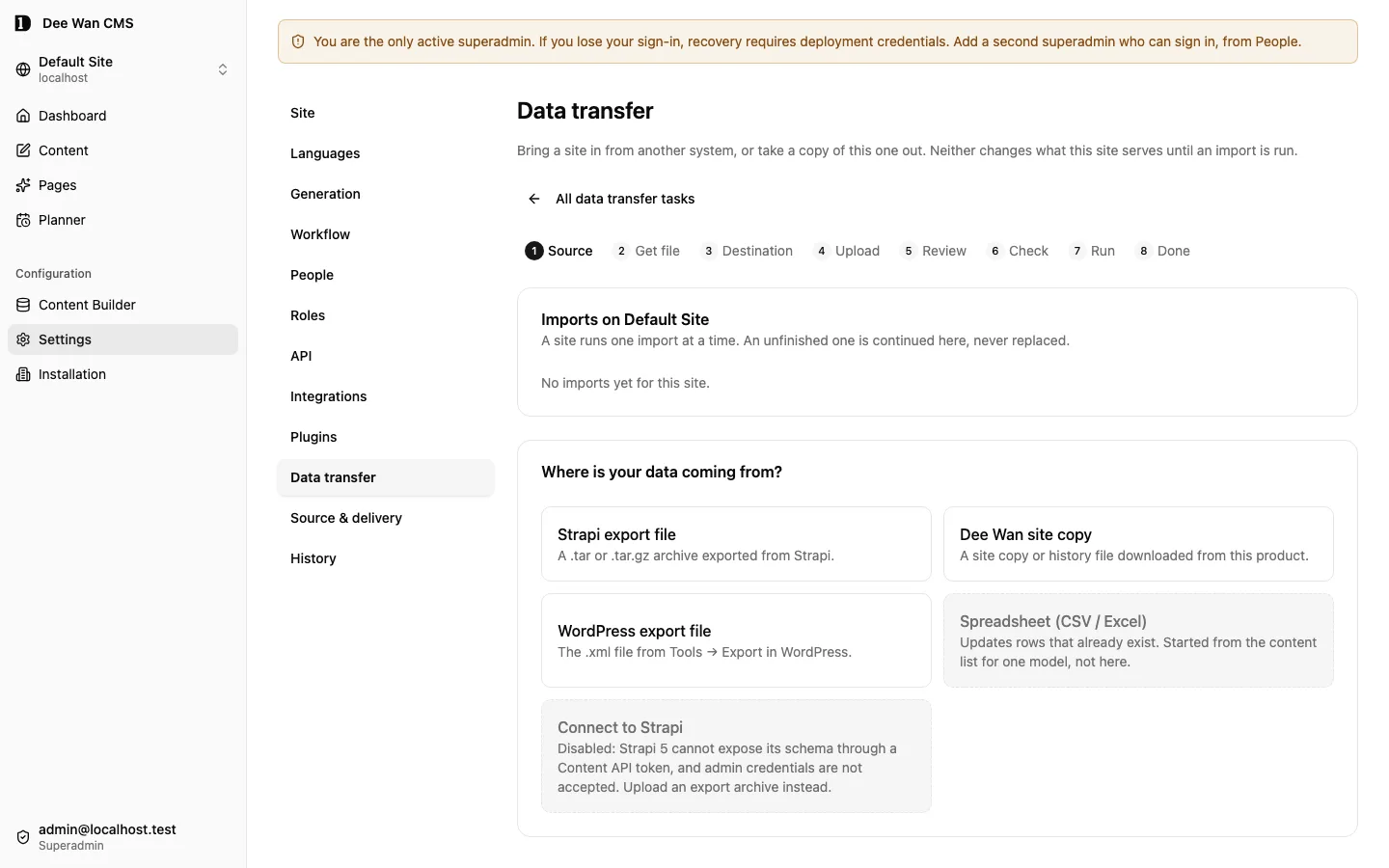
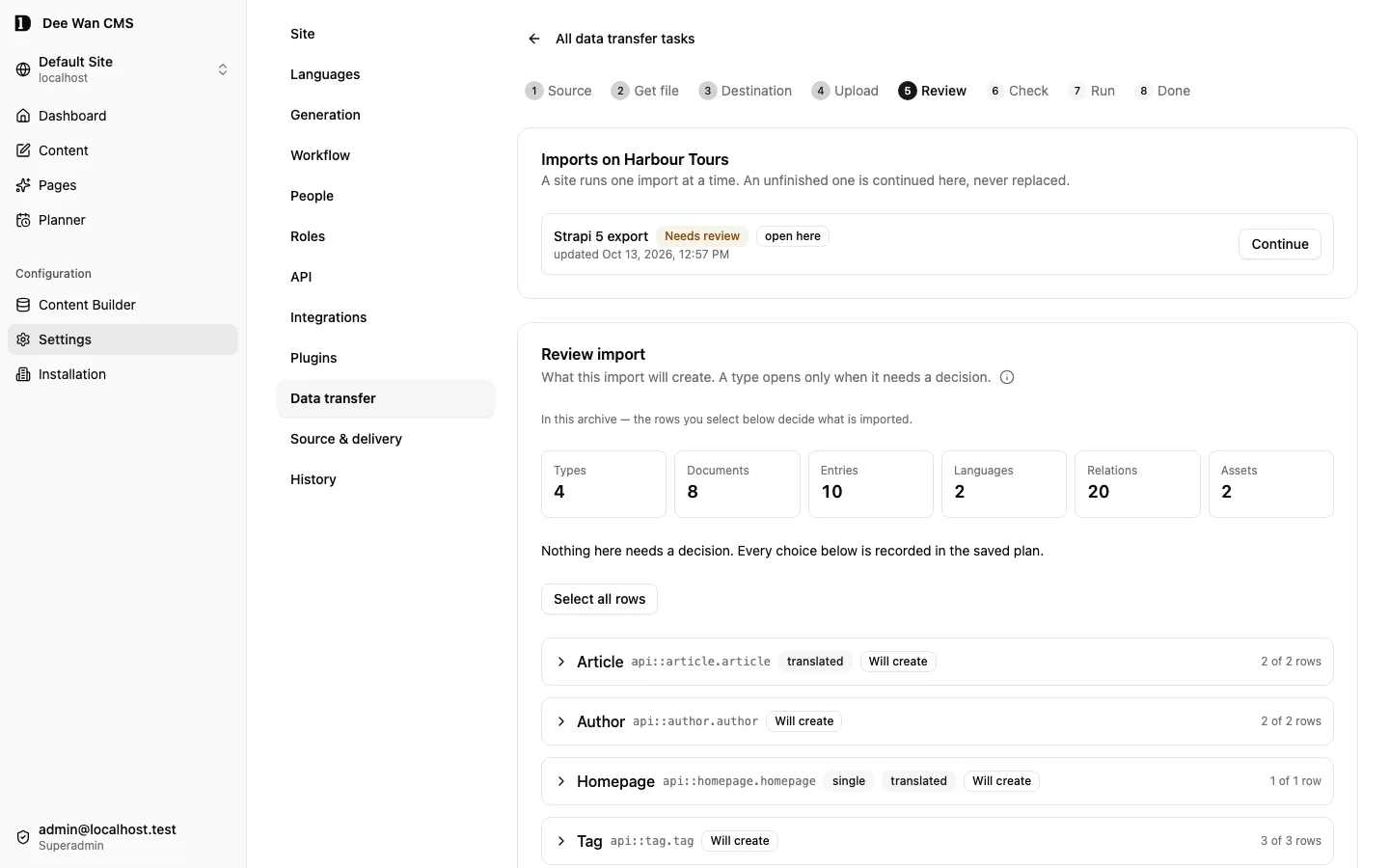
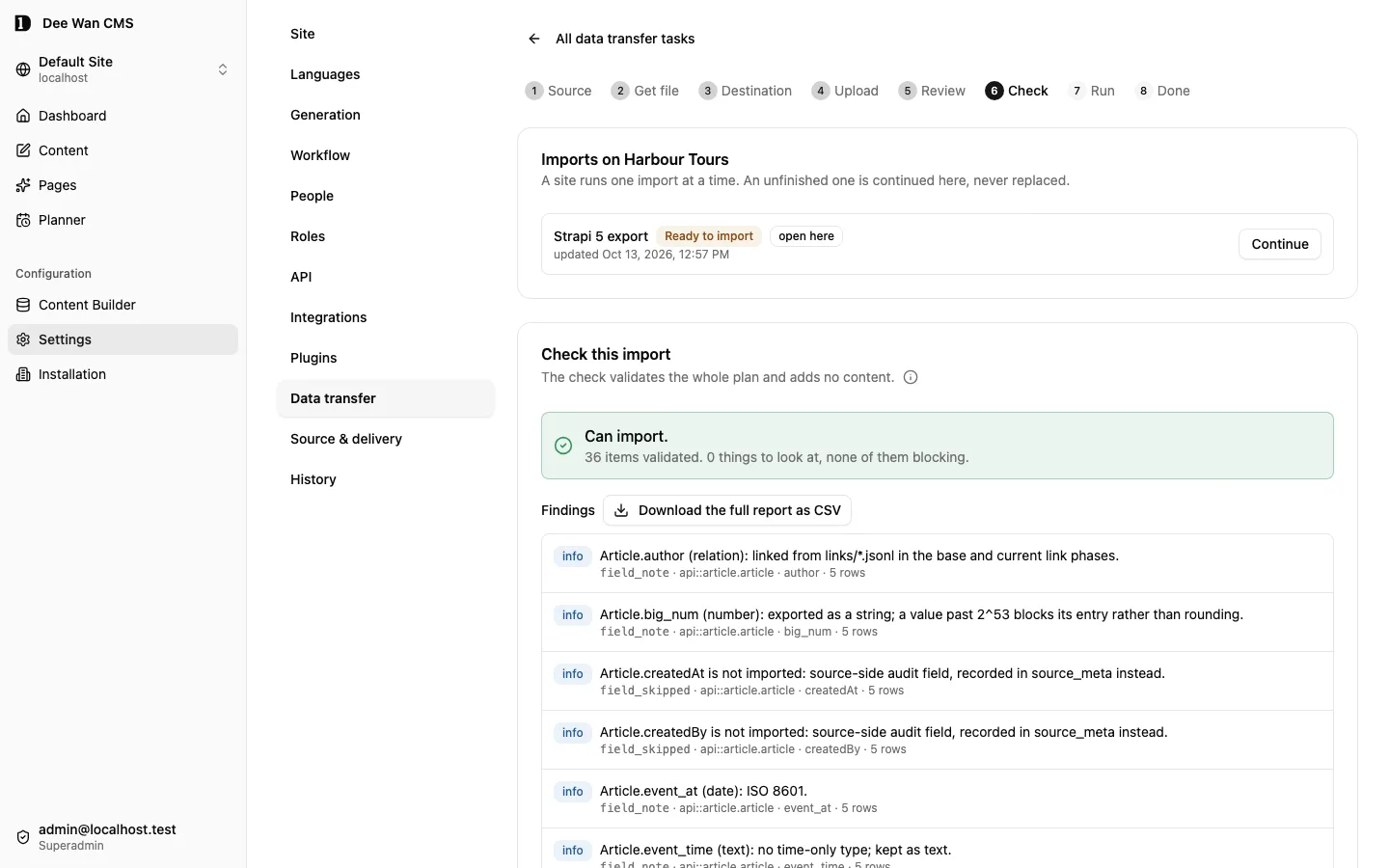
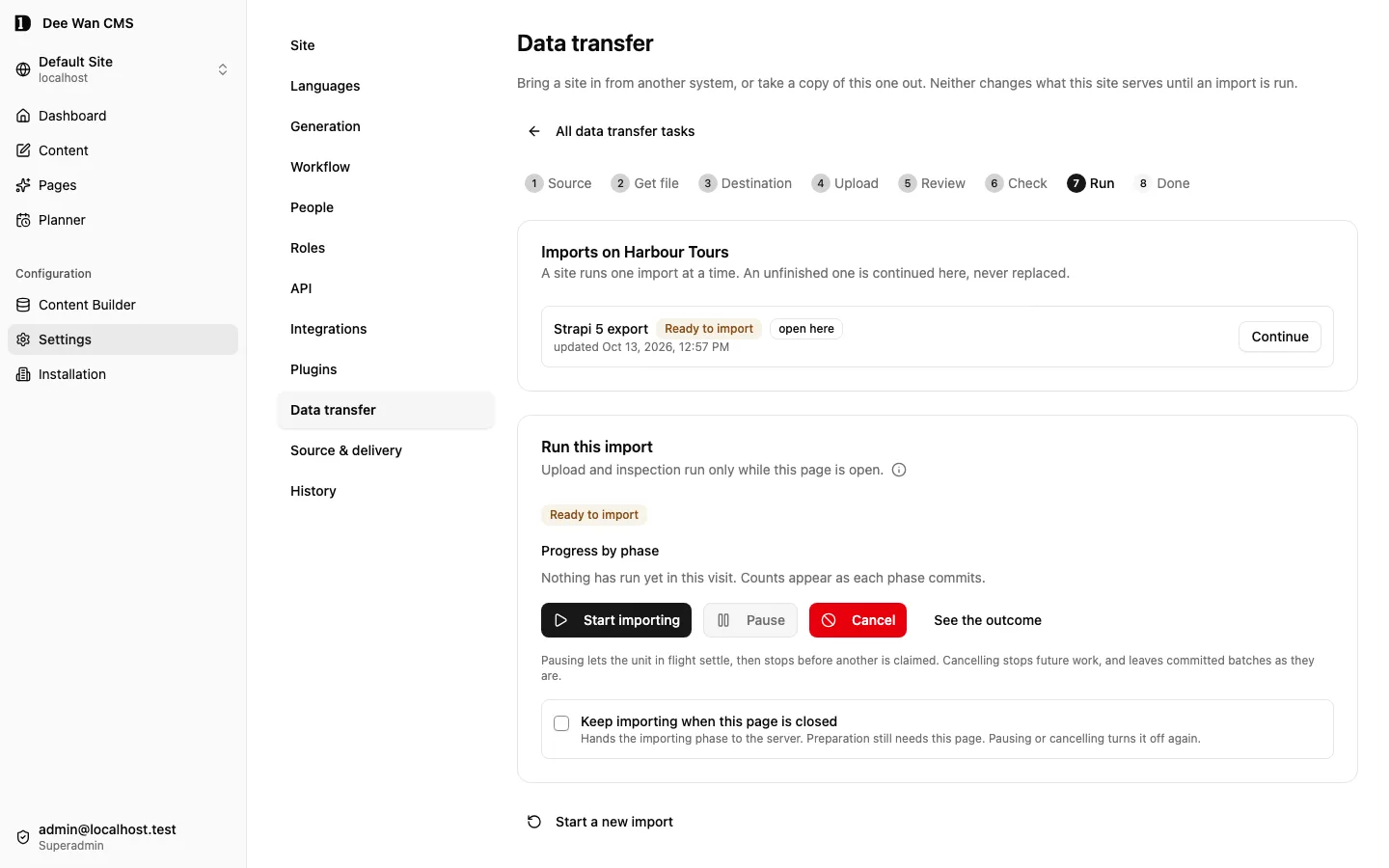
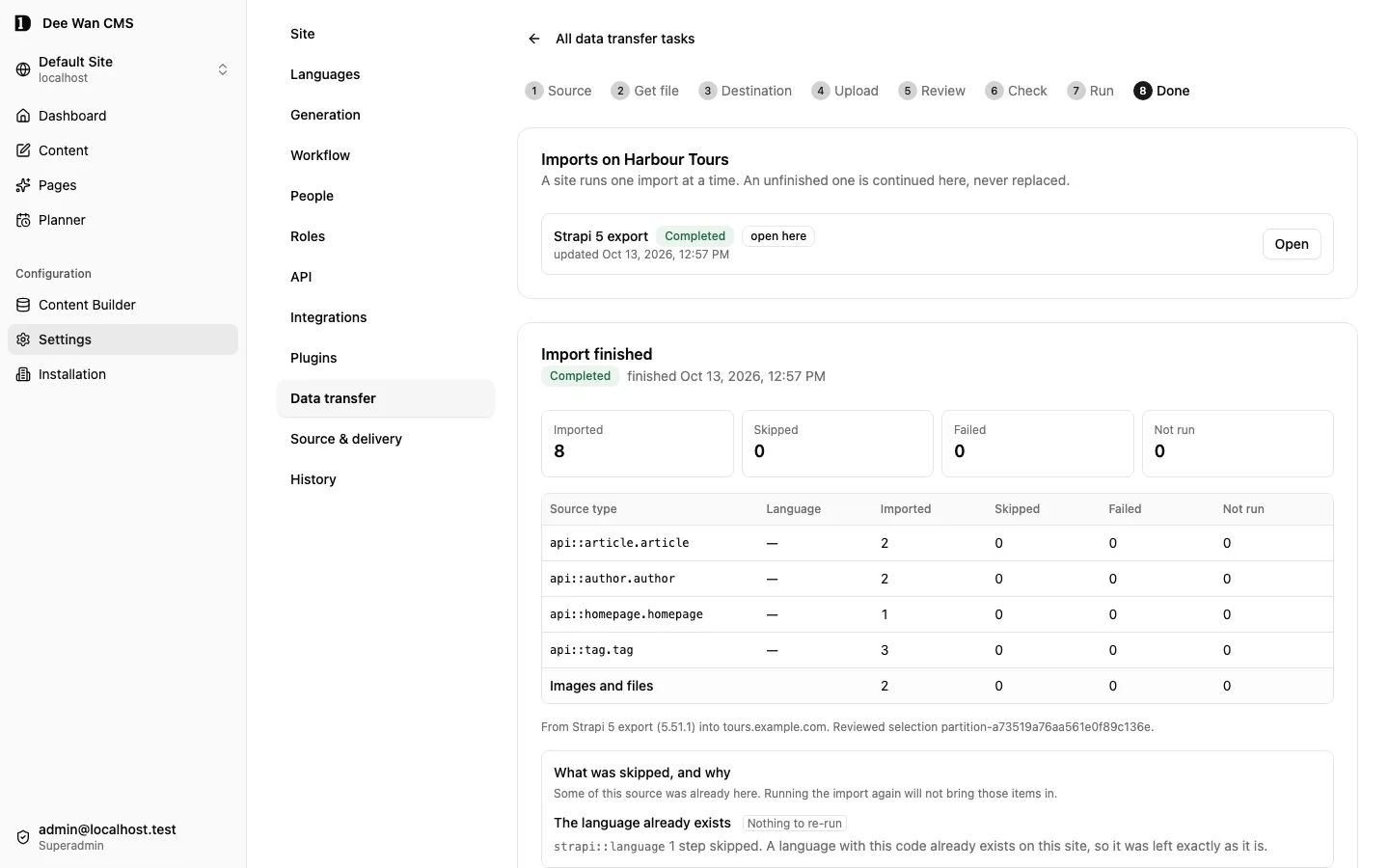
Section titled “Bringing content in, and taking it out”Both are in the admin under Settings → Data transfer — no terminal, no JSON editing.
- In: a Strapi export archive (
.tar/.tar.gz, tested with Strapi 4.25.9 and 5.51.1), or a Dee Wan site copy (.json) exported from another installation. The wizard inspects the archive, shows what it found, maps types and languages, checks the plan, then runs it. Nothing is overwritten: an import creates content or skips it, and the whole job can be undone. - Out: Download site copy writes one file with the site’s models, fields, languages, workflows, settings, current content, the published version wherever it differs, and the exact bytes of every image. If any image cannot be read exactly from R2 or Cloudflare Images, the download is refused by name instead of writing a partial copy.
- Spreadsheets update rows that already exist, starting from the content list of one model.
Archive import needs a private IMPORT_BUCKET. npm run setup offers to create it, and
npm run doctor reports whether it is enabled. Everything else works without it. Import is
implemented but not yet complete for 1.0. See the 1.0 product boundary.
Signing in, and getting back in
Section titled “Signing in, and getting back in”Public registration is closed; accounts are created through authorized provisioning. With mail configured, existing users can request a password-reset link from the sign-in screen. Passwords are set by their owner through a single-use link, never chosen by whoever sent it.
Every link below is single-use, expires in 15 minutes, and is shown exactly once. Only its hash is stored, so nothing can print it again. Minting another invalidates the first. Passwords must be at least 12 characters.
Claiming a new installation
Section titled “Claiming a new installation”The installer prints a claim link at the end of a fresh install. Open it and choose any configured
password, magic-link, Google or GitHub method. Every method must prove the exact normalized address
from BOOTSTRAP_ADMIN_EMAIL. The claim page cannot replace it. After signing in, the owner can change the account email
through Account security by verifying the new address.
If the link expires unused, run the installer again (npm run setup, or
npm run install:cms -- resume). It mints a new one as long as nobody has claimed the installation.
For an unclaimed installation, replace a lost or expired link explicitly:
Without --bootstrap, npm run claim:link gives an existing sole active superadmin account back to
its owner and refuses when there is none. See
Create and replace the first administrator.
Someone forgot their password
Section titled “Someone forgot their password”A superadmin generates a link from the People list. With mail configured (RESEND_API_KEY and
MAIL_FROM) it is also emailed. Either way it is shown once to the superadmin to deliver however
they like.
The last superadmin is locked out
Section titled “The last superadmin is locked out”This is the one case nobody else can fix, so it needs deployment credentials:
It refuses unless that address is the only active superadmin. If there are two, the other one should mint a link from the People list instead.
Your own account
Section titled “Your own account”Every signed-in user can open Account security from the identity menu to change the admin language, unlink their own Google or GitHub connection and manage their passkeys. See Account security.
Development
Section titled “Development”cd backend && npm test # backend unit tests (Vitest, local SQLite)cd frontend && npm test -- --run # admin UI unit tests (Vitest, single run)cd frontend && npm run check # admin UI type checknpm run lint # lint the backend and scriptsnpm run typecheck:scripts # type check scripts/npm run submodules:check # fail if a submodule pin or worktree has driftedTo run the local admin Worker from an installed backend/wrangler.jsonc instead of the tracked dev
config, use npm run dev:install --workspace backend.
Commands
Section titled “Commands”Installing and operating:
| Command | What it does |
|---|---|
npm run doctor |
Read-only preflight: names what is missing and how to fix it. |
npm run plan |
Read-only: every install step and its state, from files on disk. -- --json for machines. |
npm run setup |
Interactive install: provisions, applies the schema, builds and deploys everything, prints a claim link. |
npm run install:cms -- <verb> |
The installer by verb: plan, apply, resume, doctor, verify, teardown, manifest. |
npm run install:web |
The web installer on 127.0.0.1. Not a supported install path: it needs your own Cloudflare OAuth application (DEEWAN_CF_OAUTH_CLIENT_ID). See Web installer preview. |
npm run install:web:dry-run |
The web installer with every external effect faked, for review. Changes no external resources. |
npm run deploy |
Builds and deploys the admin UI and both Workers. --config, --public-config, --admin-only, --skip-migration-check. |
npm run health |
Post-deploy checks against the deployed addresses. |
npm run probe |
Anonymous, read-only reachability check. |
npm run verify -- --read-only --public <url> |
Post-deploy check that writes nothing. --model <slug> reads one model. |
npm run verify -- --admin <url> --public <url> --email <addr> --disposable |
Full check on a disposable deployment: creates a site, a model and content. Needs VERIFY_PASSWORD. |
npm run migrate:d1 |
Applies pending migrations to the deployed control database. |
npm run migrate:d1:local |
The same, to the local mirror of an installed configuration. |
npm run provision:site -- --site <id> |
Gives one site its own D1 database and redeploys both Workers. --plan to preview, --repair to re-check. Billable. |
npm run tenant:upgrade |
Applies pending per-site schema changes to every active per-site database. --plan, --site <id>. |
npm run claim:link |
Mints a single-use password link for the sole active superadmin. Add --bootstrap to replace the first-admin claim on an unclaimed installation. |
npm run revoke:sessions |
Break-glass: signs everybody out. |
npm run teardown |
Deletes what setup recorded as created by an installation, default backend/wrangler.jsonc and its public and intake configs. Dry run unless --apply. Keeps adopted, changed and unreadable resources. See Starting over or tearing down. |
npm run backend:generate -- --site <id> --source <cms.sqlite> --dest <dir> --db <scratch.sqlite> |
Generates a standalone backend locally from a SQLite copy of the CMS database. Deploys nothing. A site with an active managed renderer release also needs --template-artifacts <dir>, a local copy of that release’s template artifacts; it is exported to managed-renderer/. |
npm run backend:generate:all |
The same for every site. Deploys nothing. It cannot pass --template-artifacts, so a site with an active managed renderer release refuses there. Run npm run backend:generate for that site alone, with --template-artifacts <dir>. |
npm run template-build-service |
Runs the managed-template build and preview service on a build host. Every build and preview runs in a fresh container of the digest-pinned sandbox image. It refuses to start unless it has a build or preview key of at least 32 characters, a TEMPLATE_SERVICE_AUDIENCE origin and a valid value for every TEMPLATE_SANDBOX_* setting, and it refuses to run as root. It serves plain HTTP on TEMPLATE_SERVICE_HOST:TEMPLATE_SERVICE_PORT (default 127.0.0.1:8790) and runs one operation at a time. The admin calls only https:// origins (or http:// on loopback), so a remote host needs TLS in front of it. Holds no deployment credential. Deploys nothing. See docs/MANAGED-TEMPLATES.md. |
npm run template-sandbox:context -- --out <dir> --node-image <node@sha256:…> |
Writes the build context of the template sandbox image. --out must be a new or empty directory, and --node-image must name its image by digest. It reads the npm, Wrangler, playwright-core and axe-core versions from this checkout, so install dependencies first. Builds, pulls and pushes nothing. |
npm run managed-deploy-service |
Runs the managed renderer deployment service on a trusted host. It holds the Cloudflare API token that uploads, deploys and routes each site’s renderer Worker; the admin Worker never holds one. It also reads each renderer’s identity for the admin to check. It refuses to start when a required setting is missing or invalid. See docs/MANAGED-TEMPLATES.md. |
npm run wire:github -- --repo <owner/name> |
Pushes a generated project to GitHub and seals the secrets its build workflow reads. |
npm run backend:deliver -- --site <id> --repo <owner/name> --source <cms.db> --dest <dir> --db <target.db> |
Hands a site over as your own repository and deploys it there. --media also moves published media into your R2. Accepts --template-artifacts <dir> like backend:generate. It does not deploy the managed renderer. |
curl -H "X-Site-Id: <id>" -b "<session>" <admin>/api/models/public-client.ts |
Downloads a typed, dependency-free TypeScript client for a site’s public read API. |
Local rig:
| Command | What it does |
|---|---|
npm run local:migrate |
Applies the schema to the local database. No credential. |
npm run local:api |
Admin Worker on http://localhost:8787. |
npm run local:public |
Public read Worker on http://127.0.0.1:8788. |
npm run local:seed |
Fixture site plus the realistic corpus. Idempotent. |
npm run local:seed:fixture |
The fixture site only. |
npm run local:seed:corpus |
The corpus only. |
npm run local:admin |
Admin UI on http://localhost:5173 against the local Worker. |
Contributors:
| Command | What it does |
|---|---|
npm run test:boot |
Starts both Workers under the pinned runtime and fails if either refuses to boot. |
npm run test:e2e |
Browser end-to-end suite (Cypress) against a dev server it starts. E2E_REAL_BACKEND=1 adds real Workers. The full-screen editor spec then also gets the emitted Astro renderer on E2E_EDITOR_PORT (default 43189). Its first build needs the npm registry. The Scheduling release spec also gets the Scheduling plugin on E2E_PLUGIN_PORT (default 43190). |
npm run migrate:sync |
Regenerates backend/migrations-wrangler/ from the Prisma migrations. |
npm run migrate:check |
Fails if that mirror is out of date. |
npm run prisma:generate |
Rebuilds schema.prisma from its fragments and regenerates the Prisma client. |
npm run prisma:drift |
Fails if schema.prisma no longer describes what the migrations build. |
npm run tenant:schema |
Regenerates the schema new per-site databases start from. |
npm run tenant:schema:check |
Fails if that schema is out of date. |
npm run docs:api |
Regenerates docs/PUBLIC-API.md. |
npm run docs:plugins |
Regenerates the plugin protocol document and JSON Schemas. |
npm run contract:embed |
Regenerates the embedded page contract after editing backend/src/lib/page-contract/. |
npm run submodules:sync |
Initialises or updates the packages/ submodules. |
npm run submodules:check |
Fails when a submodule pin or worktree has drifted. |
npm run lint |
Lints the backend and scripts. |
npm run typecheck:scripts |
Type checks scripts/. |
npm run test:scripts-offline |
Runs the offline checks of the emitted deployment and auth code under Node’s type stripping. |
npm run guard-editor:check |
Type checks the guard editor package and its contract with the CMS. |
npm run guard-editor:test |
Runs the guard editor package’s tests and its contract check. |
npm run test:guard-editor-contract |
Builds the guard editor core and runs only its contract check. CI runs this. |
npm run acceptance -- plan |
Prints the release acceptance journey. Runs nothing. |
npm run acceptance -- run --account <id> --confirm-disposable |
Runs that journey against a disposable Cloudflare account and records a ledger. Creates billable resources and leaves them. |
npm run acceptance -- report --account <id> |
Prints that ledger. |
npm run public:query-probe -- --confirm-disposable … |
Exercises public API filters against a disposable deployment, then restores what it changed. Never point it at production. |
Contributing
Section titled “Contributing”Pull requests are welcome. Two conventions:
packages/are submodules — commit and push there first, then bump the pointer.- Site-scoped routes must go through the site-scoped data layer, which adds the site to every query. Bypassing it is how one site’s data leaks into another’s.
Running the installer against a shared account
Section titled “Running the installer against a shared account”The default resource names (dee-wan-cms-backend, dee-wan-cms-db and so on) are fixed, so two
installations in one Cloudflare account collide by name.
Set DEEWAN_RESOURCE_PREFIX to namespace everything a run provisions:
DEEWAN_RESOURCE_PREFIX=test-a1b2 npm run setup # creates test-a1b2-dee-wan-cms-db, …The prefix must contain only lowercase letters, digits and dashes and be at most 24 characters long. Teardown does not decide by name: it deletes only what the install record says this installation created. See Starting over or tearing down.
Set it for a fresh install, not an existing one. Wrangler finds the D1 database by the name in
backend/wrangler.jsonc, so the prefix works only once setup has written the prefixed names into
that file. Turning it on against an install whose config holds unprefixed names makes every command
fail with Couldn't find a D1 DB with the name or binding '<prefix>-…'. To move an existing
install under a prefix, re-run setup.
Deployment smoke test
Section titled “Deployment smoke test”A short check against a live deployment, for after every deploy:
DEEWAN_SMOKE_PAGES=https://admin.example.com \DEEWAN_SMOKE_HOST=https://cms.example.com \npm run smoke --workspace=dee-wan-cms-backendReplace both addresses with your own admin UI and admin API origins. It needs no session and checks two things:
- the admin UI serves the app for deep links, not just
/— a broken_routes.jsonbreaks those first, and nobody notices while navigating from the home page. - with Access on,
/api/*on the public hostname is behind Access. With Access off (the default) the API is protected by sign-in instead, and this check does not apply.
With no addresses supplied it skips rather than fails.
License
Section titled “License”MIT. Copyright (c) 2026. The complete text is in LICENSE.
Built in Thailand 🇹🇭 for the global edge
Unreleased / pre-MVP; no stable version
Source revision: fe23db481c422b40e317b92fc98116b4c0c26a87 (modified checkout)
Build date (UTC): 2026-10-18T09:22:34.630Z
Upgrade target: unavailable: modified checkout. Release notes