

Scheduling, end to end
Both services on one machine, no Cloudflare account, no production credentials: install the plugin into a local Dee Wan, schedule a real publish, make the runner execute it, and then make it fail in each of the ways it is supposed to fail.
The plugin README is the reference for routes, configuration, schedule semantics and the retry table.
This guide gives the sequence. Core-side documentation lives in
docs/plugins/ of the Dee Wan repository —
protocol v1, security,
testing.
Nothing below needs a real domain, a real token or a deployed Worker. Do not point any of it at a production site.
1. Set up both services
Section titled “1. Set up both services”Follow A local two-service setup in Testing a plugin, using this plugin. When you are done:
- Dee Wan’s admin Worker runs on
http://localhost:8787and its admin UI onhttp://localhost:5173, withPLUGIN_DEV_ORIGINS=http://localhost:8788inbackend/.dev.vars, andlocal:seedhas printed a sign-in. - this plugin runs under
npx wrangler dev --port 8788 --test-scheduledfromplugins/scheduling, with its local D1 migrated andADMIN_SECRET=local-admin-secret-0123456789in.dev.vars. - you hold a fresh activation code from
POST /admin/activation-codes. It is one-time and expires after 15 minutes, so mint another if it has lapsed.
The commands below run from plugins/scheduling.
2. Install, in the admin UI
Section titled “2. Install, in the admin UI”Sign in at http://localhost:5173 with the account local:seed printed, then
Settings → Plugins → Install:
- manifest URL
http://localhost:8788/dee-wan/manifest.json. - the activation code from step 1.
- capabilities: tick all five for this walkthrough. Every box starts unticked.
- models: tick
Article(or whatever the seeded site has).
Use the UI rather than curl: the administrative routes require a real session, the site header and the
site:plugins permission, and the UI has all three.
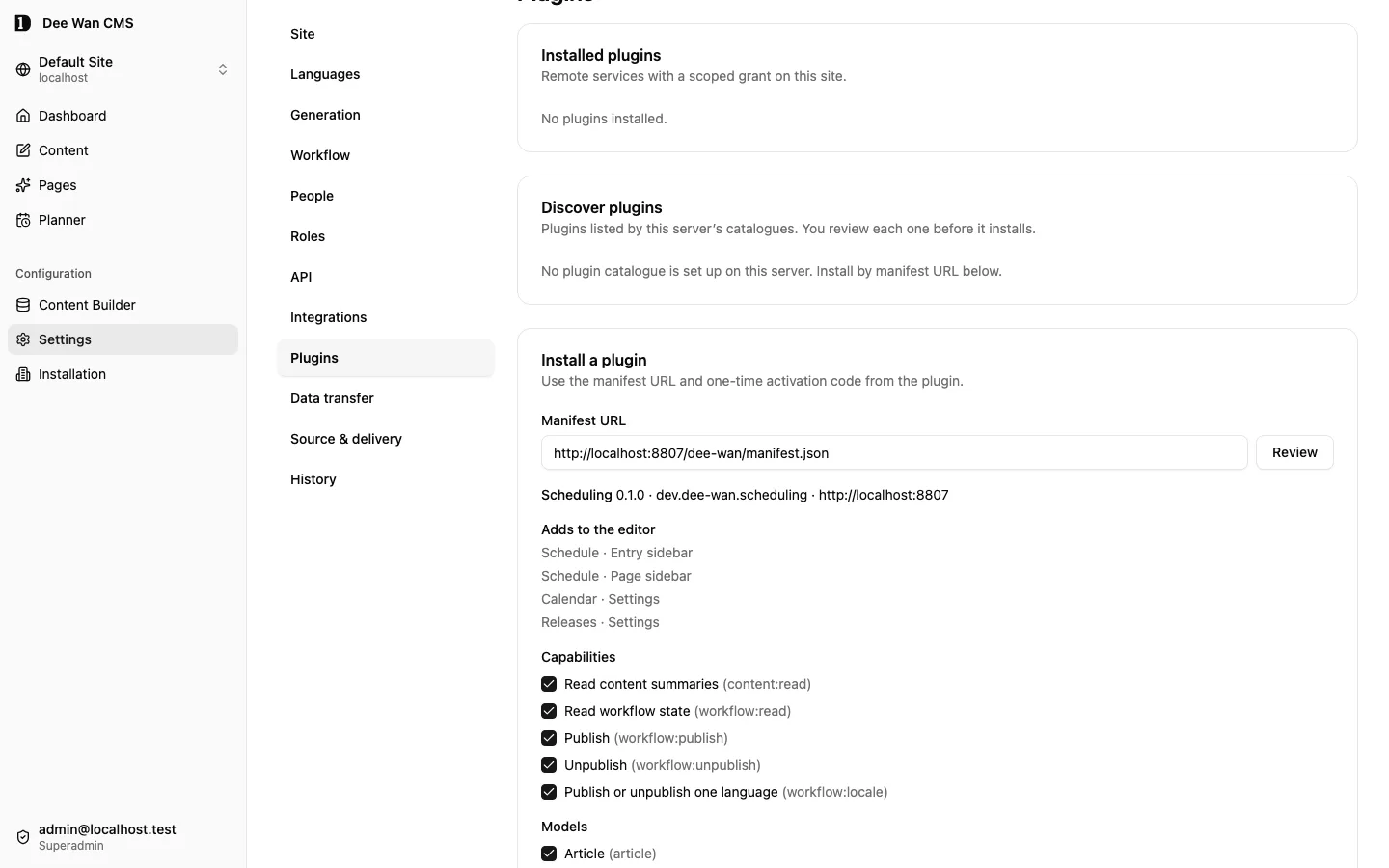
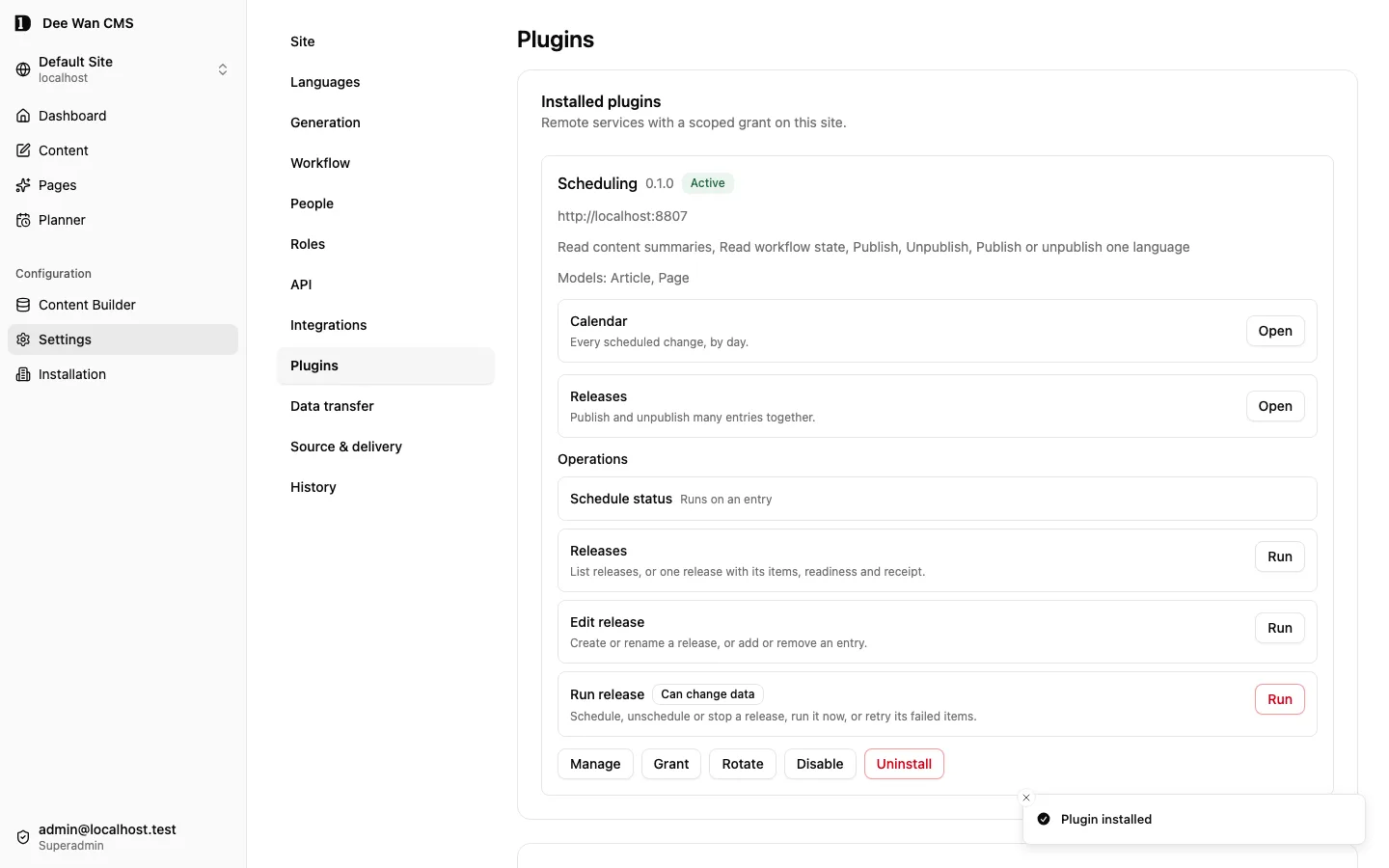
What happens, in order: Dee Wan fetches and validates the manifest, records a pending installation,
mints a token, POSTs it with your code to http://localhost:8788/dee-wan/activate, and marks the
installation active only after this plugin answers 2xx. Check the plugin’s side:
npx wrangler d1 execute dee-wan-scheduling --local \ --command "SELECT id, site_id, dee_wan_base_url FROM installation"The token_ciphertext column is what a stored token looks like. There is no column, log line or
route on either side that will show you the raw token.
3. Schedule a publish
Section titled “3. Schedule a publish”In Dee Wan: open a draft item in that model, and use the Schedule action the manifest declared.
That is a delegated launch: Dee Wan mints a one-time code, your browser lands on
http://localhost:8788/installations/<id>?dee_wan_launch=…, this plugin’s backend exchanges it for a
delegation, sets its own session cookie, and redirects to the same page without the code in the URL.
The form reads the item through the delegation, so the transitions it offers are the ones you
may take right now. Pick a local time a minute or two ahead and a timezone. The confirmation shows
both the local time with its zone and the resolved UTC instant; both values matter and both are stored. With the zone UTC the two are the same, so it shows one.
npx wrangler d1 execute dee-wan-scheduling --local \ --command "SELECT id, kind, target_state, pinned_version_id, expected_workflow_revision, local_datetime, timezone, due_at, status FROM schedule"pinned_version_id is the exact version this will publish — not “whatever is current when it runs”.
4. Make it run
Section titled “4. Make it run”A cron trigger does not fire in wrangler dev on its own. With --test-scheduled:
curl "http://localhost:8788/__scheduled?cron=*+*+*+*+*"One tick claims up to 20 due rows with a lease, sends one command per schedule, and records each outcome. Then:
npx wrangler d1 execute dee-wan-scheduling --local \ --command "SELECT id, status, attempt_count, last_code, last_message FROM schedule"npx wrangler d1 execute dee-wan-scheduling --local \ --command "SELECT schedule_id, attempt, code, http_status FROM schedule_attempt ORDER BY attempt"A completed schedule reads status = completed, last_code = transition_applied. In Dee Wan the
item is now published, its whole translation group moved together, and the content history shows
Scheduling plugin as the actor, rather than your user account; no fabricated user account is created.
A tick before the due time claims nothing. After the due time, the first tick completes the
schedule, and a second tick finds nothing to do, because only due pending or retrying rows (and
running rows whose lease has expired) are claimed, and this one is now completed. If the same
command were ever sent twice — a crashed worker whose lease is reclaimed, say — the idempotency key
makes Dee Wan answer idempotent_replay instead of publishing again.
To see it on the calendar: Calendar on the Dashboard or the Content list, or Settings →
Plugins, then Open on the Calendar card of the Scheduling row. That is a manage launch with
"view": "calendar". It needs no site:plugins, only one model granted to Scheduling that you read,
all entries or only your own. A person who reads but may not publish sees the same calendar with no
Reschedule or Cancel. A person who reads only their own entries sees only the schedules of those.
The launch URL carries
dee_wan_view=calendar next to the code, and after the exchange the plugin redirects to
/installations/<id>/calendar. The day of the schedule shows a count; the day link lists the
schedule as Completed with transition_applied. Pick another timezone in the filter to see the
same row on that zone’s local day.
4a. Run a release
Section titled “4a. Run a release”Open Settings → Plugins, then Open on the Releases card of Scheduling (a manage launch with view: releases). The Dashboard also offers Releases. Create Launch and add two entries from different models through Add to release on their Schedule cards. Select the publish action and the language or whole translation group. A release holds at most 25 items.
For an ordinary item, keep Version → Latest ordinary draft. Save a new draft of one entry, then reload the release. It remains ready to send the latest saved ordinary draft: adding an ordinary item does not pin its version. If any item is blocked, Run now is disabled with its reason. Unreadable items count as blocking without exposing their names. Fix or remove the blocking item. A scheduled release blocked at its time stays scheduled, records Blocked attempts and waits for a person to run it or change its time.
For a second release, choose Version → Independent future version when adding a publish item. In Dee Wan, open Future versions, select that release, change its title or page sections and Save. Check Future history and confirm the ordinary draft still has its original content. Set a release time, then use Preview through this release (the page editor has its own preview for composed pages). Preview includes published content and earlier release changes; without a time it refuses release_time_required. Give an overlapping change to the same entry and language a different time to avoid release_time_ambiguous.
Start the future release and confirm its branch is frozen. Publication must use that exact branch version, retain its media pins and pass current authority, required fields and review tasks. After a lost reply, retry the recorded command rather than selecting a new draft. The ordinary draft remains unchanged. Automation uses timeline-preview; release-edit uses add_future for this version mode and refuses an unpublish request with future_requires_publish.
Press Run now. The runner records every version and workflow revision, then sends one atomic /releases/commit command. All publication changes commit together or none do. Inspect the receipt and local rows:
curl "http://localhost:8788/__scheduled?cron=*+*+*+*+*"npx wrangler d1 execute dee-wan-scheduling --local \ --command "SELECT instance_id, status, attempt, published_version_id, last_code FROM content_release_item"The release reads Done; the receipt contains release_applied and the committed version for each published item.
To exercise refusal, include an unpublish item that still has a published dependent outside the release. Core returns dependent_content, the release reads Failed, and neither that withdrawal nor the other publication applies. Resolve the dependency and use Retry unfinished items. A definite refusal starts a new attempt with fresh versions under rel:<release>:a2.
Also publish a shared section and a page that uses it in one release, in either item order. Check two different locales of the same translation group together. Duplicate language scopes and whole-group/locale overlap must be refused.
A lost response must not be treated as failure or partial success. The runner retries the complete recorded command under the same key. If retry limits leave its result unknown, it shows Outcome unknown; retry recovers that command rather than guessing which items committed.
To schedule, choose a date, time and timezone and press Schedule. A tick before that time changes nothing; a due tick checks the release and sends one command. Unschedule returns it to draft. Stop remaining items cancels unsent work. Completed changes remain; a command already sent cannot be undone.
The same actions are available through the releases, release-edit and release-run plugin operations in the management API, CLI and MCP. Those operations require site:plugins.
5. Make it fail, on purpose
Section titled “5. Make it fail, on purpose”Each of these is a real state a user will hit. Do them in a scratch site.
| To see | Do this | Expect |
|---|---|---|
scheduled_target_stale |
Schedule a publish, then edit and save the draft, then tick | refused, no retry, and the item stays unpublished |
workflow_conflict |
Schedule a publish, then publish and unpublish the item by hand, then tick | refused, no retry |
transition_unavailable |
Schedule a publish, then publish the item by hand, then tick | refused. Dee Wan checks the move before the revision, and a published item offers no publish |
dependent_content |
Publish A, relate published B to it, schedule an unpublish of A, tick | refused, and Dee Wan names the dependency |
requester_unauthorized |
Schedule as a user, remove that user’s role in Dee Wan, tick | refused. Authority is re-read at execution, never carried forward |
plugin_unauthorized |
Schedule, then disable or uninstall in Settings → Plugins, tick | refused, stored with last_code = plugin_unauthorized. The plugin pages say the installation was removed or turned off, and show no schedules |
| a transport failure | Stop Dee Wan’s admin Worker (local:api), tick |
retrying with last_code = no_response and a next_attempt_at. Restart it and tick after that time to complete |
retry_exhausted |
Stop Dee Wan and tick past MAX_ATTEMPTS, or past due_at + MAX_LATENESS_MS |
refused retry_exhausted, and nothing more is ever sent |
| cancellation | Cancel a pending schedule in the plugin UI | cancelled. Dee Wan is never called and nothing is reversed |
| a running schedule | Cancel while a tick is in flight | execution_in_progress, and the UI reloads the final state |
Set MAX_ATTEMPTS=2 and MAX_LATENESS_MS=60000 in .dev.vars, and restart wrangler dev, to reach
the caps in a minute rather than a quarter of an hour.
A stopped Worker is a transport failure, not temporary_failure: there is no answer at all, so
there is no outcome code. temporary_failure is an answer: Dee Wan sends it as a structured
outcome only with 503, and the plugin also records a bare 500, 502, 503 or 504 with no outcome under
that code. A local Dee Wan does not produce either on demand. The plugin’s own suite covers it with an injected
reply.
After a retry_exhausted that followed a transport failure, the outcome is genuinely unknown —
the command may have been applied by a Dee Wan that could not answer. Check the item in Dee Wan.
That is why the schedule says so rather than claiming a failure.
6. Rotate, and uninstall
Section titled “6. Rotate, and uninstall”Rotation, which an operator should practise before they need it:
curl -X POST -H "Authorization: Bearer local-admin-secret-0123456789" \ -H 'content-type: application/json' \ --data '{"installation_id":"<installation id>"}' \ http://localhost:8788/admin/activation-codesThen Settings → Plugins → Rotate with that code. Dee Wan mints a new token, hands it here, and only then swaps its stored hash. The old token stays valid for a bounded overlap, and the first request carrying the new one ends the overlap. If this plugin refuses, the old token keeps working — check that too, by rotating with a code you have already used.
Uninstall in Dee Wan revokes the token immediately and permanently. This plugin’s data stays: any
remaining schedule is refused with plugin_unauthorized when it comes due. The plugin pages stop
showing schedules and say instead that the installation was removed from Dee Wan and its schedules
no longer run: without Dee Wan’s answer the plugin cannot tell which models the person may see.
Audit attribution in Dee Wan also stays, because the workflow event stored a snapshot of the
installation.
To remove this plugin’s data for an installation, an operator asks for it:
curl -X POST -H "Authorization: Bearer local-admin-secret-0123456789" \ http://localhost:8788/admin/installations/<installation id>/delete-dataIt answers {"deleted": true}, 404 not_found if the plugin holds no such installation, and 409
execution_in_progress while a schedule or release item of that installation is running. There is no automatic
retention purge. Deletion must be requested explicitly.
7. Reset
Section titled “7. Reset”rm -rf .wrangler/state # in plugins/scheduling: the local plugin D1npx wrangler d1 migrations apply dee-wan-scheduling --localThe Dee Wan side resets with its own local database. Re-run npm run local:migrate, and
npm run local:seed with local:api running.
What this proves, and what it does not
Section titled “What this proves, and what it does not”It proves the two services agree: manifest, activation, launch delegation, a pinned conditional transition, the named refusals, retries, revocation and deletion.
It does not prove anything about a deployment — real DNS, real D1 latency, a real cron schedule, or
two Workers under load. Nor is it a substitute for the plugin’s own suite (npm test in
plugins/scheduling), which uses a fake core deliberately, so that a failure names one service
rather than two.
npm run test:cross-service in plugins/scheduling runs most of this walkthrough unattended: both Workers running locally, installation, delegated launches, a scheduled publish and unpublish, a lost request and a
lost reply, scheduled_target_stale, workflow_conflict, transition_unavailable,
dependent_content, cancellation, isolation and uninstall.
The automated cross-service run
lists what it asserts and what it leaves to this walkthrough.
Unreleased / pre-MVP; no stable version
Source revision: fe23db481c422b40e317b92fc98116b4c0c26a87 (modified checkout)
Build date (UTC): 2026-10-18T09:22:34.630Z
Upgrade target: unavailable: modified checkout. Release notes