

Writing a plugin
A plugin is a separately deployed service. Core grants no database binding. Backend commands use HTTPS; reviewed embedded UI runs in an isolated frame with host-authorized actions. This guide builds a plugin end to end: manifest, install, grant, launch, a conditional publish command, and uninstall.
You need somewhere to run an HTTPS service and somewhere to keep its state. A Cloudflare Worker with
a D1 database is what the reference plugin uses (the Scheduling plugin source, plugins/scheduling
in the Dee Wan repository), and this document assumes that shape, but nothing in protocol v1
requires it.
Every request and response below is replayed against the real routes by Dee Wan’s own test suite, so what you read is what the server answers. The ids and secrets are synthetic and deliberately invalid.
- Protocol v1 — every route, header, body, outcome and retry rule.
- Plugin security — tokens, delegation, scope and the threat model.
- Testing a plugin — the contract checklist and a local two-service setup.
- Machine-readable:
schemas/manifest-v1.schema.json,schemas/protocol-v1.schema.json.
What you are responsible for
Section titled “What you are responsible for”| You own | Dee Wan owns |
|---|---|
| Your service, its database, its clock and its retries | Content, versions, workflow rules, permissions, audit |
| Your own browser sessions and your own UI | Whether a transition is legal, and applying it atomically |
| Deciding when to ask | Deciding whether the answer is yes |
| Deleting your own data | Revoking your access |
Dee Wan never trusts a plugin’s claim that a transition is allowed, that a version is current, or that an unpublish is safe. Those are re-checked inside the mutation.
1. Serve a manifest
Section titled “1. Serve a manifest”The manifest is one HTTPS document describing your plugin and what it wants. Dee Wan fetches it at three moments, and never on ordinary requests:
- Review fetches and validates it, shows it to the administrator, and stores nothing.
- Install fetches it again, validates it again, and stores that copy. The stored copy is what every later check uses, so serve the same manifest at install that you served at review.
- Upgrade fetches it again from the stored manifest URL when an administrator accepts a new release (see Shipping a new release).
{ "manifest_version": 1, "id": "com.example.myplugin", "name": "My Plugin", "version": "0.1.0", "protocol_versions": [1], "base_url": "https://plugin.example", "activation_url": "https://plugin.example/dee-wan/activate", "management_url": "https://plugin.example/installations/{installation_id}", "requested_capabilities": [ "content:read", "workflow:read", "workflow:publish", "workflow:unpublish" ], "content_actions": [{ "id": "schedule", "label": "Schedule" }]}Rules worth knowing before you write it, all enforced:
idis a stable reverse-domain identifier: lowercase, starting with a letter, at least three dot-separated labels, at most 128 characters. It never changes across releases.versionis your release and moves freely.nameis 1 to 64 characters, with no control characters and no<or>.versionis semantic versioning,MAJOR.MINOR.PATCHwith an optional-prereleasesuffix (no+buildsuffix), at most 64 characters.manifest_version,protocol_versionsandversionare three different things.manifest_versionis1.protocol_versionslists 1 to 8 protocol versions you speak, and at least one must be a version this core speaks, or the manifest isprotocol_unsupported.requested_capabilitieslists at least one capability, with no duplicates.- Every URL is HTTPS, carries no credentials and no fragment, and all of them — plus the manifest
URL itself — must share ONE origin. A second origin is
manifest_origin_mismatch. - Unknown top-level keys are refused. A manifest cannot rely on a field this core ignores, so you cannot ship a key today and hope it is honoured later.
- Redirects are refused on the manifest fetch and on activation. Serve both directly.
- Private, loopback, link-local and reserved destinations are refused. For local development, see Testing a plugin.
content_actionsis optional, and at most four{ id, label }pairs with unique ids. Anidmatches^[a-z][a-z0-9_-]{0,31}$. Alabelis 1 to 24 characters with no control characters and no<or>. No markup, no script, no CSS, no icon URL: core renders its own button with its own styling, and only on items whose model is in the installation’s grant.manage_viewsis optional: a list of direct management pages from a closed vocabulary:calendarandreleases. Core renders its own labelled link for each one on the installation in Settings → Plugins, and offers each beside the editorial calendar on the Dashboard and the Content list. The plugin supplies no label.management_urlmay contain{installation_id}, and is navigation only. It never receives a long-lived credential in a URL.ui_extensionsis optional: 1 to 16 declarative additions to the Dee Wan screens. See Cards and field editors.
The full schema, generated from the object core validates with, is
schemas/manifest-v1.schema.json.
Cards and field editors
Section titled “Cards and field editors”ui_extensions adds cards and field editors to Dee Wan. Declarative controls use core components.
An optional reviewed frame loads an isolated editor or management view from the plugin origin.
The frame receives a bounded field value and a MessageChannel. It receives no admin session or
installation token. Field changes use ordinary Save; declared operations use the host authorization
and confirmation path. A field editor does not change its field’s stored type.
"ui_extensions": [ { "id": "schedule-card", "placement": "entry_sidebar", "title": "Schedule", "description": "Plan when this goes live.", "launch": { "kind": "content_action", "action": "schedule" } }, { "id": "calendar-row", "placement": "settings_row", "title": "Calendar", "launch": { "kind": "manage_view", "view": "calendar" } }, { "id": "priority", "placement": "field_editor", "control": "select", "label": "Priority", "help_text": "How soon this should go out.", "options": [ { "value": "low", "label": "Low" }, { "value": "high", "label": "High" } ] }]- Each entry has an
idthat matches^[a-z][a-z0-9_-]{0,31}$, is unique in the manifest, and stays the same across releases. Model fields refer to it.manage,core,dee-wan,workflow,history,seo,previewandsettingsare reserved. placementisentry_sidebar,page_sidebar,settings_roworfield_editor. Anything else is refused.- A card has a
title(1 to 40 characters), an optionaldescription(1 to 160) and onelaunch.{ "kind": "content_action", "action": "<id>" }opens one of yourcontent_actionsfor the item on screen.{ "kind": "manage_view", "view": "calendar" }opens one of yourmanage_views. A launch that names something the manifest does not declare is refused. Asettings_rowcard launches a manage view only. Every launch goes through the delegated launch in section 5. - A field editor draws an ordinary field.
controlistext,textareaorurlfor a text field, andnumber,boolean,dateorselectfor a field of that type. The stored value stays a value of that type.label(1 to 40) names the editor, andhelp_text(1 to 200) is shown under it. - A
selecteditor lists 1 to 50options, each{ "value", "label" }with a unique value. Text and textarea editors may setvalidation.min_lengthandmax_length. A URL editor may setmax_length, and Dee Wan adds its ownhttp(s)rule. Number editors may setminandmax. Date editors may setmin_dateandmax_dateasYYYY-MM-DD. Nothing else is accepted, so every rule is one the Dee Wan save path enforces. - A
groupeditor draws one JSON field as a small form. It lists 1 to 8members, each with a uniquekey(^[a-z][a-z0-9_]{0,31}$), alabeland acontrol:text(with a requiredmax_lengthup to 500),number(min,max,integer),booleanorselect(up to 12options).requiredmakes a text, number or select member mandatory. The value is one JSON object of at most 8192 bytes. Dee Wan writes the closed schema onto the field when a site builder chooses your editor. By default, draft saves may leave required members empty; strict models require them on every save. Supplied values with invalid types or outside their bounds or choices, unknown member keys and non-object values are still refused. Publication always validates required members in the exact saved snapshot. - A site builder chooses your editor on a model field. Dee Wan copies its rules and options into the field, so the field keeps them if your plugin goes away. When your installation is disabled or uninstalled, or a release drops the editor, the field keeps its value and Dee Wan draws its own editor with a note that names your plugin.
- Text is printable, with no control characters and no
<or>. Unknown keys are refused.
Operations and policies
Section titled “Operations and policies”operations are actions Dee Wan runs on your service and shows with its own form and result. A
person runs one from Settings → Plugins (scope: "site") or from an entry (scope: "entry"). An
agent runs one through the management API or MCP. policies are checks Dee Wan asks before a save, a
restore, a deletion, a publication, an unpublication or a workflow move. A save or restore policy
may also tidy the content it is asked about.
"operations": [ { "id": "schedule-status", "label": "Schedule status", "description": "Pending scheduled changes for this entry.", "endpoint": "https://plugin.example/dee-wan/operations/schedule-status", "scope": "entry", "audience": "interactive", "requires": ["content:read"], "result": ["rows"] }]audienceis required.interactiveoperations appear in the admin, the management API, the CLI and MCP.automationoperations never appear there and their run routes refuse them; only a named Dee Wan workflow calls one, such as the content planner calling Scheduling’sschedule-draft.endpointis on your manifest’s one origin.requiresnames capabilities you also request. While the grant lacks one, the operation is not offered.inputlists at most 8 fields:text,number,booleanorselect. Dee Wan draws the form and checks the values.resultnames the components your answer may use:text,rows,links(https only) andjson. Add"destructive": trueonly when the operation changes or removes data; Dee Wan then asks the person to confirm.- Dee Wan POSTs a small envelope to
endpoint. Exchange itscodeatPOST /api/plugin/v1/invocations/exchangewith your token, then answer the POST with{ "status": "completed", "result": { "blocks": [...] } }or{ "status": "refused", "code", "message" }. Answer only after the exchange. The protocol reference has the shapes and limits: Operations and policies. - An
entryoperation’s exchange also returnsdelegation_id: a delegation bound to the person who ran it, your installation, the entry and its model. Keep it when the operation starts later work, such as a schedule, and use it like a launch delegation. Dee Wan re-reads that person’s authority on every use. Asiteoperation’s exchange returns a delegation like amanagelaunch: no entry, and the granted models the person reads. Scheduling’s release operations run each item under it. A policy getsnull.
"policies": [ { "id": "tone", "label": "Tone check", "kind": "save", "endpoint": "https://plugin.example/dee-wan/policies/tone", "requires": [] }]kindis one of:save: each language whose values, links, media or search settings a save changes. You get the changed keys inchanged_fieldsand the new parts invalues,links(relation field → entry ids),media(media field → media ids) andseo. Shared links and media come with the primary language. A change to only links, media or SEO is asked about too (seois the key for search settings).restore: an old version restored (action: "version", the same facts as a save) or an entry leaving Trash (action: "trash"). A version restore askssavepolicies as well.delete: an entry or a language moved to Trash (action: "trash") or deleted permanently (action: "purge"). You get the whole draft of each language.publish: each language going live, the whole version.unpublish: each language going offline, the version that stops being served.transition: every workflow move, withtransition: { from, to }. Scheduled releases and other plugins’ moves are asked too;caller.viasays who moves it.
- Answer
{ "decision": "allow" },{ "decision": "warning", "message", "fields"? }or{ "decision": "refuse", "code", "message", "fields"? }.fieldsare field keys; the editor shows your message on them. A warning lets the write through; nobody submits twice. - A
saveorrestorepolicy may answer{ "decision": "transform", "message"?, "values"?, "links"?, "media"?, "seo"? }instead. It replaces those parts of the entry and language you were asked about, by field key. A list replaces the whole list. Shared links and media are taken only from the primary language’s answer; a restore takesvaluesandseoonly. Dee Wan saves the result through every rule a person’s input meets. If a rule refuses it, the write is refused asplugin_policy_transform_invalidwith the reason; two policies changing one field differently refuse it asplugin_policy_transform_conflict. The editor then shows which fields your policy changed, with your message, and reloads the saved values. Nobody confirms a second time.
{ "decision": "transform", "message": "Trimmed spaces and normalized the title.", "values": { "title": "Harbour tours" }}- A refusal always stops the write. A timeout, an outage or an answer Dee Wan does not accept follows the site’s choice in Settings → Plugins: by default the write goes through with a warning; with Block changes if it does not answer it is refused.
- Every path asks: the editor, page saves, restores, Trash, bulk actions, spreadsheets, imports, the management API and other plugins’ writes. A transform changes only the entry being written; you never move a workflow.
- One path asks nothing: the scheduled purge that deletes items left in Trash past the retention
window. Nobody acts there, so there is no one to refuse. A
deletepolicy has already been asked when the item moved to Trash, and again if someone deletes it permanently by hand. - The version history shows
Changed by <plugin> · <policy>on a version your transform changed.
Content-list columns and list actions
Section titled “Content-list columns and list actions”A page operation adds a column to the content list of a model in your grant. A flagged entry
operation becomes an action on the rows a person selects. Both use the invocation described above,
and Dee Wan draws every cell and every result.
"operations": [ { "id": "schedule-column", "label": "Scheduled", "endpoint": "https://plugin.example/dee-wan/operations/schedule-column", "scope": "page", "audience": "column", "requires": ["content:read"], "result": ["cells"], "cell": "badge" }, { "id": "schedule-status", "label": "Schedule status", "endpoint": "https://plugin.example/dee-wan/operations/schedule-status", "scope": "entry", "audience": "interactive", "requires": ["content:read"], "result": ["rows"], "list_action": true }]- A column has
scope: "page",audience: "column", onecellkind (text,badgeorlink),result: ["cells"], noinputand nodestructive. Its label is the column header. - The exchange returns
$defs/column_request: the model and at most 50 ids of rows the person may read. No values; read what you need through your grant. Answer onecellsblock with at most one cell per id you were asked about:{ "id", "text" }, plustonefor a badge or an httpsurlfor a link. Text is at most 80 characters. A cell for another id, a repeated id, a link without an httpsurlor aurlon a badge makes the whole answer invalid. An empty list is a valid answer. - A column binds no delegation, is never listed or run as an ordinary operation, writes no audit row and keeps no replayed answer. Do not store anything when you answer it.
- A list action is an interactive
entryoperation withlist_action: true. Dee Wan runs it once for each of at most 25 selected rows, each with its own invocation, delegation, idempotency key and audit entry, so answer each as the entry operation it is.
Rich text blocks
Section titled “Rich text blocks”rich_blocks declares block types authors can insert into rich text. You send data only. Dee Wan
draws the fields, previews the block and renders it on the site from your declarative render tree.
This tree contains no executable script or remote calls. Vendor HTML/CSS/JS belongs in the separate
snippet block, whose preview and public output run inside an isolated frame.
"rich_blocks": [ { "name": "callout", "version": 2, "label": "Callout", "description": "A boxed note", "fields": [ { "key": "tone", "control": "select", "label": "Tone", "required": true, "default": "info", "options": [{ "value": "info", "label": "Info" }, { "value": "warning", "label": "Warning" }] }, { "key": "title", "control": "text", "label": "Title", "required": true, "validation": { "max_length": 80 } }, { "key": "image", "control": "media", "label": "Image", "media_kind": "image" } ], "preview": { "tone": "info", "title": "Heads up" }, "render": { "tone": "tone", "nodes": [ { "element": "strong", "children": [{ "field": "title" }] }, { "element": "img", "src": "image", "alt": "title" } ] }, "migrations": [{ "from": 1, "to": 2, "steps": [{ "op": "rename", "from": "heading", "to": "title" }] }] }]- A block is stored as
<your plugin id>/<name>, with the version it was saved with and its values. - Controls:
text,textarea,number,boolean,select,urlandmedia(media_kind:image,document,audio,videoorfile; afileis a download the site’s media settings let in). Rules:required,min_length/max_length,min/max/integer, select options. No patterns. Aurlvalue is anhttp(s)address or a site path. At most 24 fields. rich_textdraws the host rich editor. Its value is{ "richText": "<p>Formatted text</p>" }, with canonical host HTML up to 10,000 characters. Bind{ "field": "body" }directly inside a block element to render paragraphs, lists, links, emphasis, images and files. The stored plugin figure carries a<div data-rich-field="body">child; host media traversal, pinning, import and export read its ordinary markup. Rich children cannot contain plugin blocks, snippets or embeds; inline plugin definitions cannot declare rich children. The same private-model media rules apply.relationusesmodelsand optionalmultiple, with the ordinary relation picker and live actor read checks.groupusesfields, optionalrepeatableandmax_items; at most three nested group levels and fifty items per group. Nested media keep ordinary media pins. Render bindings scope children through{ "group", "children" }and{ "each", "children" }.render.nodesis a tree of:{ "element", "children" }fromdiv section aside p span strong em small h2 h3 h4 blockquote ul ol li figure figcaption hr br;{ "element": "a", "href": <url or media field> };{ "element": "img", "src": <image field>, "alt"?: <text field> };{ "text" };{ "field" }(a select shows its option label); and{ "when", "equals"?, "children" }. At most 64 nodes, 8 levels deep.render.tonenames a select field whose value (neutral,info,success,warning,danger) tints the block. Every value is escaped; an unsafe address renders its children without the link.- Without
render, the block can still be edited and stored, but renderers show it as unsupported: nothing on a public page, a placeholder in a preview. - Raise
versionwhen the fields change and add one migration per step (toisfrom + 1):rename,set_defaultanddrop. Stored blocks keep their version. Renderers and the editor migrate in memory; the stored block changes when an author updates it. - Disabling or uninstalling your plugin never removes blocks. They stay stored with their version and values, and your next release may migrate them.
- Content is checked on save against active plugins only. See
the save rules. The management API lists definitions with
GET /api/manage/v1/rich-blocks(listRichBlockDefinitions); the admin readsGET /api/plugins/rich-blocks; renderers readGET /v1/_rich-blocks.
Media sources
Section titled “Media sources”media_sources turns your service into a library people browse inside Dee Wan’s media picker, under
Sources, next to the site’s own library. Request media:source and declare at most four sources:
"requested_capabilities": ["media:source"],"media_sources": [ { "id": "library", "label": "Reference images", "description": "Seven self-made CC0 files.", "endpoint": "https://media-source.example/dee-wan/sources/library", "modes": ["copy", "reference"], "delivery_origins": ["https://media-source.example"] }]modes is required. copy lets people copy a file into the site’s own library; reference lets them
link it instead, with your service keeping the bytes. A source declares one or both, and Dee Wan never
guesses the mode from a URL or a name. delivery_origins (one to four bare origins, your manifest’s origin
may be one) is required with reference and absent without it.
- Core calls
endpointthrough the same invocation exchange as an operation: it POSTs the envelope, you exchange the code with your token, and the binding haskind: "media_source", your sourceidand no delegation. The bound input is$defs/media_source_request:{ "action": "browse", "query", "cursor", "limit" }or{ "action": "item", "item_id" }. - Answer a browse with
{ "status": "completed", "items": [...], "next_cursor": "..." | null }and an item with{ "status": "completed", "item": {...} }. Each item hasid,title,file_name,mime_type,thumbnail_url,download_url(required when the source declarescopy),delivery_url(required when it declaresreference) andattribution(source_name,license, and optionalauthor,author_url,license_url,source_url). Addwidth,heightandbyte_sizewhen you know them. An image’sdescription(125 characters at most) becomes its alt text in the site’s default language. Refuse with{ "status": "refused", "code", "message" }; the picker shows your message. thumbnail_urlanddownload_urlmust be on your manifest’s origin, anddelivery_urlon one of the source’sdelivery_origins. The picker loads previews straight from you with no referrer and no Dee Wan credential. When a person adds an item, core asksitemagain and GETsdownload_urlitself: no credential, no redirect, 20 seconds, the media file limit. Signdownload_urlif your files are not public.- Core checks the bytes like any upload: the site’s kinds, formats and size limits, then its duplicate
check. The copy is an ordinary media file owned by the site. It keeps your
attributionand your plugin, source and item ids, which the media details show as its credit and site copies carry. Published pages get onlycredit(author,source,license,url), shown under the image. Nothing on the site loads from you again after a copy, so pages keep working if you go away. - Reference mode links the file instead of copying it. Core fetches nothing: the library row keeps
your
delivery_urlas its address, your plugin, source and item ids as its identity and the metadata and credit you declared, and the same item added again followson_duplicate. Published pages, site copies and generated sites use thedelivery_urlas it is, so keep it served, and stable, for as long as sites use it. Dee Wan does not proxy it, cannot replace or edit its bytes (media_external_bytes_unavailable), and never calls you when a person deletes the library row. If your plugin is uninstalled or disabled, existing pages keep the stored address, the media details say the source is not available, and new links from it are refused. Add the mode with the request’s requiredmode; a mode the source does not declare is refused with 422media_source_mode_unsupported. - Browsing changes nothing and is not audited. The person needs
media:upload. Disabling the installation or removingmedia:sourcefrom the grant hides the source at once. - The management API offers the same:
listMediaSources,browseMediaSourceandimportMediaSourceItem(scopemedia:write, bodyitem_idandmode). See the management API. plugins/media-source-referenceis a complete, tiny example with tests. The conformance suite checks a source with itsmediaSourcesubject (see Testing a plugin).
Pre-operation hooks
Section titled “Pre-operation hooks”hooks let your service decide BEFORE Dee Wan accepts something. Declare at most one hook per kind:
upload_metadata is asked before a new library file is stored, comment_moderation before a visitor
comment is stored.
"hooks": [ { "id": "upload-check", "label": "Upload check", "kind": "upload_metadata", "endpoint": "https://plugin.example/dee-wan/hooks/upload", "requires": [] }, { "id": "comment-check", "label": "Comment check", "kind": "comment_moderation", "endpoint": "https://plugin.example/dee-wan/hooks/comment", "requires": [] }]A hook is off until a site administrator turns it on for the installation in Settings → Plugins.
Declaring one asks for nothing and runs nothing. An unsupported kind is refused when the manifest is
validated.
- Core calls
endpointthrough the same invocation exchange as an operation. The binding haskind: "hook", your hookid,caller: nulland no delegation. The input is only what the decision needs: for an upload,$defs/hook_upload_facts(file name, MIME type, size, folder and alt texts, never the bytes); for a comment,$defs/hook_comment_facts(the entry, the comment’s id, parent, author name, website and body, never the email). The person who initiated the operation is not identified. - Answer an upload with
$defs/hook_upload_reply:{ "decision": "accept" }, optionally withnormalized(a newfilenamethat keeps the extension, and alt texts only in languages the upload already named), or{ "decision": "refuse", "code", "message" }. The uploader sees your message (422upload_hook_refused). - Answer a comment with
$defs/hook_comment_reply:{ "decision": "approve" },{ "decision": "hold" }(the comment waits for a moderator) or{ "decision": "reject" }(stored as spam, or as refused with"as": "refused"). - Answer within 5 seconds. A hook that times out, cannot be reached, answers something outside the closed
replies, or is disabled while it runs never approves: the upload is refused (503
upload_hook_unavailable, nothing stored) and the comment stays pending. - A question has a stable retry identity. A retried upload or a re-sent comment gets your first accepted answer back for 24 hours without a new call; a failed question is asked again.
2. Accept the activation hand-off
Section titled “2. Accept the activation hand-off”Installation is a two-party hand-off, so your service needs one route before anybody can install it:
activation_url. Mint a one-time activation code, hand it to the administrator out of band, and
wait. The code must match ^[A-Za-z0-9_-]{16,128}$. Anything else is refused by Dee Wan as
invalid_activation_code before your service is called. When they install, Dee Wan POSTs this to
activation_url:
{ "kind": "activate", "installation_id": "plg_0000000000000000000000000000d1ee", "site_id": "cdocssite00000000000000001", "dee_wan_base_url": "https://cms.example", "protocol_version": 1, "token": "dwp_ExampleTokenNotRealExampleTokenNotRealExamp", "activation_code": "activation-code-0123456789"}What your handler must do:
- Consume the
activation_codeexactly once, and refuse an unknown, used or expired one. This is the only thing proving the caller is the administrator you gave the code to. - Check
protocol_versionis one you speak anddee_wan_base_urlis an origin you accept. - Store
tokenas your secret for this installation — encrypted at rest, never logged, never in a URL or an error body. - Answer 2xx, within 5 seconds, with a body of at most 32 KB. Core marks the installation
activeonly then, and stores only the token’s SHA-256 hash. It can never show the token again.
Until your handler has returned, the installation is still pending, and a pending installation’s
token answers plugin_unauthorized. So do not call /api/plugin/v1 from inside the activation
handler — store the token, answer, and make your first call afterwards.
Where to call back: every protocol request goes to dee_wan_base_url followed by /api/plugin/v1,
for example <dee_wan_base_url>/api/plugin/v1/context. Store the base URL with the token, and accept
only origins you expect.
A kind of rotate is the same hand-off for an existing installation: replace the stored token.
Both kinds carry a code, because rotation is a hand-off and not a reset.
When activation fails. A non-2xx answer, a redirect, a body over 32 KB, or no answer within 5 seconds all make the install fail: core deletes its pending installation and shows the administrator why. Core cannot see what your side did, though. If your handler stored the token and then answered too late, you now hold a token for an installation that no longer exists, and your activation code is already consumed. Plan for that:
- Keep the handler short, well inside the timeout.
- Treat a stored installation as unconfirmed until your first successful call with its token, and
remove one whose token has never worked and now answers
plugin_unauthorized. - Tell the administrator to mint a fresh activation code for the retry. The retry is a new install
with a new
installation_id, not a second attempt at the old one.
3. Review, then install
Section titled “3. Review, then install”An administrator with site:plugins reviews the manifest first. Nothing is stored by a review — it
exists so that approval is informed.
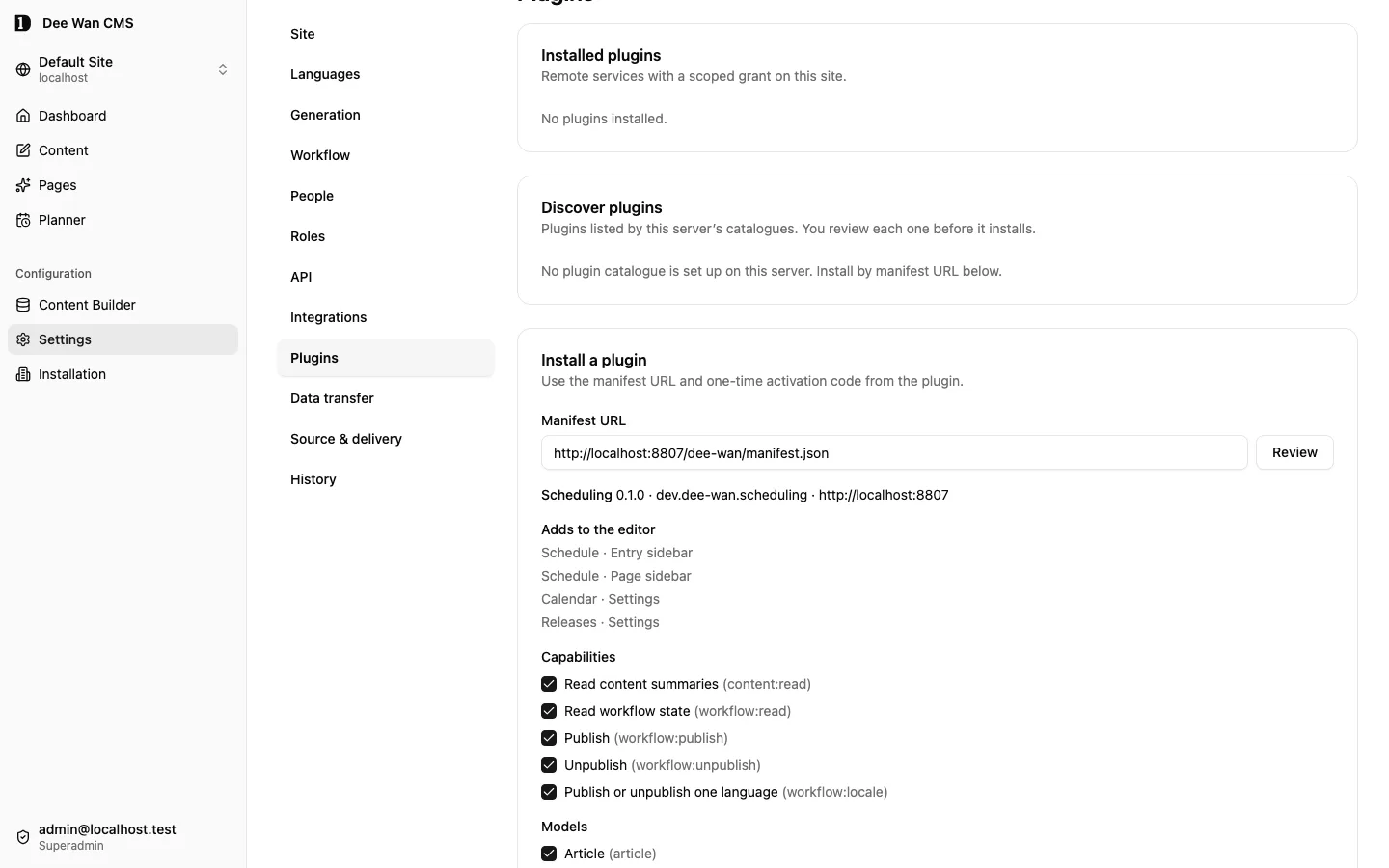
Review the manifest
curl -X POST "https://cms.example/api/plugins/review" \ -H "X-Site-Id: cdocssite00000000000000001" \ -H "Content-Type: application/json" \ -b "__Secure-better-auth.session_token=$SESSION" \ --data '{"manifest_url":"https://plugin.example/dee-wan/manifest.json"}'{ "data": { "manifest": { "manifest_version": 1, "id": "com.example.myplugin", "name": "My Plugin", "version": "0.1.0", "protocol_versions": [1], "base_url": "https://plugin.example", "activation_url": "https://plugin.example/dee-wan/activate", "management_url": "https://plugin.example/installations/{installation_id}", "requested_capabilities": [ "content:read", "workflow:read", "workflow:publish", "workflow:unpublish" ], "content_actions": [{ "id": "schedule", "label": "Schedule" }] }, "protocol_version": 1 }}Then they install: the approved capabilities, the approved model ids, and your one-time code. Install
fetches and validates the manifest again, and that second copy is the one stored. The approved set
must be a subset of what that manifest requested. An empty model_ids means no content access at
all — not every model.
Install, which activates
curl -X POST "https://cms.example/api/plugins" \ -H "X-Site-Id: cdocssite00000000000000001" \ -H "Content-Type: application/json" \ -b "__Secure-better-auth.session_token=$SESSION" \ --data '{"manifest_url":"https://plugin.example/dee-wan/manifest.json","activation_code":"activation-code-0123456789","capabilities":["content:read","workflow:read","workflow:publish","workflow:unpublish"],"model_ids":["cdocsmodel0000000000000001"]}'{ "data": { "id": "plg_0000000000000000000000000000d1ee", "plugin_id": "com.example.myplugin", "plugin_name": "My Plugin", "plugin_version": "0.1.0", "protocol_version": 1, "state": "active", "capabilities": [ "content:read", "workflow:read", "workflow:publish", "workflow:unpublish" ], "requested_capabilities": [ "content:read", "workflow:read", "workflow:publish", "workflow:unpublish" ], "model_ids": ["cdocsmodel0000000000000001"], "content_actions": [{ "id": "schedule", "label": "Schedule" }], "manage_views": [], "ui_extensions": [], "operations": [], "policies": [], "policy_modes": {}, "hooks": [], "hook_modes": {}, "manifest_url": "https://plugin.example/dee-wan/manifest.json", "management_origin": "https://plugin.example", "created_at": "2026-01-01T00:00:00.000Z", "updated_at": "2026-01-01T00:00:00.000Z" }}No token and no hash appear in that response, in any later read, or in the audit entry the install writes. Your service holds the only copy.
4. Narrow the grant
Section titled “4. Narrow the grant”A grant can be changed at any time, and only within what the stored manifest requested. Removing a capability or a model takes effect on your next request — there is no cache to wait for.
Take away a capability this plugin turned out not to need
curl -X PUT "https://cms.example/api/plugins/plg_0000000000000000000000000000d1ee/grant" \ -H "X-Site-Id: cdocssite00000000000000001" \ -H "Content-Type: application/json" \ -b "__Secure-better-auth.session_token=$SESSION" \ --data '{"capabilities":["content:read","workflow:read","workflow:publish"],"model_ids":["cdocsmodel0000000000000001"]}'{ "data": { "id": "plg_0000000000000000000000000000d1ee", "plugin_id": "com.example.myplugin", "plugin_name": "My Plugin", "plugin_version": "0.1.0", "protocol_version": 1, "state": "active", "capabilities": ["content:read", "workflow:read", "workflow:publish"], "requested_capabilities": [ "content:read", "workflow:read", "workflow:publish", "workflow:unpublish" ], "model_ids": ["cdocsmodel0000000000000001"], "content_actions": [{ "id": "schedule", "label": "Schedule" }], "manage_views": [], "ui_extensions": [], "operations": [], "policies": [], "policy_modes": {}, "hooks": [], "hook_modes": {}, "manifest_url": "https://plugin.example/dee-wan/manifest.json", "management_origin": "https://plugin.example", "created_at": "2026-01-01T00:00:00.000Z", "updated_at": "2026-01-01T00:00:00.000Z" }}Asking for a capability outside the stored manifest is 400 invalid_capabilities. A grant can
widen again later, but never past what the stored manifest requested.
Shipping a new release
Section titled “Shipping a new release”Publishing a new manifest at your URL changes nothing in an existing installation. Two explicit acts by an administrator do:
- Accept the release with
POST /api/plugins/:id/upgradeand a body of{"expected_version": "<the version they reviewed>"}. Core fetches the manifest again from the stored manifest URL and refuses it asmanifest_changed_since_reviewif itsversionis not the one named, asmanifest_identity_changedif itsidor itsbase_urlorigin changed, and asprotocol_changedif the protocol version it would negotiate changed. On success it stores the new manifest, and keeps only the granted capabilities the new manifest still requests. Accepting a release can narrow a grant. It never widens one. - Widen the grant, if the release requests a new capability, with
PUT /api/plugins/:id/grantas above. That is now allowed because the stored manifest requests it.
So a release that needs a new capability must say so in its own release notes: until an
administrator does both steps, your service keeps running with the old grant, and a command that
needs the new capability answers capability_refused.
5. Open your UI through a delegated launch
Section titled “5. Open your UI through a delegated launch”An ordinary delegated launch opens your management page in a new top-level tab. A declared,
reviewed frame opens an isolated editor or management view inside the admin and uses host-authorized
actions. Frames receive no admin session or launch code. Dee Wan session cookies stay in Dee Wan.
A delegated launch mints a one-time code, valid for 60 seconds,
stored hashed, bound to installation, site, user, action and — for a content action — one instance.
There are two kinds of launch. manage (no instance_id) opens your UI for the whole installation
and needs site:plugins. A manage launch that names a declared view is editorial: it needs no
site:plugins, only one granted model the person reads, all entries or only their own. A content action — one of your manifest’s content_actions ids, with an
instance_id — needs read access to that item, and is refused as model_not_granted when the
item’s model is not in the installation’s grant. The admin UI only shows your action on items of
granted models in the first place.
A manage launch may also carry "view", one of your manifest’s manage_views. The launch URL then
adds dee_wan_view=<view> next to dee_wan_launch. It is a landing hint only: exchange the code as
usual, then send the session to that page. It grants nothing, so treat an unknown value as no hint.
A view your manifest does not declare is refused as invalid_launch_action.
A launch can also start from an agent. A management credential or connected app with the
plugins:use scope creates the same link through the management API or MCP (see
Plugin launches). Core runs the same checks, and a person
still opens the link. Your page sees an ordinary launch.
Ask for a launch URL
curl -X POST "https://cms.example/api/plugins/plg_0000000000000000000000000000d1ee/launch" \ -H "X-Site-Id: cdocssite00000000000000001" \ -H "Content-Type: application/json" \ -b "__Secure-better-auth.session_token=$SESSION" \ --data '{"action":"schedule","instance_id":"cdocsinstance00000000000001"}'{ "data": { "url": "https://plugin.example/installations/plg_0000000000000000000000000000d1ee?dee_wan_launch=dwl_ExampleLaunchCodeExampleLaunchCodeExampleLa" }}The browser navigates there. The launch response from Dee Wan carries
Referrer-Policy: no-referrer, but the page the browser lands on is yours, and so is the rest of
the job:
- Send
Referrer-Policy: no-referreron your management page yourself, so the code in its URL cannot leak through a referrer. - Load no third-party resource before the exchange.
- Once the exchange succeeds, redirect to the same page without
dee_wan_launchin the URL, so the code does not stay in the address bar or the browser history. The reference plugin answers303 See Otherto the clean URL.
Your BACKEND exchanges the code, with your installation token:
Exchange the code for a delegation
curl -X POST "https://cms.example/api/plugin/v1/launch/exchange" \ -H "Authorization: Bearer dwp_ExampleTokenNotRealExampleTokenNotRealExamp" \ -H "Content-Type: application/json" \ --data '{"code":"dwl_ExampleLaunchCodeExampleLaunchCodeExampleLa"}'{ "data": { "delegation_id": "pld_0000000000000000000000000000d1ee", "installation_id": "plg_0000000000000000000000000000d1ee", "site_id": "cdocssite00000000000000001", "action": "schedule", "instance_id": "cdocsinstance00000000000001", "model_ids": ["cdocsmodel0000000000000001"], }}Now create your OWN session cookie for that browser, and store delegation_id against it. The
delegation is not a credential and grants nothing by itself: it names the person who asked, and
every command you later send carries it so that core can re-read their authority at execution time.
What a delegation can be used for:
- A content-action delegation (one with an
instance_id) acts only on items in the same translation group as that instance. Naming it for any other item isrequester_unauthorized. - A manage delegation (
instance_idisnull) acts on items of the models in itsmodel_ids. - Every delegation carries
model_ids: the granted models its person could read at launch, all entries or only their own (for a content action, the item’s model). Show and act only inside them. An item of another model, or one the person can no longer read, isrequester_unauthorized. GET /api/plugin/v1/delegations/<delegation_id>says what the delegation reaches now: each model, the transition kinds the person may take there, andentries. Ask before each page. Offer moving or cancelling planned work only for a listed kind.entries: "all": the person reads every item of that model and the kinds hold for each.entries: "checked": the person reads or updates only their own items there (read:own,update:own). AskGET /api/plugin/v1/delegations/<delegation_id>/entries?instance_id=…(up to 100 ids) which items to show and what each allows. Show nothing it leaves out. Do not copy who owns what into your own store; ask again on each request.- A delegation a management credential opened carries a capability ceiling: only the installation
capabilities that credential’s scopes allow. A command outside it is
capability_refused. - Core does not check the delegation’s
actionwhen you send a command. It is there so your own UI knows which screen to show. - A delegation has no time limit, because scheduled work may run long after the person launched your UI. It stops working when that person no longer holds the authority the command needs — they lost the permission, their role on the site, or their account — and when the installation is disabled, uninstalled, or its token is no longer valid. Their current authority is re-read on every command.
See Plugin security.
6. Read content, and pin exactly what you intend to move
Section titled “6. Read content, and pin exactly what you intend to move”Before you record any intent, read the item with the delegation. The workflow block tells you
what that person may actually do now, and gives you the values to pin.
Reading an item needs content:read. The workflow block — and with it workflow.revision, which
every transition command must send — is only returned when the installation also holds workflow:read.
Without it you get the summary alone, and have no revision to pin. A plugin that sends commands
therefore requests both.
A delegated read also returns saved, projected to the current person’s field/locale grants.
The response below shows summary keys.
Read one item as the person who asked
curl "https://cms.example/api/plugin/v1/content/cdocsinstance00000000000001?delegation_id=pld_0000000000000000000000000000d1ee" \ -H "Authorization: Bearer dwp_ExampleTokenNotRealExampleTokenNotRealExamp"{ "data": { "instance_id": "cdocsinstance00000000000001", "primary_instance_id": "cdocsinstance00000000000001", "translation_group_id": "cdocsgroup0000000000000001", "model_id": "cdocsmodel0000000000000001", "model_slug": "article", "lang": "en", "label": "Hello", "slug": "hello", "current_version_id": "cdocsversion00000000000001", "published_version_id": null, "workflow": { "state": "draft", "revision": 0, "transitions": [{ "to": "published", "kind": "publish" }] } }}Store, against your own record:
primary_instance_id— the instance a transition addresses. Publication applies to the whole translation group, and the primary is the group’s handle.current_version_idfor an ordinary draft publish, orpublished_version_idfor an unpublish. That is the pin.workflow.revision.- The
toandkindyou chose, which must be one of the offeredtransitions.
Independent future versions use POST /api/plugin/v1/content/:instanceId/futures to create a branch
and GET /api/plugin/v1/content/:instanceId/futures/:futureId to read it. Pin that branch’s saved
current_version_id for publication, together with future_draft_id and expected_future_revision.
Core binds it to the installation, release and entry, then freezes the exact revision when its
publication command starts. Current authority, workflow, required fields and review tasks are checked
against that snapshot; the ordinary draft stays unchanged. Retry an uncertain result with the same
command, version and idempotency key. The command below publishes an ordinary draft.
7. Send the command
Section titled “7. Send the command”One mutation, conditional on everything you pinned, with an idempotency key you can derive again.
Publish the pinned version
curl -X POST "https://cms.example/api/plugin/v1/content/cdocsinstance00000000000001/transitions/published" \ -H "Authorization: Bearer dwp_ExampleTokenNotRealExampleTokenNotRealExamp" \ -H "Content-Type: application/json" \ -H "Idempotency-Key: sched:plg_0000000000000000000000000000d1ee:sch_0001:r1" \ --data '{"kind":"publish","expected_current_version_id":"cdocsversion00000000000001","expected_workflow_revision":0,"delegation_id":"pld_0000000000000000000000000000d1ee"}'{ "outcome": { "code": "transition_applied", "message": "The transition was applied.", "retry": false }, "data": { "instance_id": "cdocsinstance00000000000001", "primary_instance_id": "cdocsinstance00000000000001", "from": "draft", "to": "published", "published": true, "published_changed": true, "published_version_id": "cdocsversion00000000000001", "revision": 1, "redirect": { "status": "none", "reason": "no_public_address" }, "policy_results": [] }}redirect is present when the transition publishes. It reports the automatic redirect core made for a
changed address, or why it made none. A replay of the same command returns this same body.
Derive the key from your own record and its revision, never from the clock. The reference plugin
uses sched:<installation_id>:<record_id>:r<revision>, which is the shape of the key above. Core
accepts any 1 to 128 printable ASCII characters with no spaces. Then:
- An exact replay returns the first result as
idempotent_replay. A retry after a timeout is safe. - A publish that moves an address writes its redirect after the transition commits. Until that
outcome is recorded, the command and its replays answer
temporary_failuresaying the transition was applied. Retry with the same key and body. You never get a result without itsredirect. - The same key with different input is
idempotency_key_reused. Rescheduling is a new revision, so a new key. - Every refusal is named and terminal except
rate_limitedandtemporary_failure. Read the table in Protocol v1 and handle each one. Do not turn an unknown failure into success, and do not retry forever.
The audit trail records this as the plugin acting, not as a user: the workflow event names the installation, your plugin id, name and accepted version, the protocol version, a digest of the idempotency key, and the person whose delegation authorised it. The admin UI shows your plugin’s name as the actor.
8. Uninstall
Section titled “8. Uninstall”Uninstall revokes first. The state becomes revoked, both token hashes are dropped, and that token
can never be valid again.
Uninstall
curl -X DELETE "https://cms.example/api/plugins/plg_0000000000000000000000000000d1ee" \ -H "X-Site-Id: cdocssite00000000000000001" \ -b "__Secure-better-auth.session_token=$SESSION"{ "data": { "id": "plg_0000000000000000000000000000d1ee", "state": "revoked" } }Every later request, including one already in flight in your queue
curl "https://cms.example/api/plugin/v1/context" \ -H "Authorization: Bearer dwp_ExampleTokenNotRealExampleTokenNotRealExamp"{ "outcome": { "code": "plugin_unauthorized", "message": "The installation token is missing, unknown, disabled or revoked.", "retry": false }}Two things follow, and both belong in your own documentation:
- Audit attribution survives. The workflow event stored a snapshot of your installation rather than a foreign key, so uninstall cannot erase who published what.
- Dee Wan does not claim to have deleted anything you hold. Remote deletion is your action, and your documentation has to say what you keep, for how long, and how an operator removes it. The reference plugin’s answer is in Scheduling, end to end.
What to build next
Section titled “What to build next”Protocol v1 deliberately gives you no scheduler, no queue and no event stream. If your plugin acts later, you own:
- a lease, so two of your workers cannot execute one record at once —
Idempotency-Keyis core’s second guard, not your first. - bounded retries with jitter, an attempt cap and an age cap, and
Retry-Afterhonoured within a maximum you choose. - a terminal-failure table your users can read, because every conditional refusal means a person has to decide something.
- your own authorisation for your own UI. Core checks the launch. After that, the session is yours.
The Scheduling plugin source (plugins/scheduling in the Dee Wan repository) is a complete worked
example of all four. Its behaviour is described in the Scheduling plugin
page.
Reusable relation values
Section titled “Reusable relation values”Relation controls store entry IDs. Public reads resolve them through ordinary published relation
authority and locale selection. { "field": "target" } renders the current published title/name.
{ "field": "target", "property": "address" } renders a projected scalar field from that target.
An anchor with href: "target" uses the shared live Page/Blog/managed-route address, or the target’s public url field.
An entry with no public address renders its link children without an anchor. Missing, draft,
withdrawn, trashed or unreadable targets contribute no labels or addresses. Private fields stay out.
Resolved labels are read output; normal saves accept IDs, not supplied label/URL objects.
Site copies and history carry rich-relations.json: source version, rich-value pointer, typed
reference pointer, target ID and allowed models. The file is counted and checksummed. Apply remaps
nested and repeatable IDs after entries exist. Missing current targets block; omitted older-history
targets use the existing named dropped-relation finding. Snippets use snippet:<source id> as owner.
A missing or unsupported source declaration refuses export by name. Restore the matching source
declaration and export again. Destination declarations never decide which source strings are IDs.
Structured inline declarations
Section titled “Structured inline declarations”Set inline: true on a rich_blocks declaration to offer it inside rich-text paragraphs. Fields,
values, media and relation references, declared versions and migrations use the existing block
contract. The stored element is <span data-inline="plugin"> with data-type, data-version and
data-values; declared media remain empty reference links inside it. Do not send rendered HTML.
Inline render trees allow only span, strong, em, small, a, img and br, including inside
conditional and group nodes. Block tone and block elements are refused. An inline item is not a link
wrapper: the host refuses nesting it inside an existing link. Its dialog uses the same host fields
and its published output uses the same escaped renderer as the block form.
Renderer metadata contributions
Section titled “Renderer metadata contributions”Declare bounded contributions in renderer_metadata and request renderer:metadata. Each declaration
has key, label, meta_names, link_rels and schema_types. Installation review grants them; new
capabilities on an upgrade remain off until reviewed. A contribution may send only declared metadata
names, link relations (alternate, related, author, license) and JSON-LD schema types.
Use delegated POST /content/:instanceId/renderer-metadata with an Idempotency-Key header and
{ delegation_id, locale, expected_version_id, contributions }. Each contribution has its declared
key and optional meta, links and json_ld. The write replaces only this plugin’s contributions
in the named locale. It creates an ordinary content version and stays a draft until publication.
A stale version, missing grant or field/locale restriction refuses the whole write.
The accepted content version carries the data. Public delivery never calls the plugin. Existing SEO titles, descriptions, canonical/robots settings, site verification and published locale alternates win. Contributions merge by plugin ID and key; duplicate names and locale links resolve deterministically. Markup, executable addresses, arbitrary contexts and invalid links are refused. Shared SEO serialization is used by managed output, generated output and signed preview; previews remain unindexable.
Contextual email recipients
Section titled “Contextual email recipients”Declare mail_templates and request mail:send. A site administrator reviews the text and recipient policy under Settings → Plugins → Email templates. Plugins never submit raw recipients or message text.
For a reviewed entry_author or entry_assignee template, send POST /api/plugin/v1/mail/send with Idempotency-Key and {delegation_id, template, instance_id, variables}. The entry must be inside the installation and delegation’s model/item grants, and the actor must still read it and hold site:plugins. A matching content-action delegation works; fixed-address templates continue to require a manage delegation and omit instance_id.
entry_author resolves the account that created the selected CMS entry (content_instance.created_by_id), not a public Blog author/profile relation or the last editor. entry_assignee resolves its current workflow assignee (content_workflow.assigned_to_id). The account must be active and have current site and entry read access; an active superadministrator may qualify without an explicit site membership. Missing assignment, missing author or ineligible account gives validation_failed; the response never returns an address. Keep the same key and input after an uncertain result. Core reuses the accepted recipient/message and checks the original account again rather than redirecting a retry after reassignment. See approved mail commands for bounds and outcomes.
Unreleased / pre-MVP; no stable version
Source revision: fe23db481c422b40e317b92fc98116b4c0c26a87 (modified checkout)
Build date (UTC): 2026-10-18T09:22:34.630Z
Upgrade target: unavailable: modified checkout. Release notes